
UniGetUI
UniGetUI provides a graphical way to discover, install, update and uninstall software through package managers, without using the command line.
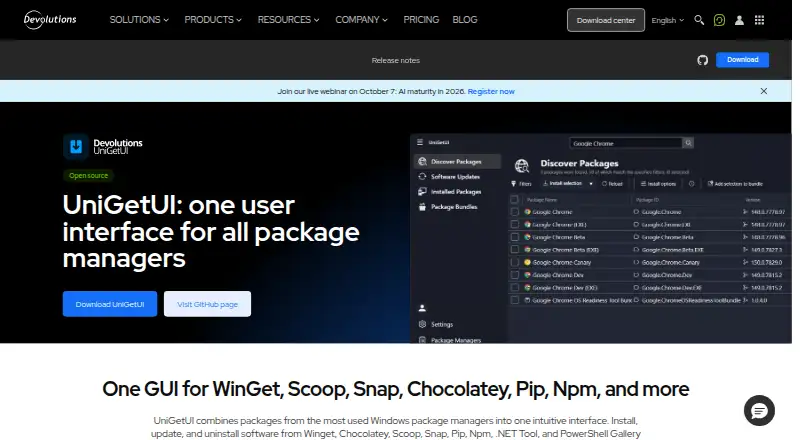
What UniGetUI is
UniGetUI provides a graphical way to discover, install, update and uninstall software through package managers, without using the command line. It supports WinGet, Chocolatey, Scoop, Snap, Pip, Npm, .NET Tool and PowerShell Gallery. Users can search and filter packages, inspect publisher, size and direct download URL details, and batch-install, update or remove packages. Package lists with parameters can be exported and imported on another machine. Updates can be applied automatically or shown as notifications, and users can ignore updates for individual packages. Builds are available for Windows, macOS and Linux, and installation options include Microsoft Store, WinGet, Scoop and Chocolatey. The project is free, open source and MIT licensed. UniGetUI is designed for individual and organizational use and is maintained by Devolutions. Package support can vary by Windows version, and some packages may require administrator privileges or extra dependencies. Packages come from third parties, so the project advises checking their sources and publishers before installing.
Good
- Graphical package management across eight listed managers
- Supports batch installation, updating and removal
- Package lists can be exported and imported
- Free, open source and MIT licensed
Watch out
- Package support may vary by Windows version
- Some packages require administrator privileges or dependencies
- Packages come from third parties
Who it suits
UniGetUI suits individual and organizational users who want to manage software through package managers without using the command line. It is available for Windows, macOS and Linux.
Verdict
UniGetUI brings search, bulk actions and update controls to a graphical interface for several package managers. It is free and cross-platform, though package compatibility and requirements can vary, and the project recommends checking third-party sources and publishers.
Plans and prices
From UniGetUI's own pricing page, checked 30 Sep 2026.
| Plan | Price | What it gives you |
|---|---|---|
| Free | Free | Free · open source · MIT licensed |
The facts
Each one read from UniGetUI's own pages, with the date it was checked.
What it does
- Bulk actions
- UniGetUI supports batch installation, updating, and uninstallation of multiple packages.checked 30 Sep 2026
- Compatibility limit
- The product page says package manager support may vary by Windows version and some packages may require administrator privileges or additional dependencies.checked 30 Sep 2026
- Install methods
- The site says UniGetUI can be installed through Microsoft Store, WinGet, Scoop, or Chocolatey.checked 30 Sep 2026
- Intended users
- The product page says UniGetUI is designed for individual and organizational use and for managing software without the command line.checked 30 Sep 2026
- License
- The project is free, open source, and MIT licensed.checked 30 Sep 2026
- Package backup
- Users can export package lists with parameters and import them on another machine.checked 30 Sep 2026
- Package discovery
- Users can search and filter packages and view publisher, size, and direct download URL details.checked 30 Sep 2026
- Package managers
- The official site lists WinGet, Chocolatey, Scoop, Snap, Pip, Npm, .NET Tool, and PowerShell Gallery.checked 30 Sep 2026
- Project stewardship
- The project README says UniGetUI was created by Martí Climent and is now maintained by Devolutions.checked 30 Sep 2026
- Purpose
- UniGetUI provides one graphical interface to discover, install, update, and uninstall software through package managers.checked 30 Sep 2026
- Security note
- The project says packages are supplied by third parties and advises reviewing their sources and publishers before installation.checked 30 Sep 2026
- Supported operating systems
- The official download center provides UniGetUI builds for Windows, macOS, and Linux.checked 30 Sep 2026
- Updates
- UniGetUI can automatically update packages or notify users when updates are available, and users can ignore updates per package.checked 30 Sep 2026
The company
- Company location
- Devolutions says it was founded in Québec, Canada.checked 30 Sep 2026
- Headquarters
- Québec, Canadachecked 23 Sep 2026
The full review of UniGetUI
Overview
UniGetUI is a graphical front end for finding and managing software through several package managers. It suits people who want package-manager breadth without working at the command line; its main trade-off is that compatibility and package behavior still depend on the underlying managers and packages.
Created by Martí Climent and now maintained by Devolutions, UniGetUI is open source under the MIT license and intended for individual and organizational use. Its single interface is most useful when you manage software from multiple package sources, rather than when you need a tool dedicated to removing ordinary desktop apps.
Key features
Discovery across package managers
Search and filters help bring package discovery into one place. Listings can show a publisher, package size, and direct download URL, useful details for deciding what to install. The official site names WinGet, Chocolatey, Scoop, Snap, Pip, Npm, .NET Tool, and PowerShell Gallery. That range is a strong convenience, but it does not make every package universally available: support may vary by Windows version, and some packages require administrator privileges or additional dependencies.
The project warns that packages come from third parties and advises checking their sources and publishers. That caution matters: a unified interface simplifies discovery, but it does not make third-party packages inherently trustworthy.
Batch actions and update controls
Batch installation, updating, and uninstallation can save time when maintaining several packages. Automatic updates and notifications cover different preferences, while per-package exclusions let users leave selected software alone. Silent installation, scheduled scans, and update rollback add useful maintenance controls for users who want less manual upkeep; they do not remove the underlying compatibility caveats.
Package lists and installation
Exporting package lists with parameters and importing them on another machine can help reproduce a software setup without rebuilding the list from memory. UniGetUI can be installed through Microsoft Store, WinGet, Scoop, or Chocolatey. A portable version is also available, which suits users who prefer not to rely on a standard installation route.
Pricing
UniGetUI is free: its Free plan costs nothing, and the project is open source under the MIT license. There is no paid tier to unlock the listed package management capabilities, making it a straightforward choice for individuals and organizations seeking a no-cost graphical interface. Its value depends instead on whether the relevant package managers and packages work with the user's system.
Platforms
UniGetUI has builds for Windows, macOS, and Linux. The product also lists cross-platform support, but package-manager compatibility can vary by Windows version, and some packages need elevated privileges or extra dependencies. Users should therefore confirm that the package sources they rely on are supported on their operating system.
Who it's for
UniGetUI is a good fit for people who want to search, install, update, and remove packages from a graphical interface, especially when they use more than one supported package manager. Batch actions, scheduled scans, and package-list transfer also suit users maintaining multiple applications or setting up another machine. It is a weaker fit for anyone who expects every package to behave consistently across operating systems or wants a tool focused specifically on conventional app removal.
Pros and cons
Pros
- One interface for several managers: Search and management span named package sources including WinGet, Chocolatey, Scoop, and Snap, reducing the need to work in separate command-line tools.
- Useful maintenance controls: Batch actions, automatic updates or notifications, per-package exclusions, scheduled scans, silent installation, and rollback support ongoing upkeep.
- Portable setup transfer: Package lists can be exported with parameters and imported elsewhere, while a portable version offers another way to run the app.
- No-cost, open-source license: The Free plan is free, and the MIT license allows a transparent, community-oriented project.
Cons
- Compatibility is not uniform: Package-manager support can vary by Windows version, and individual packages may need administrator access or additional dependencies.
- Third-party package diligence remains necessary: Users are advised to review package sources and publishers before installing.
Alternatives
Software Update Tools is a useful category page for comparing other update utilities.
- IObit Uninstaller is a Windows freemium option with batch uninstall, app removal, drag-and-drop uninstall, and automatic leftover cleanup; choose it when removing installed Windows apps is the priority.
- Topgrade is a free, open-source command-line tool for Linux, macOS, and Windows; choose it if you prefer a CLI and want a self-updating binary or installation through package-manager options.
- RuckZuck is free for private use and supports Windows, self-hosting, and an API; choose it when those deployment options suit your setup, keeping in mind its public API rate limits.
- UCheck is a Windows freemium alternative with a Premium plan at $12 a year; choose it if you want its paid features, including scheduled scans, software installation, and PUP protection.
- Version Tracker is a freemium macOS alternative; choose it if you want a Mac-focused option.
- AppGeek is a free Windows option with no Pro tier, ads, or bundled offers; choose it if those terms matter more than managing packages across several operating systems.
- Avira Phantom VPN Free is a freemium Windows VPN; it serves a different need from package management.
- Avira Software Updater is a Windows freemium updater with manual update links on its free plan; consider it if that narrower update workflow fits your needs.
Verdict
Choose UniGetUI if you want a free graphical hub for discovering and maintaining software across several package managers, with batch actions and practical update controls. Look elsewhere if you need consistent package compatibility across systems or prefer a tool built for a different task, such as focused Windows app removal.
Getting started
- Open the UniGetUI website
- Choose a build for Linux, macOS, or Windows
- Install through Microsoft Store, WinGet, Scoop, or Chocolatey
- Search or filter available packages
- Review publisher, size, and direct download URL details
- Install packages individually or in batches
Questions
How much does UniGetUI cost?
UniGetUI has a Free plan priced at 0.00 USD.
Which operating systems are supported?
Builds are provided for Linux, macOS, and Windows.
Which package managers does it support?
The listed managers are WinGet, Chocolatey, Scoop, Snap, Pip, Npm, .NET Tool, and PowerShell Gallery.
Is UniGetUI open source?
Yes. It is free, open source, and MIT licensed.
How can UniGetUI be installed?
Installation is available through the Microsoft Store, WinGet, Scoop, or Chocolatey.
Can it update packages automatically?
Yes. It can update packages automatically, notify you about updates, and ignore updates for selected packages.
Alternatives to UniGetUI
- 1

Patch My PC
Free planWebmacOSSelf-hostedWindows7.7From $3.50 a year - 2

Version Tracker
Free planmacOS6.6€4,990 one-time - 3

Glarysoft Software Update
Free planWindows6.5From $12.95 a year - 4

UCheck
Free planWindows6.5From $12 a year - 5
RuckZuck
Free planAPISelf-hostedWindows6.3Free plan - 6
Topgrade
Free planLinuxmacOSWindows6.1Free plan