Turbo Bulk Renaming Tool
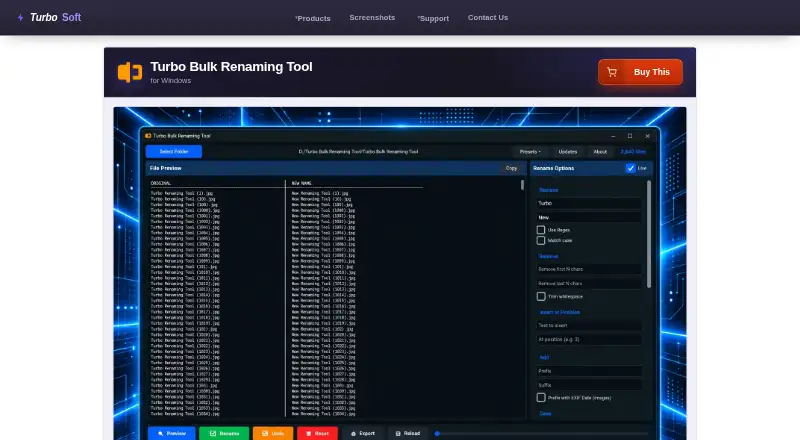
The facts below are what the maker publishes about Turbo Bulk Renaming Tool, checked and dated. Our editors have not written about it yet.
The facts
Each one read from Turbo Bulk Renaming Tool's own pages, with the date it was checked.
What it does
- Batch safety
- Uses a two-pass rename engine, attempts automatic rollback on errors, and adds a number when a destination name already exists.checked 8 Oct 2026
- Demo
- A free demo includes all features but limits the number of rename operations; a purchase and license key unlock unlimited renaming.checked 8 Oct 2026
- EXIF limit
- The EXIF date prefix works with JPG, JPEG, TIFF, and TIF files; other formats are renamed without that prefix.checked 8 Oct 2026
- File support
- Works with any file type, supports subfolders and wildcard file masks, and has no file-size limits.checked 8 Oct 2026
- Folder handling
- It can include nested subfolders and filter files with wildcard masks while preserving the folder structure.checked 8 Oct 2026
- Known limits
- Only the most recent rename session can be undone, and presets do not save the source folder.checked 8 Oct 2026
- License network use
- Internet is used for license validation; the maker says the license is cached locally and the app then works offline.checked 8 Oct 2026
- Limits
- Processing is sequential, undo covers only the most recent rename session, and presets do not save the source folder.checked 8 Oct 2026
- Logs and presets
- Saves rename logs and can export them as CSV, XLSX, or TXT; users can save and reload rule presets.checked 8 Oct 2026
- Performance
- The maker says 10,000 files can be renamed in under 10 seconds on an SSD; files are processed sequentially.checked 8 Oct 2026
- Preview
- A live preview shows original and proposed filenames and flags duplicate or conflicting names before changes are applied.checked 8 Oct 2026
- Preview and undo
- Shows a live preview of original and proposed filenames, flags conflicts, and offers one undo level per session.checked 8 Oct 2026
- Privacy
- Renaming and log export happen locally; the maker says filenames, folder paths, and file contents are not transmitted and there is no telemetry or third-party analytics in the app.checked 8 Oct 2026
- Purpose
- Renames hundreds or hundreds of thousands of files in one pass on Windows.checked 8 Oct 2026
- Rename rules
- It offers 15 combinable rules, including find and replace, regex, numbering, case conversion, EXIF date prefixes, and extension control.checked 8 Oct 2026
- Requirements
- Minimum requirements are 64-bit Windows 8, 1–2 CPU cores, 2 GB RAM, and 500 MB free storage.checked 8 Oct 2026
- Rules
- Combines 15 rename rules, including find and replace, regex, numbering, case conversion, EXIF date prefix, and extension control.checked 8 Oct 2026
- Support
- The maker directs users to its support page for installation, license activation, and technical troubleshooting questions.checked 8 Oct 2026
- System requirements
- The listed minimum operating system is Windows 8 (64-bit), with Windows 10 or later (64-bit) recommended.checked 8 Oct 2026
The company
- Company
- TurboSoft describes itself as an independent software development company focused on Windows desktop tools.checked 8 Oct 2026
Money
- Free demo
- A free demo includes every feature but limits the number of rename operations; entering the purchase email and license key unlocks unlimited renaming.checked 8 Oct 2026
Alternatives to Turbo Bulk Renaming Tool
- 1
Renamer.ai
Free planWebAPImacOSWindows7.6From $9.95 a month - 2
Avidemux
Free planOpen sourceWebLinuxmacOSWindows7.3Free plan - 3
Easy File Renamer
WebmacOSWindows7.2 - 4

Batch File Renamer
Free planOpen sourceWebSelf-hosted7.0Free plan - 5

Bulk Rename Utility
Free planWindows6.9Free plan - 6

Advanced Renamer
Free planAPImacOSWindows6.8Free plan