
TuneTank
TuneTank is a web service offering royalty-free music and copyright-free sound effects for creators, along with tools for YouTube channels and videos.
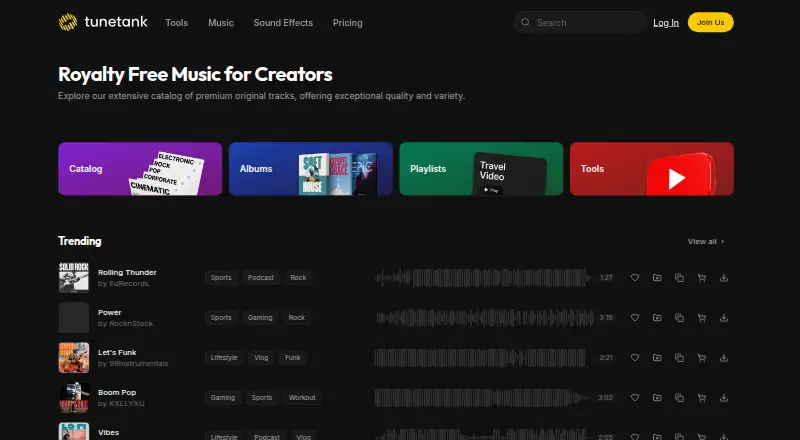
What TuneTank is
TuneTank is a web service offering royalty-free music and copyright-free sound effects for creators, along with tools for YouTube channels and videos. Its maker says tracks are cleared for YouTube, TikTok, Instagram, Twitch, and podcasts. The free YouTube Channel Analyzer reviews public channel data without login or account access. Its AI Video Clipper makes vertical 9:16 shorts from YouTube videos and adds captions, though free clips carry a Tunetank watermark. Other tools include title and tag generators, thumbnail tools, Flow, channel whitelisting, and a copyright claim cleaner. Music downloads are MP3; WAV files and isolated stems are available on Max. Free and Pro use a Personal license, while Max adds rights for paid ads, sponsored content, client work, and businesses of any size. The Free plan is free and includes three downloads per month and limited creator-tool credits. Pro is $7 a month billed for 12 months; Max is $15 a month billed for 12 months. One-time single-track licenses are also listed at 29.00 USD for personal use, 89.00 USD for commercial web use, and 289.00 USD for professional use in broadcast, films, and games.
Good
- Free analyzer uses public channel data without login.
- Tracks are described as cleared for major social platforms.
- Max includes WAV files and isolated stems.
- Single-track licenses are available.
Watch out
- Free plan allows three downloads per month.
- Free clips include a Tunetank watermark.
- Free and Pro use a Personal license.
- WAV files and stems require Max.
Who it suits
TuneTank suits creators looking for music, sound effects, and YouTube-related tools. Max is the listed plan for commercial licensing, WAV files, and stems.
Verdict
TuneTank pairs a music and sound-effects catalog with channel and video tools. Check the license scope and plan limits against the intended use, especially for commercial work and free clips.
Plans and prices
From TuneTank's own pricing page, checked 2 Oct 2026.
| Plan | Price | What it gives you |
|---|---|---|
| Free | Free | 3 downloads/month · personal music license · limited creator-tool credits |
| Pro | $7 a month | Unlimited music and sound effects · personal and small-team license · whitelist 3 YouTube channels · Billed for 12 months |
| Max | $15 a month | Unlimited music and sound effects · commercial license · WAV and stems · whitelist 10 YouTube channels · priority support · Billed for 12 months |
| Personal single-track license | $29, paid once | One track · personal use · One-time payment |
| Commercial single-track license | $89, paid once | One track · commercial web use · One-time payment |
| Professional single-track license | $289, paid once | One track · broadcast, films and games · One-time payment |
The facts
Each one read from TuneTank's own pages, with the date it was checked.
What it does
- Cancellation
- Subscribers can cancel from account settings and retain access until the end of the current billing cycle.checked 2 Oct 2026
- Channel analyzer
- The free analyzer audits public YouTube channels using public data and does not require login or account access.checked 2 Oct 2026
- Copyright claims
- The Copyright Claim Cleaner is a free tool for submitting a YouTube video that uses Tunetank music; the maker says removal generally takes within five minutes, but may take up to 48 hours.checked 2 Oct 2026
- Creator tools
- Its listed tools include a YouTube Channel Analyzer, AI Video Clipper, title and tag generators, thumbnail tools, Flow, channel whitelisting and a copyright claim cleaner.checked 2 Oct 2026
- License limits
- The maker says Free and Pro use a Personal license, while Max adds paid ads, sponsored content, client work and businesses of any size.checked 2 Oct 2026
- Music formats
- Music downloads are MP3; lossless WAV and isolated stems are available on the Max plan.checked 2 Oct 2026
- Privacy
- Tunetank's privacy policy says it will not sell or rent personally identifiable information, and identifies Braintree and PayPal as payment service providers.checked 2 Oct 2026
- Privacy policy date
- The privacy policy page states it was last updated May 5, 2021.checked 2 Oct 2026
- Product
- Tunetank offers royalty-free music and copyright-free sound effects for creators.checked 2 Oct 2026
- Support
- The maker lists [email protected] as its contact address, and the Max plan includes priority support.checked 2 Oct 2026
- Use cases
- The maker says its tracks are cleared for YouTube, TikTok, Instagram, Twitch and podcasts.checked 2 Oct 2026
- Video clipper
- The AI Video Clipper turns YouTube videos into vertical 9:16 shorts with captions, and its free clips include a Tunetank watermark.checked 2 Oct 2026
- YouTube integration
- YouTube channel whitelisting links a channel to Tunetank so its music claims are cleared automatically; the maker says activation usually takes a few hours and can take up to 48 hours.checked 2 Oct 2026
The full review of TuneTank
Overview
TuneTank combines a royalty-free music and sound-effects library with tools for YouTube creators, all through the web. It is best suited to creators who want audio and channel utilities in one place. Its main trade-off is licensing: the low-cost plans are for personal use, while commercial projects call for Max or a suitable single-track license.
Key features
The catalog covers music and sound effects, with music downloads in MP3. Max adds lossless WAV files and isolated stems, which give editors more control over mixes and a more flexible source for production work. Free accounts are capped at three downloads a month, so they are better for trying the catalog than building a regular publishing workflow.
TuneTank says its music is cleared for YouTube, TikTok, Instagram, Twitch and podcasts. For YouTube claims involving TuneTank music, the free Copyright Claim Cleaner lets users submit a video for removal; processing generally takes within five minutes, but may take up to 48 hours. Channel whitelisting is the more practical option for frequent publishing: it links a YouTube channel so claims on TuneTank music are cleared automatically. Activation usually takes a few hours and can take up to 48 hours.
The creator toolkit includes a YouTube Channel Analyzer, AI Video Clipper, title and tag generators, thumbnail tools and Flow. The analyzer audits public YouTube data without requiring login or account access. The clipper makes vertical 9:16 shorts with captions, but free clips carry a TuneTank watermark. That makes the free tier useful for evaluating the workflow, not necessarily for publishing finished clips.
Pricing
The Free plan costs nothing and includes three monthly downloads, a personal music license and limited creator-tool credits. It is a low-commitment way to sample the service, but the download cap and personal-use scope rule it out for sustained or commercial production.
Pro costs $7 a month, billed for 12 months. It provides unlimited music and sound effects, a personal and small-team license, and whitelisting for three YouTube channels. It suits individual creators and small teams publishing personal-use content; it does not cover paid ads, sponsored content, client work or business use.
Max costs $15 a month, billed for 12 months. It includes unlimited music and sound effects, a commercial license, WAV and stems, whitelisting for ten YouTube channels and priority support. This is the relevant subscription for businesses, client projects, sponsored content and paid advertising, as well as for editors who need higher-quality formats or more channel slots.
Single-track licenses are available for one-time payment: Personal single-track license costs $29, paid once for one track and personal use; Commercial single-track license costs $89, paid once for one track and commercial web use; Professional single-track license costs $289, paid once for one track used in broadcast, films and games. These suit a project needing one track rather than a continuing catalog subscription, but each is limited to its stated track and usage scope.
Subscribers can cancel in account settings and keep access through the end of the current billing cycle. The privacy policy says TuneTank does not sell or rent personally identifiable information and identifies Braintree and PayPal as payment providers.
Platforms
TuneTank is available on the web, so it suits browser-based workflows rather than people seeking a dedicated desktop or mobile app.
Who it's for
TuneTank fits YouTube creators who want music, sound effects and channel tools together, especially those who can use the personal license or need to clear claims on TuneTank tracks. Pro suits personal projects and small teams; Max is the better fit for commercial work, client deliverables and multi-channel publishing. It is less compelling for occasional users who need only a few tracks but require broad commercial rights, unless a single-track license matches the project.
Pros and cons
- Pro: Music and sound effects share a service with channel analysis, short-form clipping and claim-management tools, reducing the need to separate those tasks.
- Pro: The analyzer uses public channel data without login or account access, and whitelisting can automate clearance for linked YouTube channels.
- Pro: Max combines commercial licensing with WAV and stems, ten-channel whitelisting and priority support.
- Con: Free downloads stop at three per month, and free clips include a watermark, limiting the free plan for regular publishing.
- Con: Pro's personal-use scope excludes business, sponsored, client and paid-ad work, so commercial users need Max or a track-specific license.
- Con: Pro and Max are billed for 12 months, making their monthly prices part of an annual commitment.
Alternatives
For a broader comparison of catalog services, browse Stock Music Libraries.
- Soundstripe may suit creators who want a free, Twitch-cleared music extension or need one of its listed non-web platforms.
- RouteNote is the alternative for musicians seeking free distribution and 85% of net revenue rather than a music-and-effects catalog for creator videos.
- Sonoton is an option for commissioned radio and TV productions where the broadcaster has a GEMA contract and usage is reported.
- Bensound may fit users seeking selected free tracks with attribution or a business all-access plan priced annually.
- Melody Loops may suit non-commercial projects that can meet its credit requirement for free tracks.
- Uppbeat is worth considering for individual creators who need three free downloads or an Essentials plan for unlimited music and effects.
- Free To Use is a free option for social-platform user-generated content when attribution is acceptable and commercial use is not needed.
- Incompetech may suit projects that can credit music under its Creative Commons option.
Verdict
Choose TuneTank if you want creator-focused audio alongside YouTube analysis, clipping and claim tools, and your intended use fits its license. Pro is a reasonable match for personal publishing; commercial creators should look to Max or the appropriate single-track license. Look elsewhere if the free download cap, watermark, annual billing or licensing split does not fit your workflow.
Alternatives to TuneTank
- 1
Soundstripe
Free planAndroidiOSWebAPI8.1Free plan - 2

RouteNote
Free planAndroidiOSWeb8.0From $7.99 a month - 3
AudioSparx
AndroidiOSWeb7.2$34.95 one-time - 4

YouTube
AndroidiOSWebAPI7.0 - 5
Artlist Music
WebAPIExtensionmacOS6.7 - 6
Bensound
Free planWeb6.7From $119 a year