
Trumble
Trumble is a browser-based creative suite for game developers and artists working on texturing and painting.
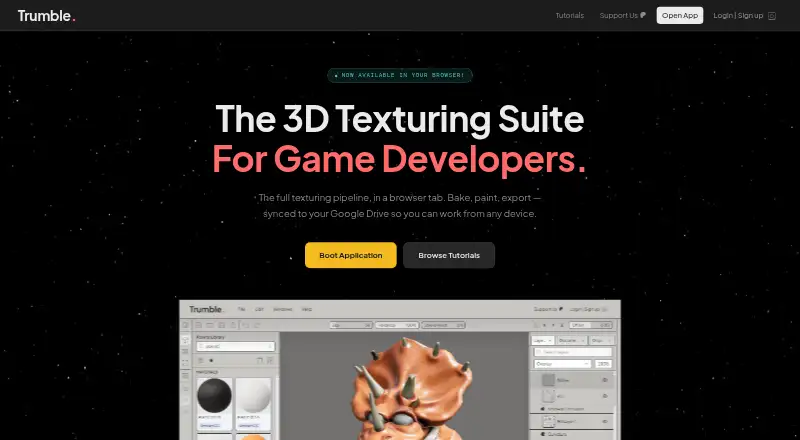
What Trumble is
Trumble is a browser-based creative suite for game developers and artists working on texturing and painting. Its Texture tool lets users paint PBR textures on meshes in a 3D viewport, while Paint handles 2D work on alphas, masks and channels. The Bake tool creates maps such as normals, ambient occlusion and curvature in the browser, without an offline renderer. Texture packs can be exported for Unreal, Unity, Godot and Roblox. The Texture tool accepts OBJ, STL, FBX, glTF and GLB files, and meshes need proper UVs to be paintable. Trumble includes hundreds of ready-to-use materials and textures, and can connect to Google Drive to save projects there rather than in Trumble account storage. It runs in modern browsers on Windows, macOS and Linux, with no account required to get started. The product is in early access and improvements ship regularly.
Good
- Paints PBR textures directly on meshes.
- Bakes maps in-browser without an offline renderer.
- Exports packs for four named game engines.
- No account is required to get started.
- Includes hundreds of materials and textures.
Watch out
- Meshes need proper UVs for painting.
- Free workspace displays ads.
- Product is in early access.
- Procedural materials are not currently listed as a feature.
Who it suits
Trumble suits game developers and artists who want browser-based 2D painting, 3D texturing and map baking. It may also fit users who need exports for Unreal, Unity, Godot or Roblox.
Verdict
Trumble provides a set of browser-based texture, painting and baking tools with several engine export formats. Its early-access status and UV requirement are worth noting before building a workflow around it.
Plans and prices
From Trumble's own pricing page, checked 14 Oct 2026.
| Plan | Price | What it gives you |
|---|---|---|
| Free | Free | all current tools · all future tools · browser-based · workspace ads · $0 / forever |
| Low-Poly | $3 a month | Free features · supports development · $3/mo |
| Pro | $5 a month | everything in Free · no ads · full workspace layout · $5 / month |
| Mid-Poly | $8 a month | Free features · roadmap voting · $8/mo |
| High-Poly | $20 a month | Free features · early access · direct developer feedback · $20/mo |
The facts
Each one read from Trumble's own pages, with the date it was checked.
What it does
- 2D editor
- The Paint tool is a 2D editor for textures, alphas, masks and channel work.checked 14 Oct 2026
- 2D painting
- The Paint tool provides 2D painting and texture editing for alphas, masks, and channels.checked 1 Oct 2026
- 3D painting
- Its Texture tool paints PBR channels directly on meshes in a 3D viewport with real-time roughness, metallic and normal updates.checked 14 Oct 2026
- 3D texturing
- The Texture tool lets users paint PBR textures directly on meshes in a browser-based 3D viewport.checked 1 Oct 2026
- Advertising
- The free workspace uses Google AdSense advertising, while the Pro plan removes workspace ads.checked 14 Oct 2026
- Asset types
- The Assets Library supports textures, alphas, materials, brushes, baked maps and imported files.checked 14 Oct 2026
- Availability
- The product is in early access and ships improvements regularly.checked 1 Oct 2026
- Baking
- The Bake tool generates normal, ambient-occlusion, curvature, position and thickness maps in the browser.checked 14 Oct 2026
- Cloud storage
- Trumble connects directly to Google Drive, auto-saving projects there without using Trumble account storage.checked 1 Oct 2026
- Data processing
- Files and assets opened or imported in the app are processed in the browser, and users retain rights to content they create or upload.checked 1 Oct 2026
- Documentation
- The tutorials site provides six tutorial series covering Texture, Bake, Paint, Assets Library and navigation shortcuts.checked 14 Oct 2026
- Early access
- The About page identifies Trumble as an early-access product whose features may change as development continues.checked 14 Oct 2026
- Engine export
- Trumble exports texture packs formatted for Unreal, Unity, Godot, and Roblox with one click.checked 1 Oct 2026
- Engine exports
- Export presets are provided for Unity, Unreal, Godot and Roblox texture workflows.checked 14 Oct 2026
- Google Drive
- Trumble says projects auto-save to the user's Google Drive and that it does not hold the user's assets.checked 14 Oct 2026
- Library limitation
- The documentation says Save to Library currently does nothing and is waiting for Google Drive implementation.checked 14 Oct 2026
- Limit: asset preparation
- Zipdo says the workflow depends on correct UVs and bake-ready asset preparation.checked 14 Oct 2026
- Limit: baking depth
- Wifitalents characterizes Trumble's high-to-low baking coverage as narrower than dedicated baking tools.checked 14 Oct 2026
- Limit: channel packing
- Wifitalents reports that advanced texture-channel packing can require extra manual steps.checked 14 Oct 2026
- Limit: procedural depth
- Zipdo reports less depth than Substance 3D Painter for material-graph workflows and weaker procedural-layer coverage.checked 14 Oct 2026
- Limit: UDIM
- Wifitalents says Trumble's UDIM workflows are limited compared with tools built around tiled assets.checked 14 Oct 2026
- Limit: UV preparation
- Wifitalents notes that complex projections require careful UV seam and scale management.checked 14 Oct 2026
- Material library
- The product advertises hundreds of built-in materials and textures that can be dragged onto meshes.checked 14 Oct 2026
- Mesh formats
- The Texture tool accepts OBJ, STL, FBX, glTF, and GLB files, and meshes need proper UVs to be painted.checked 1 Oct 2026
The full review of Trumble
Trumble suits game artists who want browser-based painting, baking, and engine exports in one workspace. It brings those tasks together without requiring a desktop installation, but painting meshes depends on proper UVs and the product is still in early access.
Overview
Trumble combines 3D texture painting, 2D texture editing, map baking, and engine-formatted exports in a browser. That makes it a practical fit for artists who want several common texture tasks in one place, especially when their meshes are already UV-ready. Early access and regular improvements mean the product is continuing to evolve.
It runs in modern browsers on Windows, macOS, and Linux, with no account required to get started. Imported files and assets are processed in the browser, and users retain rights to content they create or upload. Google Drive integration can save projects there automatically, rather than using Trumble account storage.
Key features
- 3D texturing: Paint PBR textures directly onto meshes in the Texture tool's 3D viewport. It accepts OBJ, STL, FBX, glTF, and GLB, but models need proper UVs; this is not a way around UV preparation.
- 2D painting: The Paint tool handles texture editing as well as work on alphas, masks, and channels. That gives users a separate space for 2D adjustments alongside painting on a mesh.
- Map baking: Generate normals, ambient occlusion, curvature, and other maps in the browser without an offline renderer. Keeping baking in the same workspace is useful for artists who want fewer separate steps.
- Engine exports: Export texture packs for Unreal, Unity, Godot, and Roblox with one click. This is a clear advantage for work targeting those engines; it does not establish support for other engine presets.
- Material library: Hundreds of ready-to-use materials and textures span metal, wood, fabric, and stone, giving projects a starting point without requiring every surface to be built from scratch.
- Early-access roadmap: Planned work includes procedural materials, a trim sheet tool, more bake-map types, and additional engine export presets. These are future plans, not current tools; procedural materials are not currently supported.
Pricing
The Free plan costs $0 / forever and includes all current tools and all future tools, but the workspace has ads. It is the natural starting point for artists evaluating the workflow or who can accept ads; there is no free trial because the product already has a free plan.
Low-Poly costs $3/mo and includes everything in Free, with the stated purpose of supporting ongoing development. Pro costs $5 / month and adds an ad-free workspace and full workspace layout, making it the clearest paid choice for people who want to remove ads and use the full layout. Mid-Poly costs $8/mo and adds a vote on roadmap features to everything above. High-Poly costs $20/mo and adds early access and direct developer feedback to everything above. The higher tiers are aimed at users who value a greater role in development, rather than a different core toolset. The paid plans are monthly; no seat or usage quotas are stated.
Platforms
Trumble runs in modern browsers on Windows, macOS, and Linux. Its browser-based access and no-account start make it a fit for users who prefer not to install a desktop application.
Who it's for
Choose Trumble if you make game assets, want painting and baking together, and can supply meshes with proper UVs. Its free tier and support for four named engine exports make it especially approachable for independent artists working in those pipelines. Look elsewhere if you need procedural materials now, or if your workflow depends on painting meshes before UV preparation.
Pros and cons
- Pro: 3D painting, 2D texture work, baking, and engine exports share one browser workspace, reducing the need to split these tasks across separate tools.
- Pro: The free plan includes all current tools, while Google Drive auto-save avoids using Trumble account storage.
- Pro: The Texture tool accepts five common mesh formats, and exports cover Unreal, Unity, Godot, and Roblox.
- Con: Meshes must have proper UVs to be painted, limiting its usefulness for models that are not ready for texturing.
- Con: The Free workspace includes ads, and the product remains in early access.
- Con: Procedural materials are not yet available, despite being part of planned future work.
Alternatives
For a broader category comparison, browse 3D Texturing Software.
- Mixos Paint is another freemium choice with a free plan, but its free tier caps the 2D texture view at 512px and limits cloud storage to 100 MB.
- Surface Labs is worth considering if a free early-access product is your priority and you want its listed Android and iOS support.
- InstaMAT is a desktop alternative for Linux, macOS, and Windows; its free Pioneer License is limited to users with revenue or total funding under $100,000 and requires attribution.
- Mari offers a free non-commercial plan with a free trial for its paid offering, making it an alternative to consider for non-commercial work on Linux or Windows.
- Marmoset Viewer is a free option included with Toolbag versions 2.07 and newer.
- LigidPainter is a free desktop alternative for Linux, macOS, and Windows.
- Material Maker is a free desktop option with Windows, macOS, and Linux downloads; its Itch.io download is name your own price.
- Forge Material Studio is a free, open-source web and Windows alternative under the MIT license.
Verdict
Trumble is a strong starting point for game artists who want browser-based texture painting, baking, and exports for Unreal, Unity, Godot, or Roblox without paying for the core tools. Its main reasons to look elsewhere are the requirement for properly UV-mapped meshes and the early-access state; choose another workflow if either is a blocker.
Getting started
- Open https://trumble.app/ in a modern browser
- Use Trumble on Windows, macOS, or Linux
- Start without creating an account
- Import an OBJ, STL, FBX, glTF, or GLB mesh with proper UVs
- Choose the Free plan or a paid plan from 5 /mo
Limits worth knowing
The Free plan includes all current and future tools but shows workspace ads. The Low-Poly plan costs $3 a month, while Pro at $5 a month removes ads and provides the full workspace layout.
Questions
Is Trumble free?
Yes. The Free plan costs nothing, billed at $0 forever, and includes all current and future tools with workspace ads.
What platforms support Trumble?
It runs in modern browsers on Windows, macOS, and Linux.
Does Trumble require an account?
No account is required to get started.
Which mesh formats can it import?
The Texture tool accepts OBJ, STL, FBX, glTF, and GLB files. Meshes need proper UVs for painting.
How much do paid plans cost?
Plans include Low-Poly at $3 a month, Pro at $5 a month, Mid-Poly at $8 a month, and High-Poly at $20 a month.
Alternatives to Trumble
- 1

Mixos Paint
Free planAndroidiOSWebAPI8.0From $5.99 a month - 2

Surface Labs
Free planAndroidiOSAPILinux7.5Free plan - 3

Mari
Free planLinuxWindows7.1From $689 a year - 4

InstaMAT
Free planLinuxmacOSWindows6.9Free plan - 5

Adobe Substance 3D Modeler
ExtensionWindows6.7 - 6
Material Maker
Free planLinuxmacOSWindows6.7$14.99 one-time