Thermaltake NeonMaker
Thermaltake NeonMaker is free software for customizing RGB lighting on compatible PC components.
What Thermaltake NeonMaker is
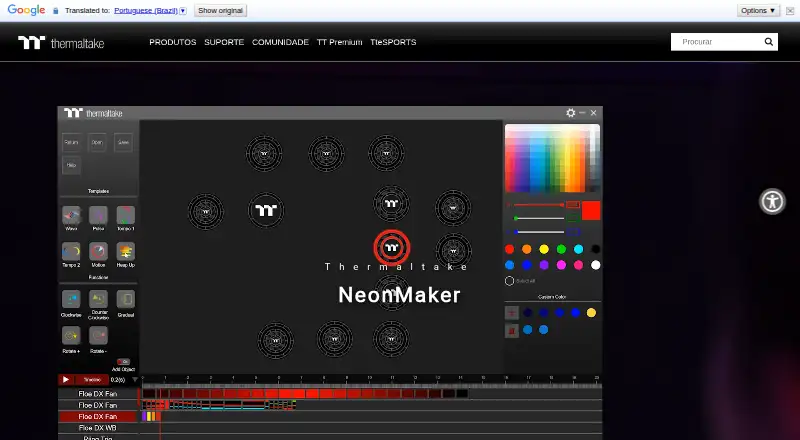
Thermaltake NeonMaker is free software for customizing RGB lighting on compatible PC components. Users can edit effects on each LED bulb, choose custom colors, apply presets, and arrange changes on a timeline. The listed presets are Wave, Pulse, Tempo 1, Tempo 2, Motion, and Heap Up. Controls include clockwise and counterclockwise rotation, gradients, and effects moving between outer and inner rings. Profiles can be saved and reopened, while Thermaltake offers creator profiles with filters for Riing Quad Fan, Memory, Floe DX, Memory + Floe DX, SWAFAN, and SWAFAN EX. Supported product families include Riing Quad Fans, Riing Trio Fans, Distro Case, Floe DX RGB AIO, and TOUGHRAM RGB. Thermaltake presents NeonMaker alongside TT RGB PLUS and provides a guide covering controller pairing, colors, templates, editing, timelines, and profile saving. Version 1.1.6 is listed dated 2023-07-25.
Good
- Edits lighting on individual LED bulbs
- Includes six listed preset effects
- Timeline supports custom effect sequences
- Profiles can be saved and reopened
- Supports several Thermaltake component families
Watch out
- Compatibility is limited to listed product families
- Thermaltake directs users to product pages for details
- The listed version is dated 2023-07-25
Who it suits
It suits PC builders who want per-LED RGB customization and reusable lighting profiles. Compatibility depends on the supported Thermaltake component families.
Verdict
NeonMaker provides detailed RGB editing, timeline control, and profile management for compatible Thermaltake hardware. Check the component-specific compatibility pages before installing or planning a lighting setup.
The facts
Each one read from Thermaltake NeonMaker's own pages, with the date it was checked.
What it does
- Audience
- Thermaltake presents NeonMaker for people seeking to create customized RGB lighting across their PC build.checked 9 Oct 2026
- Compatibility
- Thermaltake directs users to compatible product pages for compatibility details.checked 9 Oct 2026
- Compatible products
- Thermaltake lists Riing Quad Fans, Riing Trio Fans, Distro Case, Floe DX RGB AIO, and TOUGHRAM RGB as compatible product families.checked 9 Oct 2026
- Customization
- The product page lists built-in effects, custom color, and a setup timeline.checked 9 Oct 2026
- Download
- Thermaltake lists NeonMaker version 1.1.6, dated 2023-07-25, and says it added Pacific TF3 Liquid Cooling System Dashboard and Pacific SW1 Plus Water Block support.checked 9 Oct 2026
- Ecosystem
- Thermaltake describes NeonMaker lighting alongside TT RGB PLUS.checked 9 Oct 2026
- Individual LED editing
- Users can edit lighting effects on individual LED bulbs.checked 9 Oct 2026
- Latest listed release
- The download page also lists version 1.1.5, dated 2023-05-12, with SWAFAN EX RGB fan support and a fix for reading files from the older version.checked 9 Oct 2026
- LED editing
- Users can edit lighting effects on each individual LED bulb.checked 9 Oct 2026
- Lighting functions
- The guide describes clockwise and counterclockwise rotation, gradients, and rotating effects between outer and inner rings.checked 9 Oct 2026
- Operating system
- A Thermaltake product page lists Windows 10 / 11 system compatibility for a NeonMaker-compatible product.checked 9 Oct 2026
- Preset effects
- The software includes preset lighting effects.checked 9 Oct 2026
- Presets
- The quick guide lists six default lighting effects: Wave, Pulse, Tempo 1, Tempo 2, Motion, and Heap Up.checked 9 Oct 2026
- Product support
- Thermaltake lists NeonMaker as supporting Riing Quad fans, Riing Trio fans, Distro Case, Floe DX RGB AIO, and TOUGHRAM RGB.checked 9 Oct 2026
- Profile library filters
- The profile download page offers product filters for Riing Quad Fan, Memory, Floe DX, Memory + Floe DX, SWAFAN, and SWAFAN EX.checked 9 Oct 2026
- Profiles
- Users can save and reopen lighting profiles, and the site offers downloadable profiles from creators.checked 9 Oct 2026
- Profiles by product
- The profile download page offers product filters including RIING QUAD FAN, Memory, Floe DX, SWAFAN, and SWAFAN EX.checked 9 Oct 2026
- Purpose
- NeonMaker is Thermaltake software for customizing RGB lighting effects.checked 9 Oct 2026
- Support
- Thermaltake provides a NeonMaker manual link and links to technical support from its site.checked 9 Oct 2026
- Support material
- Thermaltake provides a NeonMaker quick guide covering controller pairing, the color palette, templates, functions, editing, timeline, and profile saving.checked 9 Oct 2026
- Timeline
- The software includes a timeline for editing lighting effects.checked 9 Oct 2026
The company
- Company founded
- Thermaltake Group says it was founded in 1999.checked 9 Oct 2026
- Headquarters
- Thermaltake lists its Taiwan headquarters in Taipei City, Taiwan.checked 9 Oct 2026
Where it runs
- Platform
- Thermaltake lists NeonMaker as downloadable software; the opened pages do not state supported operating systems.checked 9 Oct 2026
Alternatives to Thermaltake NeonMaker
- 1
SteelSeries GG
Free planAndroidiOSWebAPI7.5Free plan - 2
OpenRGB
Free planOpen sourceAPILinuxmacOSSelf-hosted7.2Free plan - 3

Nexus
Free planAndroidiOSWebLinux6.9Free plan - 4
GALAX Xtreme Tuner Plus
Free planAndroidiOSWindows6.7Free plan - 5

Razer Chroma App
Free planmacOSWindows6.5Free plan - 6

G.SKILL Trident Z Lighting Control
Free planWindows6.4Free plan