Thermaltake iTAKE Engine
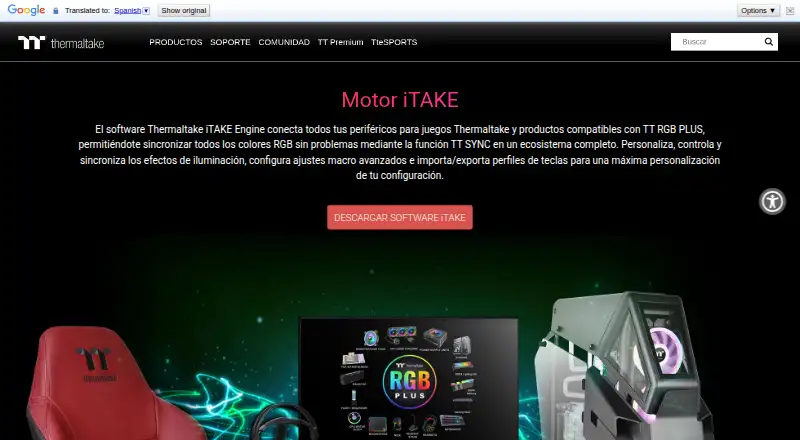
Thermaltake iTAKE Engine connects compatible Thermaltake gaming peripherals and TT RGB PLUS products so users can control and synchronize RGB lighting.
What Thermaltake iTAKE Engine is
Thermaltake iTAKE Engine connects compatible Thermaltake gaming peripherals and TT RGB PLUS products so users can control and synchronize RGB lighting. Settings cover lighting effects, colors, speed, and brightness. Supported device categories include keyboards, mice, headsets, headset stands, mouse pads, and gaming desks. The software also supports macro settings and importing or exporting key profiles. The iTAKE app is available for Android and iOS, alongside Windows desktop software. On mobile, users can issue voice commands for lighting controls, while a phone or tablet can act as a virtual game controller or provide a virtual keyboard for word processing; both functions are described as compatible with keyboards only. Android setup requires the computer and mobile device to share a Wi-Fi network. The iOS requirement is version 10 or later. Thermaltake's Windows guide says Microsoft Visual C++ 2015 Redistributable is required for the software to launch. Thermaltake support says iTake is needed for RGB control on most of its peripherals and for custom key bindings on most of its keyboards, though some keyboards can create bindings without software. The software is free.
Good
- Synchronizes lighting across compatible products.
- Controls color, effects, speed, and brightness.
- Supports macro settings and key profile transfers.
- Mobile apps include lighting voice commands.
- Available for Windows, Android, and iOS.
Watch out
- Android pairing requires a shared Wi-Fi network.
- Windows launch requires Microsoft Visual C++ 2015 Redistributable.
- Mobile controller and virtual keyboard work with keyboards only.
- The iOS requirement is version 10 or later.
Who it suits
iTAKE Engine may suit people using compatible Thermaltake peripherals who want to manage lighting and macros. Mobile controls may be useful to users whose devices meet the listed requirements.
Verdict
iTAKE Engine combines lighting controls with macro and profile features for compatible Thermaltake devices. Check the pairing, operating system, and software requirements before setup.
The facts
Each one read from Thermaltake iTAKE Engine's own pages, with the date it was checked.
What it does
- Hardware compatibility
- The listed supported device categories include keyboards, mice, headsets, headset stands, mouse pads, and gaming desks.checked 5 Oct 2026
- Lighting control
- Users can customize lighting effects, colors, speed, and brightness across compatible products.checked 5 Oct 2026
- Lighting controls
- The software lets users customize, control, and sync lighting effects, including color, speed, and brightness.checked 5 Oct 2026
- Mobile compatibility
- The page lists the mobile app as compatible with keyboards, headsets, headset stands, mouse pads, and gaming desks.checked 5 Oct 2026
- Mobile controller
- The app can use a smartphone or tablet as a virtual game controller, a feature the page says is compatible with keyboards only.checked 5 Oct 2026
- Mobile requirements
- The maker page specifies iOS 10 or later and lists compatibility with iPhone and iPad models.checked 5 Oct 2026
- Mobile voice control
- The iOS and Android app offers voice commands for lighting color, effects, speed, and brightness.checked 5 Oct 2026
- Pairing requirement
- The Android app setup instructions require the computer and mobile device to be connected to the same Wi-Fi network.checked 5 Oct 2026
- Privacy disclosure
- Google Play displays the developer-provided declaration that the app collects no data and shares no data with third parties.checked 5 Oct 2026
- Purpose
- iTAKE Engine connects Thermaltake gaming peripherals and TT RGB PLUS compatible products into an RGB lighting ecosystem using TT SYNC.checked 5 Oct 2026
- Razer Chroma
- Thermaltake’s setup document describes enabling a Thermaltake connection in Razer Synapse for iTAKE Engine and Razer Chroma effects.checked 5 Oct 2026
- Software support
- Thermaltake support says iTake is required for RGB control on most Thermaltake peripherals and provides an RGB control guide.checked 5 Oct 2026
- TT RGB PLUS integration
- The page says users can sync RGB lighting across compatible Thermaltake TT RGB PLUS products.checked 5 Oct 2026
- Virtual game controller
- A smartphone or tablet can act as a mobile game controller, a feature the page says is compatible with keyboards only.checked 5 Oct 2026
- Virtual keyboard
- The app offers a virtual keyboard on smartphones and tablets for word processing, compatible with keyboards only.checked 5 Oct 2026
Where it runs
- iOS requirement
- The page states compatibility with iOS 10 or above and lists supported iPhone and iPad models.checked 5 Oct 2026
- Macro limits
- Thermaltake support says custom key bindings are available for most Thermaltake keyboards, though some keyboards can create them without software.checked 5 Oct 2026
- Macros and profiles
- The software supports advanced macro settings and importing and exporting key profiles.checked 5 Oct 2026
- Macro support guide
- Thermaltake’s support guide says iTake software is required for custom key bindings on most of its keyboards.checked 5 Oct 2026
- Mobile app
- The iTAKE app for iOS and Android provides lighting controls and voice recognition commands.checked 5 Oct 2026
- Mobile app features
- The app listing describes 13 lighting effects for the front side, 14 for the side face, and a four-key macro function.checked 5 Oct 2026
- Supported devices
- The listed supported devices include keyboards, mice, headset stands, mouse pads, and gaming desks.checked 5 Oct 2026
- Windows installation
- The iTAKE user guide describes installing the desktop software from a Windows .EXE and says Microsoft Visual C++ 2015 Redistributable is required for it to launch.checked 5 Oct 2026
Alternatives to Thermaltake iTAKE Engine
- 1
SteelSeries GG
Free planAndroidiOSWebAPI7.5Free plan - 2
OpenRGB
Free planOpen sourceAPILinuxmacOSSelf-hosted7.2Free plan - 3

Nexus
Free planAndroidiOSWebLinux6.9Free plan - 4

GALAX Xtreme Tuner Plus
Free planAndroidiOSWindows6.7Free plan - 5

Razer Chroma App
Free planmacOSWindows6.5Free plan - 6

G.SKILL Trident Z Lighting Control
Free planWindows6.4Free plan