Texturelabs
Texturelabs is an online source of free original textures, tutorials, and custom tools for art and design.
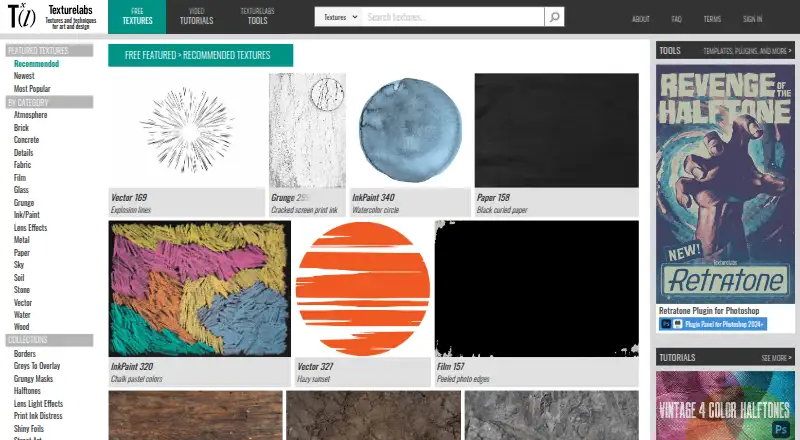
What Texturelabs is
Texturelabs is an online source of free original textures, tutorials, and custom tools for art and design. Its library includes atmosphere, brick, concrete, fabric, film, glass, grunge, ink and paint, metal, paper, sky, stone, water, and wood. Tutorials cover Photoshop and After Effects. The Tools section includes Photoshop actions, brushes, gradient maps, patterns, and plugins, as well as After Effects templates, bulk downloads, and lossless textures. Texture resources may be used in personal and commercial projects, including film, advertising, print, apparel, and video games, subject to restrictions: they cannot be resold, redistributed, or repackaged as competing design products, and cannot be used to train or assist AI image-generation systems. Retratone provides print-style halftones, pattern styles, custom inks, and 100 presets that users can save. Distressor is a Photoshop panel with 14 distress styles based on real-world samples. Both plugins require Adobe Photoshop and Creative Cloud installation; activation requires a license key and an internet connection initially. Free textures and tutorials are available, while paid options are one-time purchases.
Good
- Free original textures and tutorials are available.
- Texture categories span materials, weather, and effects.
- Commercial use is allowed under the stated terms.
- Retratone includes 100 built-in presets.
- Distressor offers 14 distress styles.
Watch out
- Photoshop plugins require Adobe Creative Cloud installation.
- Plugin activation needs an internet connection initially.
- Resources cannot be used to train image-generation AI.
- Texture packs cannot be resold or redistributed.
Who it suits
It suits artists and designers looking for textures, tutorials, or Photoshop and After Effects resources. Commercial projects are allowed under the stated usage restrictions.
Verdict
Texturelabs offers free resources alongside one-time purchases, with specific Photoshop tools for halftones and distress effects. Check the usage restrictions and software requirements before choosing assets or plugins.
Plans and prices
From Texturelabs's own pricing page, checked 4 Oct 2026.
| Plan | Price | What it gives you |
|---|---|---|
| Free textures and tutorials | Free | Free original textures and tutorials · commercial use allowed under terms |
| Distressor Plugin for Photoshop | $39, paid once | Photoshop 2022+ · one user · up to two devices · One-time purchase |
| Bulk Downloads + Lossless Textures | $40, paid once | Bulk downloads · lossless textures · Texturelabs login access · One-time pass |
| Retratone Plugin for Photoshop | $45, paid once | Photoshop 2024+ · one user · up to two devices · Limited time launch price |
The facts
Each one read from Texturelabs's own pages, with the date it was checked.
What it does
- AI restriction
- The site prohibits using its resources to train or assist AI image generation models or algorithms.checked 4 Oct 2026
- Analytics and store
- The privacy policy says Texturelabs uses WooCommerce for its store and Google Analytics to understand site use.checked 4 Oct 2026
- Commercial use
- Textures may be used in personal and commercial work, including film, advertising, print, apparel, and video games, subject to the stated restrictions.checked 4 Oct 2026
- Distressor features
- Distressor is a Photoshop panel for applying distress effects and offers 14 styles based on real-world samples.checked 4 Oct 2026
- Integrations
- Retratone and Distressor require Adobe Photoshop and installation through Adobe Creative Cloud; their listed minimum versions are Photoshop 2024+ and 2022+, respectively.checked 4 Oct 2026
- Plugin activation
- Plugin activation requires a license key and an active internet connection for the initial activation only.checked 4 Oct 2026
- Redistribution limits
- Texture resources may not be resold, redistributed, or repackaged as texture packs, templates, stock assets, or other competing design products.checked 4 Oct 2026
- Retratone features
- Retratone offers print-style halftones, multiple pattern styles, custom inks, and 100 built-in presets with the option to save presets.checked 4 Oct 2026
- Security
- The privacy policy says card payments are processed through Stripe, sensitive information is transmitted using SSL, and payment card details are not stored on Texturelabs servers after a transaction.checked 4 Oct 2026
- Support
- The FAQ says the site is run by one person and invites users to contact the maker by email for help.checked 4 Oct 2026
- Texture library
- Textures are offered in categories including atmosphere, brick, concrete, fabric, film, glass, grunge, ink and paint, metal, paper, sky, stone, water, and wood.checked 4 Oct 2026
- Tools
- The Tools section includes Photoshop actions, brushes, gradient maps, patterns and plugins, After Effects templates, bulk downloads, and lossless textures.checked 4 Oct 2026
- Tutorials
- The site provides Photoshop and After Effects tutorials.checked 4 Oct 2026
- What it is
- Texturelabs is an online source of free, original textures, tutorials, and custom tools for art and design.checked 4 Oct 2026
The company
- Founded
- 2018checked 28 Sep 2026
The full review of Texturelabs
Overview
Texturelabs is an online library of original photographic textures, tutorials and custom tools for art and design. It suits designers who work in Photoshop or After Effects and want both downloadable assets and targeted effects plugins. Its mix of free resources and focused, one-time purchases is appealing, though plugin buyers need compatible Photoshop versions and asset users must follow clear reuse restrictions.
Key features
The library spans atmosphere, brick, concrete, fabric, film, glass, grunge, ink and paint, metal, paper, sky, stone, water and wood. That breadth makes it useful for finding source material across varied visual styles, rather than relying on a single texture category. Assets are photographic and come in JPG, PNG and EPS formats.
Photoshop and After Effects tutorials complement the downloads, while the Tools section adds Photoshop actions, brushes, gradient maps, patterns and plugins, plus After Effects templates, bulk downloads and lossless textures. The custom plugins are more specialized: Retratone creates print-style halftones with multiple pattern styles, custom inks and 100 built-in presets that users can save. Distressor is a Photoshop panel with 14 distress styles based on real-world samples. These offer defined creative treatments, not a general-purpose design suite.
Textures may be used in personal and commercial work, including film, advertising, print, apparel and video games, subject to the stated restrictions. Users cannot resell, redistribute or repackage the resources as texture packs, templates, stock assets or competing design products. Texturelabs also prohibits using them to train or assist AI image-generation models or algorithms. Those terms make the library viable for commercial projects, but not for building or reselling derivative asset collections.
Pricing
The free plan costs nothing and includes original textures and tutorials, with commercial use allowed under the terms. It is a strong starting point for asset browsing and learning without a subscription; it does not include the separately sold plugins or bulk-download and lossless-texture access.
Distressor costs $39, paid once. It covers one user and up to two devices, requires Photoshop 2022+, and is the lower-cost plugin choice for buyers seeking its 14 distress styles. Retratone costs $45, paid once at its limited-time launch price, covers one user and up to two devices, and requires Photoshop 2024+. Its halftone patterns, custom inks and preset-saving options make it the more specific fit for print-style treatments.
Bulk Downloads + Lossless Textures costs $40, paid once and includes bulk downloads, lossless textures and Texturelabs login access. It is the straightforward choice for users who want those asset-access features rather than a Photoshop effects panel. Each paid option is a one-time purchase or pass, not a recurring membership.
Platforms
Texturelabs is available on the web, macOS and Windows. Retratone and Distressor require Adobe Photoshop and installation through Adobe Creative Cloud; their minimum versions are Photoshop 2024+ and Photoshop 2022+, respectively. Plugin activation requires a license key and an internet connection for initial activation only, so users on older Photoshop releases cannot use either plugin.
Who it's for
Texturelabs is best for visual artists and designers who need photographic source textures, Photoshop or After Effects learning material, or a particular halftone or distress treatment. Its commercial-use allowance broadens its usefulness for client and production work. It is a poor fit for anyone who needs permission to resell or repackage the assets, or wants to use them in AI image-generation training.
Pros and cons
- Pro: The free library covers many material and atmosphere categories, giving designers a broad place to source original textures without an upfront purchase.
- Pro: Commercial use is allowed under the terms, making the assets usable in work such as advertising, print and games.
- Pro: The two plugins have distinct, concrete creative uses, and both are sold as one-time purchases rather than subscriptions.
- Con: Plugin compatibility is version-specific: Retratone needs Photoshop 2024+ and Distressor needs Photoshop 2022+.
- Con: The redistribution ban rules out reselling or repackaging assets as competing design products, and the AI restriction excludes model training or assistance.
- Con: Plugin activation needs an internet connection once, which may complicate initial setup in offline environments.
Alternatives
For a different asset source or a more specialized licensing model, compare Texture Libraries. Mextures is worth considering for iOS users seeking overlay packs or a yearly membership; its X-Film Overlay Pack is $10 a month for 11 overlays at 4000 x 4000 pixels. Choose ambientCG when free downloads under a CC0 license are the priority. Textures.com offers a free sample selection through a free account, with paid plans for users who need a credit-based option.
Poly Haven is a strong alternative for users who want CC0 assets without paywalls or signup, including HDRIs at 16k+ and textures at least 8k. Architextures may suit web users who need standard texture downloads for personal and educational use, with a paid Pro plan for high-resolution downloads. CGBookcase offers 566 free textures under CC0 1.0 and a free, open-source tiling tool. FreePBR is another option for free use in games and 3D designs, subject to its noncommercial-use terms. FreePBRTextures provides a free CC0 library of 30+ textures at 4K resolution without signup.
Verdict
Texturelabs is a sensible pick for Photoshop- and After Effects-oriented artists who want a broad free texture library, commercial-use rights under clear terms and optional, focused plugins. The main reasons to look elsewhere are equally clear: its assets cannot be repackaged or used to train or assist image-generation models, and its plugins require recent Photoshop versions. If those constraints fit the work, its free resources make an easy starting point and its one-time plugin prices keep specialized effects separate from recurring fees.
Alternatives to Texturelabs
- 1

Textures.com
Free planWebWindows7.5From $13 a month - 2

Architextures
Free planWeb7.3From $89.99 a year - 3
Mextures
Free planiOSmacOSWindows7.2From $89 a year - 4

ambientCG
Free planWebAPILinuxmacOS7.1Free plan - 5
SketchUp Texture Club
Free planWebmacOSWindows6.9From $17 a year - 6

Poly Haven
Free planWebAPIExtension6.8From $3 a month