
Telegram
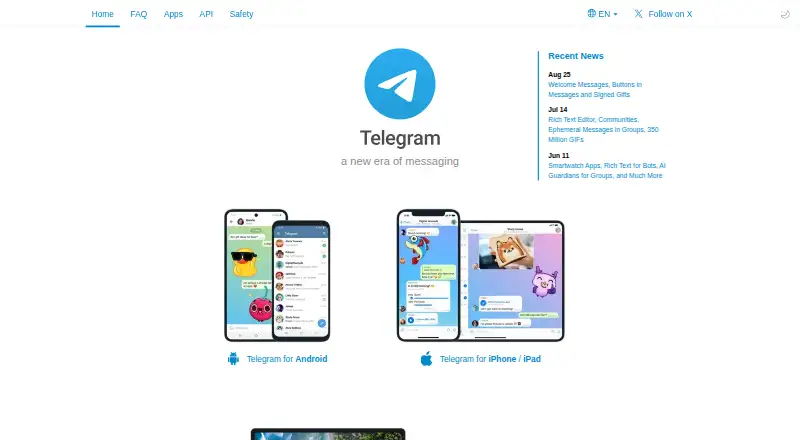
Telegram is a cloud-based messaging app for mobile and desktop, focused on security and speed.
What Telegram is
Telegram is a cloud-based messaging app for mobile and desktop, focused on security and speed. Users can exchange messages, photos, videos, and files, with cloud chats synced across devices. Groups can include up to 200,000 members, while channels can broadcast to unlimited audiences. Voice and video calls are end-to-end encrypted, and group calls support up to 200 participants. Secret Chats use end-to-end encryption and remain only on the devices involved; cloud chats are stored encrypted on Telegram servers. Bots and Mini Apps can connect services and workflows, while the open API and Bot API let developers build apps and integrations. The free plan includes cloud storage, groups and channels, calls, and use across multiple devices and accounts. Ordinary users can upload files up to 2 GB each; Premium subscribers can upload up to 4 GB. Premium also lists faster downloads and doubled limits, but its price varies by country and subscription provider. Telegram is available on Android, iOS, Linux, macOS, web, and Windows, and requires a phone account.
Good
- Free plan includes cloud storage, calls, groups, and channels.
- Groups support up to 200,000 members.
- Channels can broadcast to unlimited audiences.
- Apps are available across mobile, desktop, and web.
Watch out
- Ordinary users' file uploads are limited to 2 GB each.
- A phone is required for an account.
- Secret Chats are limited to their participating devices.
- Premium pricing varies by country and provider.
Who it suits
Telegram suits people who want messaging across devices, large groups, channels, or developer integrations. Business users and small teams may also use groups, usernames, desktop apps, and file sharing to communicate.
Verdict
Telegram brings cloud chats, calls, groups, channels, and developer tools together across devices. Note the difference between encrypted Secret Chats and cloud chats, and the standard file-upload limit.
Plans and prices
From Telegram's own pricing page, checked 30 Sep 2026.
| Plan | Price | What it gives you |
|---|---|---|
| Free | Free | Unlimited cloud storage · groups and channels · voice and video calls · multiple devices and accounts · Free to use; the FAQ says existing features remain free. |
| Telegram Premium | — | 4 GB file uploads · faster downloads · doubled limits · exclusive features · Monthly or yearly subscriptions are available; price varies by country and subscription provider. |
The facts
Each one read from Telegram's own pages, with the date it was checked.
What it does
- Bots and integrations
- Bots can connect businesses’ existing tools and workflows, and Mini Apps can integrate with third-party services, APIs and devices.checked 30 Sep 2026
- Business users
- Telegram says business users and small teams may use large groups, usernames, desktop apps and file sharing for communication.checked 30 Sep 2026
- Calls
- Telegram supports end-to-end encrypted voice and video calls and group calls for up to 200 participants.checked 30 Sep 2026
- Groups and channels
- Groups can hold up to 200,000 members, while channels can broadcast to unlimited audiences.checked 30 Sep 2026
- Messaging
- Users can send messages, photos, videos and files, and cloud chats sync across devices.checked 30 Sep 2026
- Notable limit
- The FAQ says ordinary users can upload files up to 2 GB each, while Premium subscribers can upload files up to 4 GB.checked 30 Sep 2026
- Premium pricing
- Premium subscriptions can be purchased through the App Store, Google Play or @PremiumBot, and the FAQ says yearly subscriptions are discounted.checked 30 Sep 2026
- Privacy
- Telegram says it does not use personal data for ad targeting or sell it to others, and describes retaining data needed to operate its cloud service.checked 30 Sep 2026
- Product
- Telegram describes itself as a cloud-based mobile and desktop messaging app focused on security and speed.checked 30 Sep 2026
- Security
- Secret Chats use end-to-end encryption and are available only on the devices where they were sent or received; cloud chats are stored encrypted on Telegram servers.checked 30 Sep 2026
- Support
- Telegram directs users to its FAQ and provides a contact option for Telegram Support.checked 30 Sep 2026
Where it runs
- Developer platform
- Telegram provides an open API and Bot API for building apps, specialized tools and integrations, including payment features.checked 30 Sep 2026
The company
- Founded
- 2013checked 28 Sep 2026
- Headquarters
- Dubai, United Arab Emirateschecked 28 Sep 2026
The full review of Telegram
Telegram is a messaging service for people who want chats, calls, large communities and broadcast channels across devices. It is strongest as a flexible, free communications hub; its key trade-off is that ordinary cloud chats are not end-to-end encrypted.
Overview
Founded in 2013 and headquartered in Dubai, Telegram brings mobile and desktop messaging together with groups, channels, calls and tools for developers. Users can send messages, photos, videos and files, with cloud chats syncing across devices. A phone number is required for an account, which may rule it out for people who need to communicate without tying an account to a phone.
Telegram draws a clear line between two kinds of conversation. Secret Chats use end-to-end encryption and remain only on the devices involved; cloud chats are stored encrypted on Telegram’s servers. That makes Secret Chats the better fit for conversations requiring end-to-end encryption, while cloud chats provide the multi-device synchronization that makes Telegram convenient. Telegram says it does not sell personal data or use it for ad targeting, and retains data needed to operate its cloud service. Encrypted backups and disappearing messages are supported.
Key features
- Groups and channels: Groups can hold up to 200,000 members, and channels can broadcast to unlimited audiences. These capacities suit large communities and one-to-many announcements; they are more than most small groups need, but useful when a conversation needs room to grow.
- Voice and video calls: Telegram supports end-to-end encrypted voice and video calls, plus group calls for up to 200 participants. That gives users private calling and a substantial group-call ceiling, alongside messaging and broadcasts.
- Files and synchronization: Cloud chats sync across devices, and free users can upload files up to 2 GB each. The cap is generous for everyday sharing, but people who regularly send larger files need Premium’s 4 GB limit.
- Bots and Mini Apps: Bots can connect business tools and workflows, while Mini Apps can work with third-party services, APIs and devices. This makes Telegram more adaptable for businesses and small teams than a messaging-only service, though the value depends on the integrations they need.
- Developer platform: The open API and Bot API support apps, specialized tools and integrations, including payment features. Developers can build on Telegram rather than being limited to its built-in chat functions.
- Support: Telegram directs users to its FAQ and provides a contact option for Telegram Support.
Pricing
Telegram is freemium, and its free plan is broad enough to serve as the default for most personal users. It costs free and includes unlimited cloud storage, groups and channels, voice and video calls, and use across multiple devices and accounts. Existing features remain free, so users do not need a paid plan for the core messaging service.
Telegram Premium has custom pricing: subscriptions are available monthly or yearly, with prices varying by country and purchase provider. The FAQ says yearly subscriptions are discounted. Premium adds 4 GB file uploads, faster downloads, doubled limits and exclusive features. It is the relevant upgrade for people who regularly share files beyond the free 2 GB cap or want the increased limits; most users who do not need those additions can stay on Free. Subscriptions can be purchased through the App Store, Google Play or @PremiumBot.
Platforms
Telegram supports Android, iOS, Linux, macOS, web and Windows, as well as an API. Desktop apps and multi-device support let users continue cloud chats across mobile and computer; Secret Chats, by contrast, are available only on the devices where they were sent or received.
Who it's for
Telegram is a strong fit for people coordinating across devices, running large groups or broadcasting to broad audiences. Businesses and small teams can draw on large groups, usernames, desktop apps, file sharing, bots and Mini Apps to connect communication with workflows. Developers get open APIs and payment features to build specialized tools.
It is less suitable when end-to-end encryption is expected in every conversation: that protection applies to Secret Chats, not cloud chats. It is also a poor fit for anyone unable to use a phone number for account setup, or for frequent file sharers who need uploads above 2 GB but do not want Premium.
Pros and cons
- Pro — Broad free core: Free includes unlimited cloud storage, calls, groups and channels, plus multiple devices and accounts, reducing the need to pay for everyday use.
- Pro — Room for large audiences: Groups support up to 200,000 members and channels have unlimited audiences, making Telegram suitable for communities and announcements at scale.
- Pro — Extensible platform: Bots, Mini Apps and open APIs give businesses and developers ways to connect services and workflows.
- Con — Cloud chats are not end-to-end encrypted: Only Secret Chats use that encryption, so users must choose the chat type deliberately.
- Con — Phone number required: Account setup depends on a phone number, which excludes people seeking phone-free registration.
- Con — Free uploads stop at 2 GB: Larger files require Premium, whose price varies by country and purchase provider.
Alternatives
For other options, browse Secure Messaging Apps.
- Wire is worth considering if open-source code is a priority: Wire says its source code is fully open source and available on GitHub for verification.
- Olvid has a free plan billed forever, with unlimited messages and attachments, secure group discussions, ephemeral messages and multiple platforms; choose it if those are the capabilities you want in a free service.
- Crypho offers a free personal plan with encrypted calls and video calls, but limits it to one group and files up to 3 MB. Its Pro Plan costs €379 a month, so it is a different fit for users whose needs exceed that free allowance.
- Jami is a free option across mobile, desktop, web and API platforms.
- Viber offers free messaging and calls to Viber users; Viber Out uses prepaid credit or a subscription, with rates varying by destination.
- Delta Chat is free and open-source software for readers who want that model.
- Signal provides free messaging and calling, with a mobile account required for desktop use.
- SimpleX Chat is a free option across mobile, desktop, API and self-hosted platforms.
Verdict
Choose Telegram if you want a free, multi-device messaging service that can also handle large groups, unlimited-audience channels and developer-built integrations. Its breadth is the main reason to pick it; the main reason to look elsewhere is that end-to-end encryption is limited to Secret Chats rather than cloud chats.
Getting started
- Visit Telegram’s website or install the app for Android, iOS, Linux, macOS, or Windows
- Create an account using a phone number
- Use Telegram through the web, desktop, or mobile app
- Start chats, groups, channels, calls, or file sharing on the Free plan
- Purchase Premium through the App Store, Google Play, or @PremiumBot if needed
Limits worth knowing
The Free plan permits file uploads up to 2 GB each. Premium subscribers can upload up to 4 GB and receive faster downloads, doubled limits, and exclusive features.
Questions
Is Telegram free?
Yes. The Free plan costs nothing and includes cloud storage, groups and channels, voice and video calls, and multiple devices and accounts.
What platforms does Telegram support?
Telegram runs on Android, iOS, Linux, macOS, web, and Windows.
What is the free file-upload limit?
Ordinary users can upload files up to 2 GB each. Premium subscribers can upload files up to 4 GB.
Does Telegram offer encrypted conversations?
Secret Chats use end-to-end encryption and are limited to the devices where they were sent or received. Cloud chats are stored encrypted on Telegram servers.
Can developers integrate Telegram?
Yes. Telegram provides an open API, a Bot API, bots, and Mini Apps for apps, workflows, third-party services, devices, and payment features.
Alternatives to Telegram
- 1

Discord
Free planAndroidiOSWebAPI7.8From $29.99 a year - 2

SocialBu API
Free planAndroidiOSWebAPI7.3From $29 a month - 3
Mastodon
Free planAndroidiOSWebAPI7.0Free plan - 4

Ayrshare
AndroidiOSWebAPI6.9From $149 a month - 5
Upload-Post
Free planWebAPISelf-hosted6.7From $192 a year - 6

WoopSocial API
Free planWebAPI6.7From $19 a month