
Signal
Signal is a private messaging app for sending messages and making internet calls.
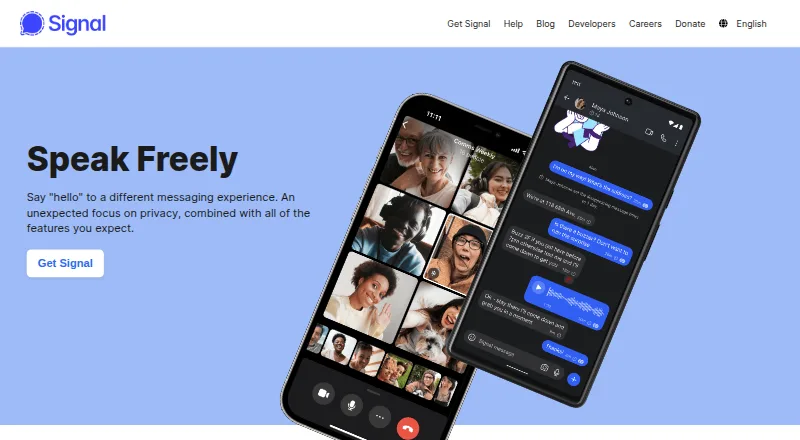
What Signal is
Signal is a private messaging app for sending messages and making internet calls. Users can share text, voice messages, photos, videos, GIFs, and files for free, and make voice or video calls, including group calls. Group chats provide admin controls, permissions, and @mentions. Signal says its messages and calls are always end-to-end encrypted and inaccessible to Signal, and that it does not sell, rent, or monetize personal data or content. Users can connect using a unique username instead of sharing their number with contacts, but a phone number is still needed to register. Signal is available on Android, iOS, Linux, macOS, and Windows. Desktop use requires first installing the app on a phone, and each account can link up to five devices. Signal describes itself as an independent 501(c)(3) nonprofit funded by grants and donations. Its terms set a minimum age of 13, though local requirements may be higher. The free plan includes messaging and calls. A Support Center covers getting started, features, security, troubleshooting, and general topics.
Good
- Messages and calls are end-to-end encrypted.
- Supports voice and video group calls.
- Group chats include admins and permissions.
- Available on mobile and desktop platforms.
- Free plan includes messaging and calls.
Watch out
- Phone number is required to register.
- Desktop use requires a phone installation first.
- Accounts can link up to five devices.
- Local minimum age requirements may exceed 13.
Who it suits
Signal suits people seeking encrypted messaging and internet calls across mobile and desktop platforms. Desktop users should be prepared to set up an account on a phone first.
Verdict
Signal offers free messaging and calls with end-to-end encryption, plus group chat controls and several desktop options. Keep the phone-based registration and initial mobile setup requirement in mind.
Plans and prices
From Signal's own pricing page, checked 29 Sep 2026.
| Plan | Price | What it gives you |
|---|---|---|
| Signal | Free | Free messaging and calling · mobile account required for desktop |
The facts
Each one read from Signal's own pages, with the date it was checked.
What it does
- Age and registration
- Signal's terms require users to be at least 13 and to register using a phone number, with local minimum age possibly higher.checked 29 Sep 2026
- Calls
- Signal offers voice and video calls, including group calls.checked 29 Sep 2026
- Desktop requirement
- Signal must first be installed on a phone to use the desktop app.checked 29 Sep 2026
- Encryption
- Signal says messages and calls are always end-to-end encrypted and cannot be accessed by Signal.checked 29 Sep 2026
- Funding
- Signal says it is an independent 501(c)(3) nonprofit supported by grants and donations.checked 29 Sep 2026
- Groups
- Group chats support admins, permissions, and @mentions.checked 29 Sep 2026
- Integrations
- Signal's privacy policy names YouTube, Spotify, and Giphy as third-party services users may interact with in connection with Signal.checked 29 Sep 2026
- Messaging
- Users can share text, voice messages, photos, videos, GIFs, and files for free.checked 29 Sep 2026
- Phone number privacy
- Users can connect with a unique username without sharing their phone number, though a phone number is still required to register.checked 29 Sep 2026
- Privacy
- Signal says it does not sell, rent, or monetize personal data or content.checked 29 Sep 2026
- Product
- Signal is a private messaging app for sending messages and making internet calls.checked 29 Sep 2026
- Support
- Signal provides a Support Center with Getting Started, Features, Security, Troubleshooting, and General categories.checked 29 Sep 2026
The company
- Headquarters
- Mountain View, California, United Stateschecked 23 Sep 2026
Where it runs
- Linked device limit
- An account can have up to five linked devices.checked 29 Sep 2026
- Platforms
- Signal lists Android, iPhone and iPad, Windows, Mac, and Linux downloads.checked 29 Sep 2026
The full review of Signal
Signal is a private messaging app for people who want encrypted conversations and calls without paying for core communication features. It suits individuals and groups who value privacy, and is a weaker fit if desktop setup without a phone account is essential.
Its combination of default end-to-end encryption, group controls and free messaging makes it a focused choice; the phone-number registration requirement is the main compromise.
Overview
Signal covers everyday communication with free text, voice messages, photos, videos, GIFs and file sharing, alongside voice and video calls, including group calls. Messages and calls are end-to-end encrypted by default, and Signal says it cannot access their contents. The organization also says it does not sell, rent or monetize personal data or content.
A username lets people connect without sharing a phone number with one another, but it does not remove the phone number requirement for registration. That distinction matters: Signal can limit what contacts need to know, but it is not an account system independent of a phone number.
Key features
Private conversations and groups
Encryption is on by default for messages and calls, rather than a setting users must remember to enable. Groups can contain up to 1,000 members, with admins, permissions and @mentions to help manage larger conversations. Disappearing messages and end-to-end encrypted backups add privacy-oriented options, though users still need to decide how those features fit their own retention needs.
Connections and outside services
Signal names YouTube, Spotify and Giphy as third-party services users may interact with in connection with the app. That is relevant for anyone assessing privacy beyond the contents of Signal messages and calls: those interactions involve outside services, not just Signal.
Pricing
Signal’s core plan is free: the Signal plan is free and includes free messaging and calling. There is no free trial because the core plan costs nothing. The pricing model is freemium, with paid plans from $1.99/mo, but no paid-plan inclusions are established here; treat that starting price as an entry point, not a description of what a paid tier adds.
The free plan is the clear fit for personal messaging and calling without a subscription. Signal says it is an independent 501(c)(3) nonprofit supported by grants and donations, rather than monetizing personal data or content. No per-user seat price or free-plan cap is stated beyond the five-device linking limit.
Platforms
Signal supports Android, iOS, Linux, macOS and Windows. Desktop apps are available, but they must be linked after Signal is installed on a phone; each account can link up to five devices. That is practical for people who already use Signal on mobile, but a meaningful barrier for anyone seeking a standalone desktop account.
Who it's for
Signal is a strong choice for people who want private, encrypted messaging and calls at no cost, especially those organizing group chats that benefit from admin controls, permissions and mentions. It also suits users who want desktop access alongside a mobile account. Look elsewhere if phone-number-based registration is unacceptable or desktop use must work without first setting up a phone.
Pros and cons
- Pro: End-to-end encryption is the default for messages and calls, so users do not need to turn it on conversation by conversation.
- Pro: Free messaging, calls and group features make the core service useful without a recurring payment.
- Pro: Groups support up to 1,000 members, with permissions, admins and @mentions for more structured conversations.
- Con: Registration requires a phone number, even though usernames can keep that number from other people.
- Con: Desktop requires an initial phone installation, and accounts are limited to five linked devices.
- Con: The paid starting price of $1.99/mo does not by itself clarify what paid plans include.
Alternatives
Browse Secure Messaging Apps or Encrypted Messaging Apps to compare more options. Wire is worth considering if source-code availability for verification matters; Wire says its code is fully open source and available on GitHub. Olvid offers a free plan and a free trial, making it an option for readers who want to try another freemium messenger.
Delta Chat is a free alternative for readers who want a free and open source option. SimpleX Chat is another free alternative. Telegram may suit readers looking for unlimited cloud storage and groups and channels on a free plan. Element offers Community and Enterprise plans with user-count tiers, which may fit readers comparing plans by organization size.
Viber has a free core app for messaging and calls to Viber users, with Viber Out offered separately. Threema is a paid alternative with a free trial and open-source apps.
Verdict
Choose Signal if you want free, default-encrypted messaging and calls, with capable group controls and the option to use desktop after mobile setup. Its privacy posture and no-cost core make it an easy recommendation for phone-first users. Look elsewhere if you need registration without a phone number or a desktop app that stands alone.
Alternatives to Signal
- 1
SimpleX Chat
Free planOpen sourceAndroidiOSAPILinux8.0Free plan - 2

Jami
Free planOpen sourceAndroidiOSWebAPI7.9Free plan - 3

Wire
Free planAndroidiOSWebLinux7.9From €7.45 a month - 4
WhatsApp
Free planAndroidiOSWebAPI7.7Free plan - 5

Olvid
Free planAndroidiOSWebLinux7.5From €990 a year - 6

Session
Free planAndroidiOSLinuxmacOS7.4From $2.99 a month