
TaskExplorer
TaskExplorer is a free, open-source process and system monitoring tool for Windows and Linux.
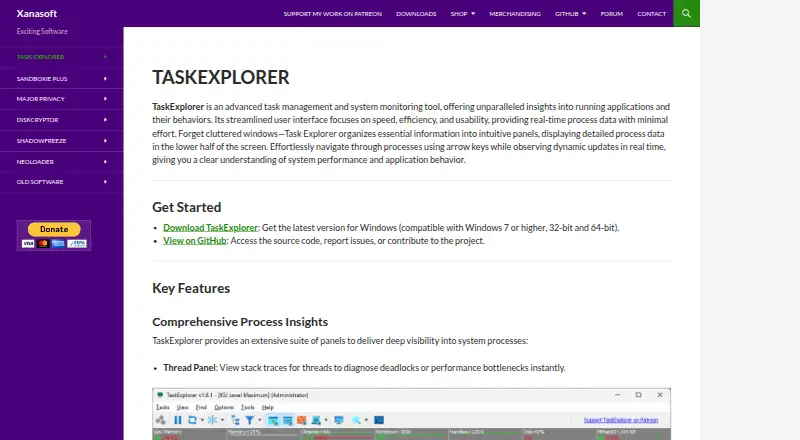
What TaskExplorer is
TaskExplorer is a free, open-source process and system monitoring tool for Windows and Linux. It provides real-time details about running applications, including threads, memory, handles, network connections, modules, tokens, environment variables, windows, GDI objects, and .NET processes. Performance graphs cover CPU, memory, network, disk, and GPU activity, while system panels show files, sockets, services, and drivers. It can monitor multiple remote Windows and Linux machines, including cross-platform connections. Remote monitoring requires a Task Explorer supporter certificate and includes secure authentication and encrypted credential storage. Version 2.0.0 adds native Linux support for x64 and ARM64, plus Wine integration for Windows-specific details about Wine processes. On Windows, optional Window Agents can enumerate and control windows in other user sessions. Windows requirements include Windows 7 SP1, 10, or 11, with ARM64 supported only on Windows 11. The installer should be run as Administrator, and administrative privileges are recommended for full functionality and process control; a portable ZIP is also available.
Good
- Free and open source
- Monitors CPU, memory, network, disk, and GPU
- Connects to remote Windows and Linux systems
- Portable ZIP package is available
Watch out
- Remote monitoring requires a supporter certificate
- Administrative privileges are recommended for full functionality
- Windows ARM64 support requires Windows 11
Who it suits
TaskExplorer suits developers, IT professionals, and power users diagnosing performance problems, troubleshooting applications, or monitoring network activity. It can also help users who need to inspect processes across Windows and Linux systems.
Verdict
TaskExplorer provides detailed process inspection alongside system performance and service monitoring for Windows and Linux. Remote monitoring has a certificate requirement, and full Windows process control may require administrative privileges.
Plans and prices
From TaskExplorer's own pricing page, checked 10 Oct 2026.
| Plan | Price | What it gives you |
|---|---|---|
| Task Explorer Pro Business | €60 a year | Commercial use · one license per deployment using supporter-only functionality · €60,00; includes one year of software updates and commercial use of supporter-only features |
| Task Explorer Pro Personal | €60 a year | Private use · supporter certificate unlocks remote monitoring · €60,00; includes one year of software updates |
The facts
Each one read from TaskExplorer's own pages, with the date it was checked.
What it does
- Administrative privileges
- The maker recommends administrator rights for full functionality and says they are needed to view or control system processes.checked 10 Oct 2026
- Audience
- The maker presents TaskExplorer for diagnosing system performance issues, troubleshooting applications, and monitoring network activity, with tools for developers, IT professionals, and power users.checked 4 Oct 2026
- Code signing
- The maker says the kernel driver is Microsoft-signed and that executable, library, and installer files are signed with its EV code signing certificate.checked 10 Oct 2026
- Development
- Xanasoft describes TaskExplorer as a passion project maintained by a single developer and invites users to support development through Patreon or direct donation.checked 4 Oct 2026
- Installation and privileges
- The installer should be run as Administrator, and administrative privileges are recommended for full functionality and process control; a portable ZIP package is also available.checked 4 Oct 2026
- Intended users
- The maker describes the tool as intended for developers, IT professionals, and power users; its Business certificate is aimed at commercial organizations, IT administrators, and enterprise deployments.checked 10 Oct 2026
- Process details
- Its panels show thread stack traces, process memory, open handles, network connections, loaded modules, tokens, environment variables, windows, GDI objects, and .NET processes.checked 4 Oct 2026
- Process inspection
- Its panels expose process threads and stack traces, memory, handles, sockets, modules, tokens, environment variables, windows, GDI objects, and .NET processes.checked 10 Oct 2026
- Purpose
- TaskExplorer is a process and system monitoring tool that provides real-time information about running applications and their behavior.checked 10 Oct 2026
- Remote access security
- Remote access includes secure authentication and encrypted credential storage, and remote monitoring requires a Task Explorer supporter certificate.checked 4 Oct 2026
- Remote monitoring
- With a supporter certificate, TaskExplorer can monitor multiple Windows and Linux systems, including cross-platform connections, through TaskServer and TaskRemote.checked 10 Oct 2026
- Remote security
- Remote access includes secure authentication, encrypted credential storage, and automatic discovery of TaskServer instances on the local network.checked 10 Oct 2026
- Support
- The maker directs users with issues to GitHub Issues or its troubleshooting forum.checked 10 Oct 2026
- System monitoring
- It displays real-time CPU, memory, network, disk, and GPU metrics, along with information about open files, sockets, services, and drivers.checked 10 Oct 2026
- System requirements
- The listed minimum memory is 2 GB and required disk space is approximately 100 MB.checked 4 Oct 2026
Where it runs
- Linux support
- TaskExplorer 2.0 is available natively on Linux for x64 and ARM64, with Wine integration for inspecting Windows processes running under Wine.checked 10 Oct 2026
- Windows agents
- On Windows, optional Window Agents allow windows belonging to other user sessions to be enumerated and controlled.checked 10 Oct 2026
- Windows capabilities
- Version 2.0.0 adds optional Window Agents to enumerate and control windows belonging to other user sessions.checked 4 Oct 2026
- Windows requirements
- The download page lists Windows 7 SP1, Windows 10, and Windows 11, 64-bit architecture, at least 2 GB of memory, and about 100 MB of disk space.checked 10 Oct 2026
Alternatives to TaskExplorer
- 1

PM2
Free planOpen sourceWebAPILinuxmacOS8.1From $79 a month - 2
Glances
Free planOpen sourceAndroidWebAPILinux8.0Free plan - 3
Process Lasso
Free planWindows7.4From $14.97 a year - 4

Ambih Monitor
Free planWindows7.2From $55 a year - 5
runit
Free planOpen sourceLinuxmacOSSelf-hosted7.0Free plan - 6
Remote Process Explorer
Free planWindows6.4$149.95 one-time