TagsForAll
TagsForAll is Windows software for organizing files with tags and descriptions.
What TagsForAll is
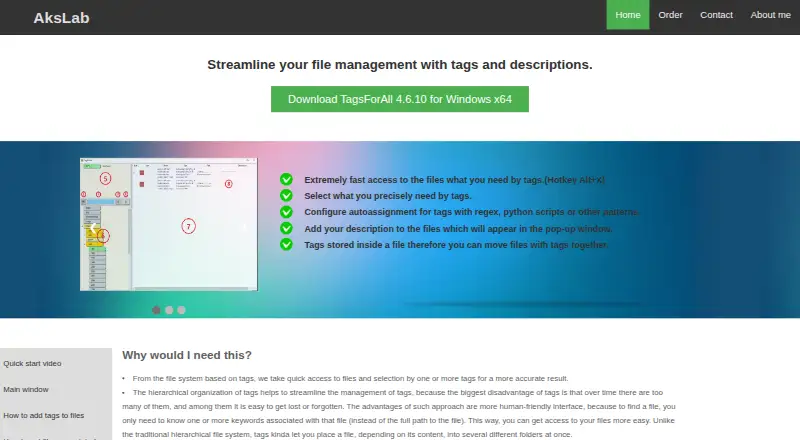
TagsForAll is Windows software for organizing files with tags and descriptions. Files can be filtered by one or more tags, while hierarchical tags let a parent selection include files assigned to its subtags. Tagging works from the Windows Explorer context menu or by dragging files into the application, and the configurable Alt+X shortcut opens FastTagAccess. Automatic assignment can use extensions, filename or path patterns, regular expressions and Python scripts. Directory Watcher applies tags to new files in watched folders. Descriptions can appear when hovering over files in Explorer. Tags and descriptions are kept in NTFS alternate data streams and a local database; the database can be restored by scanning tagged files, and changes from moving, renaming or deleting files are tracked. The free version costs nothing and allows 70 tags. It runs on Windows x64.
Good
- Hierarchical tag searching
- Python-based automatic assignment
- Directory Watcher for new files
- Tracks moved and renamed files
- Free version available
Watch out
- Free version limited to 70 tags
- Windows only
- Removable drives need NTFS for streams
- Non-NTFS media needs archiving workaround
Who it suits
It suits Windows users who want searchable file tags, descriptions and automated classification. It is useful for workflows involving watched directories or Explorer-based tagging.
Verdict
TagsForAll provides detailed tagging and automation inside Windows Explorer. Check the 70-tag free limit and NTFS storage requirement against your file setup.
Plans and prices
From TagsForAll's own pricing page, checked 10 Oct 2026.
| Plan | Price | What it gives you |
|---|---|---|
| Free version | Free | 70 tags · no other software limitations stated |
The facts
Each one read from TagsForAll's own pages, with the date it was checked.
What it does
- Automatic tagging
- Autoassignment supports file extensions, filename or path patterns, regular expressions, and Python scripts.checked 10 Oct 2026
- Descriptions
- File descriptions can appear in a popup when hovering over a file in Windows Explorer.checked 10 Oct 2026
- Directory monitoring
- Directory Watcher can automatically assign tags to new files added to watched directories.checked 10 Oct 2026
- File change tracking
- TagsForAll tracks file system changes and updates its local database when tagged files are moved, renamed, or deleted.checked 10 Oct 2026
- Portability limit
- The product page says removable drives need NTFS to carry the alternate data streams with the files; it suggests archiving with WinRAR for non-NTFS media.checked 10 Oct 2026
- Purpose
- TagsForAll organizes files with tags and descriptions to make them easier to find.checked 10 Oct 2026
- Support
- The maker invites questions, proposals, and feature requests at [email protected].checked 10 Oct 2026
- Tagging workflow
- Users can tag files from the Windows Explorer context menu or by dragging files into the application.checked 10 Oct 2026
- Tag hierarchy
- Tags can be arranged hierarchically, and selecting a parent tag with only subtags returns files associated with those subtags.checked 10 Oct 2026
- Tag search
- Users can filter files by one or more tags and use the configurable Alt+X hotkey for FastTagAccess.checked 10 Oct 2026
- Tag storage
- Tags and descriptions are stored in NTFS alternate data streams and in a local database; the product page says the database can be restored by scanning tagged files.checked 10 Oct 2026
Money
- Free version limit
- The free version is limited to 70 tags, and the page says there are no other software limitations.checked 10 Oct 2026
The company
- Maker
- The product page identifies the maker as AksLab and shows a 2006–2021 copyright notice.checked 10 Oct 2026
Where it runs
- Platform and download
- The maker offers TagsForAll 4.6.10 for Windows x64; the product page describes Windows Explorer integration.checked 10 Oct 2026
Alternatives to TagsForAll
- 1
BitDock
Free planWindows7.2Free plan - 2

DeskBox
Free planOpen sourceWindows7.0Free plan - 3
iTop Easy Desktop
Free planWindows6.6From $11.99 a year - 4
Tabbles
Free planAPIExtensionWindows6.6From €3 a year - 5

AutoShelf
Free planmacOS6.5$19.99 one-time - 6
Right Click Enhancer
Free planWindows6.5$9.99 one-time