Streamlabs Podcast Editor
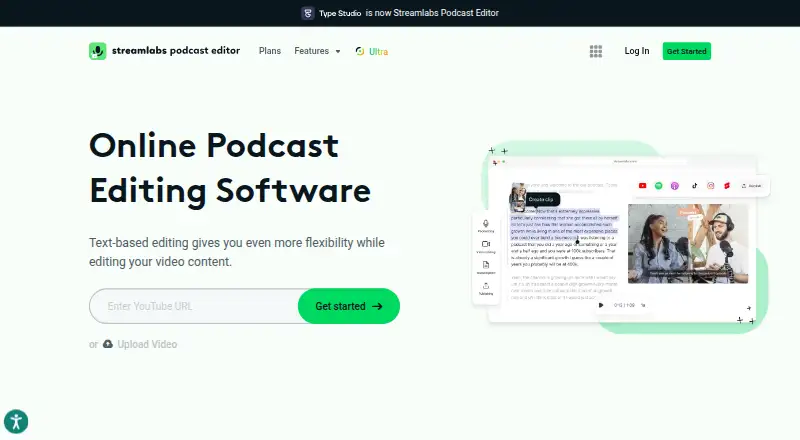
Streamlabs Podcast Editor is a browser-based video editor for podcasts, interviews, Just Chatting streams, and other video content.
What Streamlabs Podcast Editor is
Streamlabs Podcast Editor is a browser-based video editor for podcasts, interviews, Just Chatting streams, and other video content. Users can edit video through its transcript, including trimming sections and removing pauses or filler words. The editor transcribes and translates podcasts, with translation support for over 30 languages, and can automatically add subtitles or generate closed captions that Streamlabs says have over 95% accuracy. Creators can make shorter clips and change their aspect ratio for different platforms. Podcasts can be shared to a platform or embedded on a website or blog with an interactive transcript. Videos recorded in Talk Studio can be uploaded directly, while links can import videos from YouTube, Google Drive, or Dropbox. Webcam and screen recording tools and cloud collaboration are included. Using the editor requires a Streamlabs ID account. The free plan allows one hour per month, a one-hour video limit, and 15GB storage.
Good
- Transcript editing can remove pauses and filler words.
- Translation supports over 30 languages.
- Clips can be resized for different platforms.
- Cloud collaboration is supported.
Watch out
- Free plan allows one hour per month.
- Free plan has a one-hour video limit.
- A Streamlabs ID account is required.
Who it suits
It suits podcast and video creators who want transcript-based editing, translation, captions, and shorter clips in a browser. Users need a Streamlabs ID account.
Verdict
Streamlabs Podcast Editor covers transcript-led edits, translation, captions, and clip repurposing in a browser. Compare the free usage limits with the Pro plan's listed capacity before choosing.
Plans and prices
From Streamlabs Podcast Editor's own pricing page, checked 20 Sep 2026.
| Plan | Price | What it gives you |
|---|---|---|
| Podcast Editor Pro | — | 40 hours per month · 2-hour video limit · 250GB storage |
| Podcast Editor Free | Free | Free plan; translation available to try |
The facts
Each one read from Streamlabs Podcast Editor's own pages, with the date it was checked.
What it does
- Account
- The Podcast Editor signup page requires a Streamlabs ID account to use the product.checked 9 Oct 2026
- Captions
- It can automatically add subtitles and generate closed captions that Streamlabs says have over 95% accuracy.checked 9 Oct 2026
- Cloud collaboration
- Yeschecked 20 Sep 2026
- Import sources
- Streamlabs' captioning guide says videos can be uploaded from YouTube, Google Drive, or Dropbox using a link.checked 9 Oct 2026
- MIDI sequencing
- Nochecked 20 Sep 2026
- Publishing
- Users can share a podcast to a platform or embed it on a website or blog with an interactive transcript.checked 9 Oct 2026
- Purpose
- Streamlabs Podcast Editor is an online video editor for podcasts, interviews, Just Chatting streams, and other video content.checked 9 Oct 2026
- Recording tools
- Streamlabs says Podcast Editor includes a webcam and screen recorder.checked 9 Oct 2026
- Repurposing
- Users can make shorter clips and change the aspect ratio to fit different platforms.checked 9 Oct 2026
- Support
- Streamlabs directs Podcast Editor users who need help to submit a support ticket.checked 9 Oct 2026
- Talk Studio integration
- Streamlabs says video recorded in Talk Studio can be uploaded directly to Podcast Editor.checked 9 Oct 2026
- Text editing
- Users can trim video by editing its transcript, including removing pauses and filler words.checked 9 Oct 2026
- Transcription and translation
- The editor supports podcast transcription and translation, and its translation feature supports over 30 languages.checked 9 Oct 2026
Money
- Free plan
- Yeschecked 20 Sep 2026
The company
- Maker history
- Streamlabs says it was founded in 2014 and is a brand of Logitech.checked 9 Oct 2026
Where it runs
- Supported platforms
- Web browserchecked 20 Sep 2026
Alternatives to Streamlabs Podcast Editor
- 1
WavePad
Free planAndroidiOSmacOSWindows8.8From $39.95 a year - 2
n-Track Studio
Free planAndroidiOSLinuxmacOS8.7From $109 a year - 3
Zenbeats
Free planAndroidiOSmacOSWindows8.5From $2.99 a month - 4
Koala Sampler
Free planAndroidiOSLinuxmacOS8.4$2.99 one-time - 5
Pro Tools
Free planmacOSWindows8.3Free plan - 6

Soundtrap
Free planAndroidiOSWebLinux8.3Free plan