
Start Menu X
Start Menu X replaces the Windows system Start menu with a customizable menu aimed at professionals and power users.
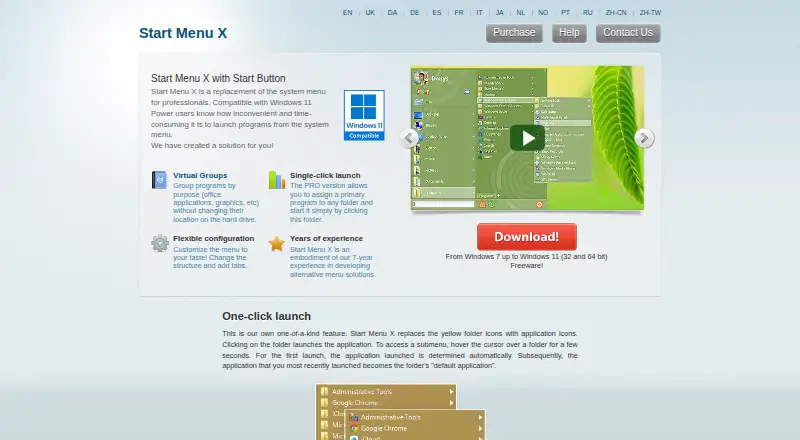
What Start Menu X is
Start Menu X replaces the Windows system Start menu with a customizable menu aimed at professionals and power users. It lets users group programs by purpose without moving them on disk, and groups can be folded or unfolded. Users can change the menu structure, add tabs and build a customized folder list from 25 system folders alongside folders or applications they add. Folder contents can use the full screen to display applications. The PRO version allows a primary program to be assigned to a folder for single-click launch; it also includes virtual-group management and file sorting by name. The menu can set a delayed shutdown or sleep timer. The installer includes Group Manager for organizing virtual groups. The maker describes compatibility from Windows 7 through Windows 11 and offers 32-bit and 64-bit versions. The free version limits virtual groups to five. PRO costs $14.99, paid once with no subscription, and includes free minor 7.x updates.
Good
- Groups programs without moving them on disk.
- Menu structure and tabs can be customized.
- Can set delayed shutdown or sleep timers.
- PRO includes single-click folder launch.
Watch out
- Free version limits virtual groups to five.
- Available on Windows only.
- PRO costs $14.99, paid once.
Who it suits
It suits Windows users who want to organize programs into purpose-based groups or customize the Start menu layout. PRO may fit users who want folder-based single-click launch or more than five virtual groups.
Verdict
Start Menu X focuses on replacing and organizing the Windows Start menu, with customization in the free version and added folder launch in PRO. The five-group free limit and one-time PRO cost are the main plan distinctions.
Plans and prices
From Start Menu X's own pricing page, checked 30 Sep 2026.
| Plan | Price | What it gives you |
|---|---|---|
| Freeware | Free | free version; virtual groups limited to 5 |
| Start Menu X PRO | $14.99, paid once | Single-click launch · menu structure and tabs · manage virtual groups · sort files by name · free minor 7.x updates · No subscription |
The facts
Each one read from Start Menu X's own pages, with the date it was checked.
What it does
- Customization
- Users can change the menu structure and add tabs.checked 30 Sep 2026
- Data storage
- The program stores settings under the user's AppData folder and in the current user's Windows registry; the portable version stores settings in its program folder.checked 30 Sep 2026
- Folder access
- The menu can show a customized list drawn from 25 system folders and folders or applications users add themselves.checked 30 Sep 2026
- Folder launch
- The PRO version lets users assign a primary program to a folder and launch it by clicking the folder.checked 30 Sep 2026
- Installation contents
- The installer includes Start Menu X and Group Manager, a tool for organizing programs into virtual groups.checked 30 Sep 2026
- Power management
- The menu can set a delayed shutdown or sleep timer for the computer.checked 30 Sep 2026
- Purpose
- Start Menu X replaces the Windows system Start menu and is described as a solution for professionals and power users.checked 30 Sep 2026
- Support
- The site provides help topics and a contact page for sending a message by email.checked 30 Sep 2026
- System integration
- The maker says the program uses documented Windows Hook functions and can be enabled or disabled easily.checked 30 Sep 2026
- Virtual groups
- It groups programs by purpose without changing their location on disk, and groups can be folded or unfolded.checked 30 Sep 2026
- Website privacy
- The site's privacy policy says it uses Google Analytics cookies and says submitted personal details are not passed to third parties.checked 30 Sep 2026
Where it runs
- Fullscreen application list
- Folder contents use the entire screen to display applications in the menu.checked 30 Sep 2026
- Windows compatibility
- The maker describes compatibility from Windows 7 through Windows 11 and offers 32-bit and 64-bit versions.checked 30 Sep 2026
Alternatives to Start Menu X
- 1
Launchy
Free planOpen sourceAndroidAPILinuxmacOS7.7Free plan - 2
Executor
Free planOpen sourceSelf-hostedWindows7.2Free plan - 3
LaunchMenu
Free planOpen sourceAPImacOSWindows7.0Free plan - 4
Starling
Free planWebLinuxmacOSWindows6.7Free plan - 5

Dawn Launcher
Free planWindows6.5CN¥34 one-time - 6
Listary
Free planWindows6.5$19.95 one-time