Start Menu Reviver
Start Menu Reviver is a free Windows utility that provides a Start Menu with a Metro-style interface and customizable tiles.
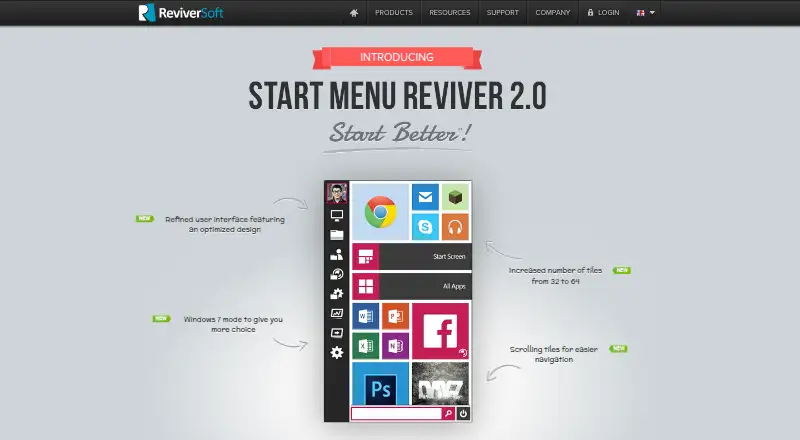
What Start Menu Reviver is
Start Menu Reviver is a free Windows utility that provides a Start Menu with a Metro-style interface and customizable tiles. Tiles can open applications, Windows tasks, websites, documents, music, videos, and other files; they can also point to shortcuts and media. The product page says the tile capacity was raised from 32 to 64. A search box finds applications, computer settings, and documents. From the menu, users can launch traditional desktop programs and Windows 8 modern applications, or go directly to the Windows 8 Start screen. Its touch-optimized interface is intended to work on Windows 8-based tablets. Listed requirements are Windows 7, 8, or 10, a CPU of at least 300MHz, 256 MB of RAM, and 22 MB of disk space. Version 3.0.6.4 is offered for download. ReviverSoft provides support articles and a contact-support option. The company says Corel acquired its Windows and Mac utility software and resources in September 2014.
Good
- Free for Windows users.
- Tiles can link to apps and files.
- Search finds apps, settings, and documents.
- Launches desktop and Windows 8 modern apps.
- Touch-optimized for Windows 8-based tablets.
Watch out
- Listed requirements stop at Windows 10.
- Requires at least 256 MB of RAM.
- Requires 22 MB of disk space.
Who it suits
It suits Windows users who want a customizable tile-based Start Menu and search for apps, settings, or documents. The listed requirements also make it an option for Windows 7, 8, and 10 systems meeting the stated minimums.
Verdict
Start Menu Reviver offers a free, tile-based alternative for accessing programs, files, and settings, with support for touch use on Windows 8-based tablets. Check the listed Windows versions and hardware requirements before installing.
Plans and prices
From Start Menu Reviver's own pricing page, checked 1 Oct 2026.
| Plan | Price | What it gives you |
|---|---|---|
| Start Menu Reviver | Free | Windows 7, 8, 10 · CPU 300MHz or higher · RAM 256 MB · 22 MB disk space |
The facts
Each one read from Start Menu Reviver's own pages, with the date it was checked.
Where it runs
- Application support
- It launches traditional desktop programs and Windows 8 modern applications from the Start Menu.checked 1 Oct 2026
- Windows Start Screen
- Users can access the Windows 8 Start screen directly from Start Menu Reviver.checked 1 Oct 2026
What it does
- Download version
- The product page offers Start Menu Reviver version 3.0.6.4 for download.checked 1 Oct 2026
- Links
- Tiles can link to websites, shortcuts, apps, documents and media.checked 1 Oct 2026
- Personalization
- Users can create tiles for applications, Windows tasks, websites, documents, music files, video files and other files.checked 1 Oct 2026
- Purpose
- Start Menu Reviver restores a functional Start Menu in Microsoft Windows with a Metro-style interface.checked 1 Oct 2026
- Search
- Its search box finds applications, computer settings and documents on the computer.checked 1 Oct 2026
- Support
- ReviverSoft provides Start Menu Reviver support articles and a contact-support option.checked 1 Oct 2026
- System requirements
- The listed requirements are Windows 7, 8, or 10, a 300MHz-or-higher CPU, 256 MB RAM and 22 MB of hard-disk space.checked 1 Oct 2026
- Tile capacity
- The product page says the number of tiles increased from 32 to 64.checked 1 Oct 2026
- Tile system
- It provides an innovative customizable tile-based system.checked 1 Oct 2026
- Touch support
- The product is touch-optimized and works with Windows 8-based tablet computers.checked 1 Oct 2026
- Trust certifications
- ReviverSoft says its website was tested and certified safe by authorities including DigiCert and that its products were tested and certified safe by authorities like AppEsteem.checked 1 Oct 2026
The company
- Maker history
- ReviverSoft says Corel acquired its Windows and Mac utility software and resources in September 2014.checked 1 Oct 2026
Alternatives to Start Menu Reviver
- 1
Launchy
Free planOpen sourceAndroidAPILinuxmacOS7.7Free plan - 2
Executor
Free planOpen sourceSelf-hostedWindows7.2Free plan - 3
LaunchMenu
Free planOpen sourceAPImacOSWindows7.0Free plan - 4
Starling
Free planWebLinuxmacOSWindows6.7Free plan - 5

Dawn Launcher
Free planWindows6.5CN¥34 one-time - 6
Listary
Free planWindows6.5$19.95 one-time