
SplitCam Multistream
SplitCam Multistream is a free streaming tool for sending a stream to multiple destinations using an encoder-based setup.
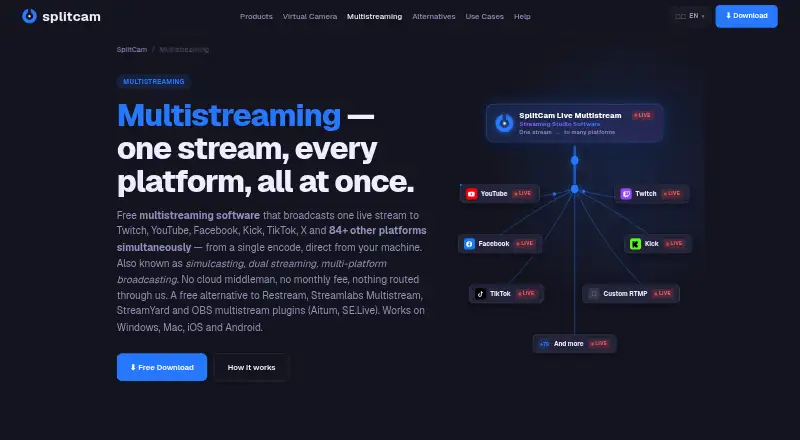
What SplitCam Multistream is
SplitCam Multistream is a free streaming tool for sending a stream to multiple destinations using an encoder-based setup. Its listed features include scene composition, a virtual camera, AI background removal, and an audio mixer. The free plan is listed as free, billed Free forever, with no subscription and no watermark. SplitCam Multistream supports resolutions up to 4K. It is available on Windows, macOS, iOS, and Android, but its studio is not browser-based. That makes the desktop and mobile platforms the places to use it rather than a browser studio. The listed feature set brings streaming, scene work, audio mixing, and background removal together in one tool. For readers choosing streaming software, its main points are multistreaming, encoder mode, broad device-platform support, and a no-cost plan.
Good
- Free plan has no subscription and no watermark.
- Supports multistreaming with encoder mode.
- Offers scene composition and an audio mixer.
- AI background removal is included.
- Maximum resolution is 4K.
Watch out
- No browser-based studio is available.
Who it suits
SplitCam Multistream may suit streamers who want multistreaming and scene, audio, and background tools in one free package. It is for people using Windows, macOS, iOS, or Android rather than a browser-based studio.
Verdict
SplitCam Multistream combines multistreaming with scene composition, audio mixing, virtual camera, and AI background removal. Its free plan and 4K maximum resolution are notable listed details, though it does not provide a browser-based studio.
Plans and prices
From SplitCam Multistream's own pricing page, checked 20 Sep 2026.
| Plan | Price | What it gives you |
|---|---|---|
| Free | Free | Multistreaming · Scene composition · Virtual camera · AI background removal · Audio mixer · No watermark · Free forever; no subscription |
| SplitCam Multistream | Free | 84+ platforms · up to 8 destinations comfortably · more destinations depend on hardware and upload bandwidth · Free forever; no subscription |
The facts
Each one read from SplitCam Multistream's own pages, with the date it was checked.
What it does
- Bandwidth requirement
- Users need upload capacity for the combined bitrates of all selected streams, plus about 20% safety margin.checked 9 Oct 2026
- Connection check
- A built-in Upload Speed Test checks whether the connection can handle the selected stream bitrates.checked 9 Oct 2026
- Destinations
- The maker lists 84+ preconfigured platforms and says custom RTMP or RTMPS destinations are supported.checked 9 Oct 2026
- Direct streaming
- The multistreaming page says streams go directly from the user’s machine to each platform’s ingest endpoint without a cloud middleman.checked 9 Oct 2026
- Intended users
- The multistreaming page describes use by gaming streamers, churches, educators, podcasters, live shoppers and brands, and webcam creators.checked 9 Oct 2026
- Mobile features
- The iOS and Android builds support multistreaming and RTMP, vertical and horizontal canvases, and in-app multi-platform chat.checked 9 Oct 2026
- Per-destination controls
- Users can configure bitrate, resolution and framerate independently for each destination.checked 9 Oct 2026
- Privacy
- The privacy policy says streaming account names, pictures, and access tokens are stored in the app’s private device storage and are not sent to SplitCam servers; it also describes an optional Restream mode that routes video and stream keys through a SplitCam relay.checked 9 Oct 2026
- Purpose
- SplitCam sends one live stream from the user’s device to multiple platforms simultaneously.checked 9 Oct 2026
- Reconnect
- The maker says SplitCam automatically tries to reconnect to a destination that drops while other destinations continue streaming.checked 9 Oct 2026
- Studio features
- SplitCam includes scenes and sources, a virtual camera, AI background removal, effects, and an audio mixer.checked 9 Oct 2026
- Support
- The maker offers free English-language support through Telegram and directs users to its FAQ for common questions.checked 9 Oct 2026
Where it runs
- Browser-based studio
- Nochecked 20 Sep 2026
- Platform limits
- The maker says up to 8 destinations work comfortably, while higher counts depend on available CPU/GPU capacity and upload bandwidth.checked 9 Oct 2026
The company
- Founded
- 2003checked 28 Sep 2026
Money
- Free plan
- Yeschecked 20 Sep 2026
Alternatives to SplitCam Multistream
- 1

Restream
Free planAndroidiOSWebAPI9.1From $19 a month - 2
mimoLive
Free planiOSWebAPImacOS8.7From $70 a month - 3

Amazon Interactive Video Service
Free planAndroidiOSWebAPI8.7Free plan - 4

BoxCast
AndroidiOSWebAPI8.6From $8.25 a month - 5
OneStream Live
Free planAndroidiOSWebExtension8.5From $15 a month - 6

StreamYard On-Air
Free planiOSWebExtension8.5From $35.99 a month