SongRec
SongRec is a free, open-source desktop app for identifying songs through Shazam.
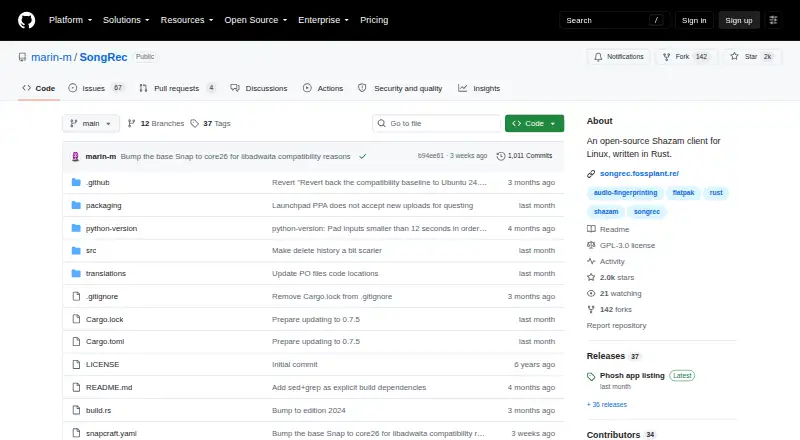
What SongRec is
SongRec is a free, open-source desktop app for identifying songs through Shazam. It can analyze an audio file or listen through a microphone or speakers, and offers both a graphical interface and command-line use. In the GUI, users can select an input device for continuous microphone detection, then review a history of recognized tracks and export it to CSV. The command line can return results in CSV or JSON. File support includes MP3, FLAC, WAV, and OGG without FFmpeg; with FFmpeg, formats it supports are accepted. For a lookup, SongRec sends audio fingerprints to Shazam servers rather than raw audio. The project says it collects no data and contacts no other servers. It is released under the GNU GPL v3 license, with downloads linked for Linux distributions and Windows x64. macOS is not officially supported, though compilation instructions are available. Flatpak filesystem sandboxing may limit some command-line features. SongRec cannot identify music offline.
Good
- Recognizes songs from files, microphones, or speakers.
- Continuous detection supports choosing an input device.
- Recognition history can be exported to CSV.
- Command line supports CSV and JSON output.
- Free and released under GNU GPL v3.
Watch out
- Offline identification is not available.
- macOS is not officially supported.
- Flatpak sandboxing may limit command-line features.
Who it suits
SongRec suits listeners who want Shazam-based song recognition on a desktop, whether through a GUI or command line. It may also suit developers who want CSV or JSON results for programmatic use.
Verdict
SongRec combines desktop song recognition with a choice of GUI or command-line workflows. Consider its Shazam connection, lack of offline identification, and platform support before choosing it.
Plans and prices
From SongRec's own pricing page, checked 4 Oct 2026.
| Plan | Price | What it gives you |
|---|---|---|
| Free | Free | Open-source Shazam client · Linux-focused desktop app |
The facts
Each one read from SongRec's own pages, with the date it was checked.
What it does
- Audio recognition
- It recognizes songs from audio files, a microphone, or speakers.checked 4 Oct 2026
- CLI output
- The command line can emit CSV or JSON output for programmatic use.checked 4 Oct 2026
- Continuous detection
- The GUI supports continuous microphone detection and lets users choose an input device.checked 4 Oct 2026
- Downloads
- The project site links downloads for Linux distributions and Windows x64, and provides instructions to compile it yourself.checked 4 Oct 2026
- File formats
- Without FFmpeg, the README lists MP3, FLAC, WAV, and OGG support; with FFmpeg, it says formats supported by FFmpeg can be accepted.checked 4 Oct 2026
- GUI and command line
- SongRec can be used from both a graphical interface and the command line.checked 4 Oct 2026
- History export
- The GUI keeps a history of recognized songs that can be exported to CSV.checked 4 Oct 2026
- License
- The software is released under the GNU GPL v3 license.checked 4 Oct 2026
- Notable limitation
- The README warns that Flatpak filesystem sandboxing may make some command-line features unusable.checked 4 Oct 2026
- Privacy
- The project says SongRec collects no data, contacts no servers besides Shazam, and uploads fingerprints rather than raw audio.checked 4 Oct 2026
- Purpose
- SongRec is an open-source Shazam client for Linux, written in Rust.checked 4 Oct 2026
- Shazam service
- SongRec sends audio fingerprints to Shazam servers for song lookup.checked 4 Oct 2026
- Support
- The project asks users to report bugs and request features through GitHub Issues, and also lists a Matrix channel.checked 4 Oct 2026
Where it runs
- macOS support
- The README says macOS is not officially supported, though it includes compilation instructions for macOS.checked 4 Oct 2026
The full review of SongRec
SongRec is a free, open-source desktop music recognizer for people who want to identify tracks from files or live audio. It is especially suited to Linux users who value a graphical app alongside scriptable command-line tools. Its flexible inputs and exports are useful, but recognition relies on Shazam’s online service.
Overview
SongRec recognizes music from audio files, a microphone, or speakers, giving it more range than a tool limited to one listening method. Its GNU GPL v3 license and free price make it a straightforward option for Linux desktop users, though its desktop focus is less compelling for people who want a mobile-first music app.
For identification, SongRec sends audio fingerprints to Shazam servers. The project says it collects no data, contacts no other servers, and uploads fingerprints rather than raw audio. That is a narrower form of sharing than sending recordings, but it does not make recognition private or offline: each lookup still depends on Shazam’s service.
Key features
Live listening and file recognition
The graphical interface can continuously detect music through a microphone, and lets users select an input device. That suits a desktop left listening to a sound source or a setup with multiple inputs. SongRec also accepts audio files, so users can identify a saved clip without playing it aloud.
File formats and history
Without FFmpeg, supported formats include MP3, FLAC, WAV, and OGG. With FFmpeg installed, SongRec can accept formats FFmpeg supports, widening its usefulness for mixed audio libraries. The GUI keeps a history of recognized songs and can export it to CSV, a practical benefit for anyone who wants a record beyond a single lookup.
Command-line workflows
SongRec’s command-line interface can emit CSV or JSON, making it a better fit than a GUI-only recognizer for scripts and other programmatic workflows. That flexibility comes with a Linux-specific caveat: Flatpak filesystem sandboxing may leave some command-line features unusable, so users who depend on those features should account for the packaging environment.
Pricing
SongRec is free, with no trial or paid tier. The Free plan costs nothing and includes an open-source Shazam client focused on Linux desktop use. There are no paid features to unlock, but the free software does not remove the service dependency: identification still requires Shazam servers. The GNU GPL v3 license also makes the project’s open-source status clear.
Platforms
SongRec is cross-platform in scope, with the project providing downloads for Linux distributions and Windows x64, as well as instructions for compiling it yourself. Linux is its clearest fit: the project describes it as Linux-focused. macOS is not officially supported, although compilation instructions are provided, so Mac users should expect a less certain path than Linux or Windows users.
Who it's for
SongRec is a strong choice for Linux users who want file and live-audio recognition, a selectable microphone input, and a searchable-by-export history in CSV. Its command-line CSV and JSON output also suits technically comfortable users automating lookups. It is a weaker choice for anyone who needs offline identification, an officially supported macOS app, or a primarily mobile experience.
For help, the project directs users to GitHub Issues for bug reports and feature requests, and lists a Matrix channel. That gives users a route to discuss problems and requests, though it is a project-support model rather than a commercial support offering.
Pros and cons
- Multiple input paths: Recognition from files, microphones, and speakers accommodates both saved clips and live listening.
- Useful exports: GUI history can be saved as CSV, while command-line output supports CSV or JSON for further processing.
- Open and free: The GNU GPL v3 release and free price avoid subscription costs and proprietary licensing.
- Online dependency: Fingerprints go to Shazam servers, so SongRec cannot identify tracks offline.
- Uneven platform support: Linux is the focus, and macOS has compilation instructions but no official support.
- Flatpak constraint: Filesystem sandboxing may interfere with some command-line features.
Alternatives
Music Identification Apps is a useful starting point for comparing options across the category. Choose AHA Music instead if you want a broader set of platforms, including Android, iOS, and web, and accept an ad-supported free plan capped at five recognitions per day with no history or playlists. WhoSampled is a better fit for people who want text search, track ID, and Spotify or Apple Music library scanning on Android, iOS, or web.
Annie suits mobile users on Android or iOS who want free music identification and universal links without a subscription. Choose SoundHound if you prefer a mobile app and are willing to pay $6.99, paid once for an ad-free experience; its free plan is ad-supported. AirScrobble is an iOS alternative for people seeking music discovery with Last.fm integration, auto scrobbling, and Apple Music integration.
Kooha is another free Linux desktop app to consider. Audile is a free Android option for mobile identification, with AudD and ACRCloud potentially requiring their own API account or token. AudioTag is worth considering for web or API use instead of a desktop app.
Verdict
Choose SongRec if you want a free Linux-focused desktop recognizer that handles files and live audio, keeps an exportable history, and can feed results into scripts. Its main advantage is that combination of flexible inputs and GUI or command-line use without a fee. Look elsewhere if you need offline recognition, officially supported macOS software, or a mobile-first service.
Getting started
- Open the SongRec project website
- Choose a Linux distribution or Windows x64 download
- Compile the application yourself when using macOS
- Launch the graphical interface or command-line mode
- Select an input device or provide an audio file
Limits worth knowing
SongRec has no offline identification. Flatpak filesystem sandboxing may make some command-line features unusable, and macOS lacks official support.
Questions
Is SongRec free?
Yes. It has a free plan listed as free and no free trial is offered.
Which platforms does it support?
It supports Linux, Windows, and macOS compilation. The project links Linux and Windows x64 downloads, while macOS is not officially supported.
Does it upload recordings?
SongRec sends audio fingerprints to Shazam servers for lookup rather than raw audio, and the project says it collects no data.
Can I export recognition results?
The GUI history can be exported to CSV, and command-line output can be CSV or JSON.
Is SongRec open source?
Yes. It is released under the GNU GPL v3 license.
Alternatives to SongRec
- 1

SoundHound
Free planAndroidiOSWebAPI8.1$5.99 one-time - 2
AHA Music
Free planAndroidiOSWebAPI8.0From $39.99 a year - 3

AirScrobble
Free planiOSWebAPI7.6From $7.49 a year - 4

Annie
Free planAndroidiOSWebAPI7.2Free plan - 5

AudD
AndroidWebAPIExtension7.2From $5 a month - 6
ACRCloud
AndroidiOSWebAPI7.1