
AirScrobble
AirScrobble identifies music playing nearby and can log discoveries to Last.fm.
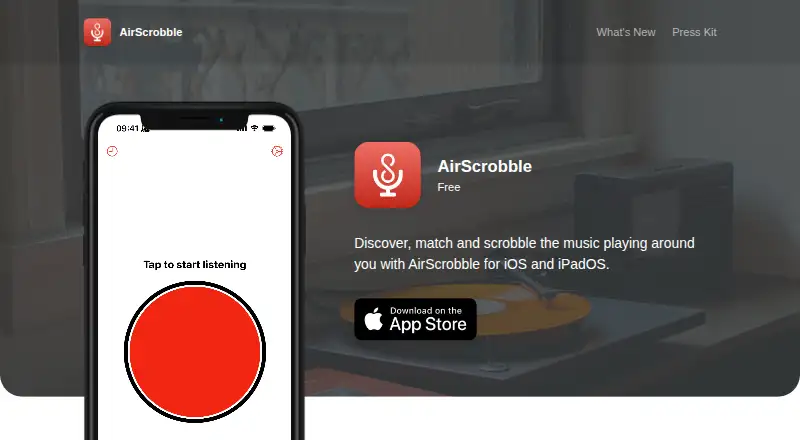
What AirScrobble is
AirScrobble identifies music playing nearby and can log discoveries to Last.fm. Its iPhone and iPad app can also match audio coming through the device speakers, including sound from videos, voice memos, and social media feeds. That speaker-based matching does not work with earbuds or headphones such as AirPods. Matched tracks are saved in History, and entries sync between devices with iCloud; full History access requires AirScrobble+. A free Last.fm account is not needed to discover music or view history, but is required to scrobble songs and use some Last.fm API shortcut actions. Users can view discoveries in Apple Music and add them to their library through a playlist, with an option to save new discoveries automatically. AirScrobble+ adds Auto Match, which listens continuously and can scrobble in the background. The app also supports Siri and Shortcuts, Control Center widgets, and Live Activities. The free plan includes discovery, Last.fm integration, Auto Scrobble, Apple Music integration, Siri, and Shortcuts. It requires iOS 16.2 or later; no macOS app is available.
Good
- Free plan includes music discovery and Auto Scrobble
- Matched tracks sync across devices with iCloud
- Apple Music playlist support
- Siri and Shortcuts integration
Watch out
- Speaker matching does not work with earbuds or headphones
- Full History access requires AirScrobble+
- AirScrobble+ costs $0.99 a month
- No macOS app
Who it suits
AirScrobble suits iPhone and iPad users who want to identify music and keep a discovery history. It may also suit Last.fm users who want scrobbling, Shortcuts, or Apple Music links.
Verdict
AirScrobble covers music discovery, history, and optional Last.fm scrobbling on iPhone and iPad. Auto Match and full History require a paid AirScrobble+ plan, with monthly, yearly, and lifetime options.
Plans and prices
From AirScrobble's own pricing page, checked 15 Oct 2026.
| Plan | Price | What it gives you |
|---|---|---|
| Free | Free | Music Discoverability · Last.fm integration · Auto Scrobble · Apple Music integration · Siri · Shortcuts · unlimited matching/scrobbling |
| AirScrobble+ Monthly | $0.99 a month | Auto Match · Full History Access · $0.99 per month |
| AirScrobble+ Yearly | $7.49 a year | Auto Match · Full History Access · $7.49 per year |
| AirScrobble+ Lifetime | $17.99, paid once | Lifetime membership · $17.99 one-time in-app purchase |
| AirScrobble+ Lifetime | $24.99, paid once | Auto Match · Full History Access · $24.99 one time purchase |
The facts
Each one read from AirScrobble's own pages, with the date it was checked.
What it does
- Ambient recognition
- The app listens to nearby music such as songs in cafés, concerts, stores, radios and from record players.checked 15 Oct 2026
- Auto Match
- Auto Match continuously identifies and scrobbles songs in the background with notifications and Live Activities.checked 15 Oct 2026
- Auto Scrobble
- Users can set a confirmation timer before new matches are scrobbled automatically.checked 15 Oct 2026
- Availability
- AirScrobble is for iPhone and iPad running iOS 16.2 or later; the maker says it has no macOS app and its iOS app is unavailable for Apple Silicon Macs.checked 5 Oct 2026
- Control Center
- Control Center widgets start single matching or Auto Match while status appears in Live Activities.checked 15 Oct 2026
- Developer stack
- The developer says AirScrobble uses SwiftUI, ShazamKit, MusicKit, WidgetKit, Live Activities and App Intents.checked 15 Oct 2026
- History
- Matched songs are saved in History, can be scrobbled later and synchronize across devices through iCloud.checked 15 Oct 2026
- Initial release
- The changelog dates the initial App Store release to August 21, 2022 after a TestFlight beta.checked 15 Oct 2026
- Last.fm
- A Last.fm account is not required for music discovery or history, but a free account is needed to scrobble songs and use some Last.fm API shortcut actions.checked 5 Oct 2026
- Last.fm integration
- A free Last.fm account lets users scrobble discoveries, love tracks and open more details on Last.fm.checked 15 Oct 2026
- Limit: audio routing
- An update note says background Auto Match does not work with system audio, headphones or AirPods unless the microphone hears audible speakers.checked 15 Oct 2026
- Limit: Auto Scrobble reliability
- Reviewers reported Auto Scrobble failing to detect songs and requiring manual app opening, reducing the value of subscribing.checked 15 Oct 2026
- Limit: documented bugs
- Version notes record Auto Match stalls, duplicate scrobbles, microphone activation failures, timer-reset errors and Live Activity rendering problems.checked 15 Oct 2026
Where it runs
- Apple Music
- Discoveries can be opened in Apple Music, added through a playlist and optionally saved automatically.checked 15 Oct 2026
- Apple privacy label
- Apple’s listing reports that the developer indicates no data is collected, while noting Apple has not verified the declaration.checked 15 Oct 2026
- App Store seller
- Apple lists the seller as Tomas Feitoza Martins and copyright as © 2026 Tomás Martins.checked 15 Oct 2026
- Current App Store compatibility
- The App Store listing currently requires iOS 17, iPadOS 17 or visionOS 1.0 and lists a 13.1 MB download.checked 15 Oct 2026
- Device audio matching
- It can recognize audio from music apps, videos, voice memos, social feeds and camera-roll videos.checked 15 Oct 2026
- In-device matching
- It can identify and scrobble audio playing through the iPhone or iPad speakers, including audio from videos, voice memos, and social media feeds; this feature is not compatible with earbuds or headphones such as AirPods.checked 5 Oct 2026
- Limit: Apple Watch request
- A Reddit user requested Apple Watch support, indicating it was missing or incomplete at that time.checked 15 Oct 2026
- Limit: earlier platform gap
- The 2023 iPhoneBlog review said AirScrobble then lacked Shazam’s ability to identify music playing directly inside iPhone apps.checked 15 Oct 2026
- Mac availability
- The maker says there is no macOS app and the iOS app is unavailable on Apple Silicon Macs.checked 15 Oct 2026
The company
- Headquarters
- Campinas, Brazilchecked 28 Sep 2026
- Maker
- The official site identifies Tomás Martins as the maker in Campinas, Brazil.checked 15 Oct 2026
The full review of AirScrobble
AirScrobble is an iPhone and iPad app for identifying music and keeping track of what you discover. It suits listeners who play audio through device speakers and want Apple Music or Last.fm connections. The free tier is useful for occasional matching, while continuous background recognition and an unrestricted archive require a paid upgrade.
Overview
AirScrobble recognizes music playing around you, as well as audio coming from an iPhone or iPad itself. That includes videos, voice memos, and social-media feeds, so it can identify a track embedded in content already on your device rather than limiting you to music heard through an external source. The important limitation is that in-device matching does not work with earbuds or headphones, including AirPods.
You can use discovery and History without a Last.fm account. A free Last.fm account is required to scrobble songs and to use some Last.fm API shortcut actions. Apple Music users can open discoveries in Apple Music and add them to their library through a playlist; an option can save new discoveries automatically.
Key features
Matching and History
Single Match is the practical choice when you want to identify one song on demand. Auto Match continuously listens and can scrobble while AirScrobble runs in the background, which is much better for passive tracking, but it is reserved for AirScrobble+. Matched songs go into History, and entries synchronize between devices with iCloud. The free plan does not provide full History access, so free users get discovery without the complete long-term archive.
Shortcuts, widgets and alerts
Siri and Shortcuts extend the app beyond manual matching. They include actions for Last.fm music and profile data, trending tracks, and scrobbling, making AirScrobble a better fit for users who already automate tasks on Apple devices. Control Center widgets can launch Single Match or Auto Match, while Live Activities show matching status. Auto Match still depends on the paid plan.
Privacy
The maker says recordings are not stored and discoveries are not shared with third-party services. Its privacy policy says requested personal information remains on the device, while error logs collected through third-party products may include device and usage details. The policy describes commercially acceptable safeguards but does not promise absolute security.
Pricing
The Free plan costs nothing and includes music discovery, Last.fm integration, Auto Scrobble, Apple Music integration, Siri, and Shortcuts. It is the sensible starting point for occasional identification, Apple Music saving, or users who do not need a complete History.
AirScrobble+ Monthly costs $0.99 a month, billed at $0.99 per month, and adds Auto Match and Full History Access. The Yearly plan costs $7.49 a year, billed at $7.49 per year, making it the lower-cost recurring option for regular users who expect to keep using background matching. Lifetime costs 24.99 USD once, billed as a one-time purchase, and suits committed users who want those two features without ongoing renewal. The paid tiers do not add a separate feature list beyond Auto Match and full History access.
Platforms
AirScrobble supports iPhone and iPad running iOS 16.2 or later. It has no macOS app, and the iOS app is unavailable for Apple Silicon Macs, so it is not a choice for Mac-based identification. The app is made by Tomás Martins in Campinas, Brazil, with support available at [email protected].
Who it's for
Choose AirScrobble if you use an iPhone or iPad as a listening source and want to capture songs from videos, voice memos, or social feeds. It is particularly well suited to Last.fm users who want automatic scrobbling, and to Apple Music listeners who want discoveries collected in a playlist or saved automatically.
It is less suitable if you primarily listen through AirPods or other headphones, need a Mac app, or only want a quick desktop identifier. Users who identify songs rarely can stay on Free; listeners building a persistent, cross-device listening record should consider AirScrobble+.
Pros and cons
- Pros: identifies audio from on-device videos, voice memos, and social feeds; connects discoveries with Apple Music and Last.fm; iCloud synchronizes History; Siri, Shortcuts, widgets, and Live Activities support automation and quick access; the free tier covers core discovery.
- Cons: speaker-based in-device matching does not work with earbuds or headphones; Auto Match and full History are paywalled; Last.fm scrobbling requires a separate free Last.fm account; there is no macOS app or Apple Silicon Mac availability; error-log collection may include device and usage details.
Alternatives
For a broad cross-platform option, Music Identification Apps is the relevant category. AHA Music is a better fit when you need Android, browser, Linux, macOS, or Windows support; its free Guest plan allows five recognitions per day, includes BPM and key detection, and omits recognition history and playlists.
WhoSampled suits users who want text search, track identification, and Spotify or Apple Music library scanning in an ad-free free plan. Choose SongRec for a free, open-source, Linux-focused desktop Shazam client. Audible Magic is aimed at organizations needing tailored enterprise services and existing-license integration, with custom pricing.
SoundHound is the alternative for Android and iOS users who prefer an ad-supported free app or a 6.99 USD one-time ad-free upgrade. Annie offers free music identification and universal links without a subscription on Android and iOS. Kooha is a free Linux desktop choice, while Audile is a free Android option for Android 8.0 or later, with AudD and ACRCloud potentially requiring their own API account or token.
Verdict
AirScrobble is a strong choice for iPhone and iPad listeners who want speaker-based identification tied to Apple Music or Last.fm, especially when automatic background scrobbling and synced History matter. Start with Free for occasional discoveries; choose Yearly or Lifetime if Auto Match and a complete archive become central to your routine. Look elsewhere if headphone recognition, Mac support, or broader platform coverage is essential.
Alternatives to AirScrobble
- 1

SoundHound
Free planAndroidiOSWebAPI8.1$5.99 one-time - 2
AHA Music
Free planAndroidiOSWebAPI8.0From $39.99 a year - 3

Annie
Free planAndroidiOSWebAPI7.2Free plan - 4
AudD
AndroidWebAPIExtension7.2From $5 a month - 5
ACRCloud
AndroidiOSWebAPI7.1 - 6
WhoSampled
Free planAndroidiOSWeb6.9Free plan