
SmartestQA
SmartestQA is a test automation platform that turns analysis documents and recorded browser sessions into executable test scenarios.
What SmartestQA is
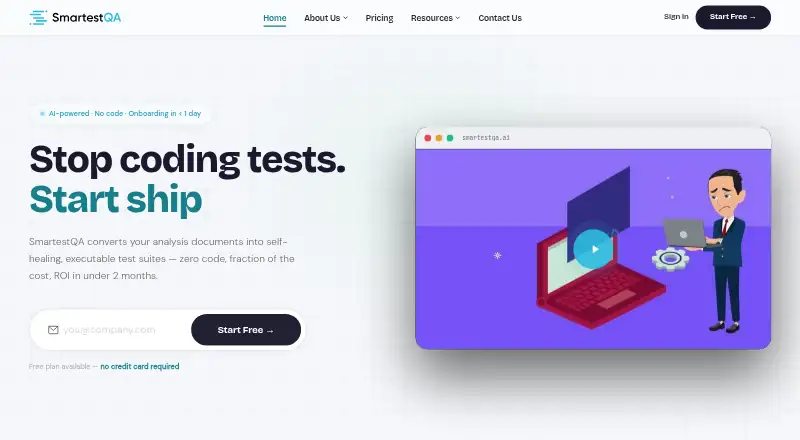
SmartestQA is a test automation platform that turns analysis documents and recorded browser sessions into executable test scenarios. Its AI can extract requirements from uploaded documents, generate test cases, and run them automatically. A Chrome plugin records clicks, inputs, and assertions as runnable tests, while AutoHeal detects interface changes and repairs broken locators. It supports web, mobile, and API testing, with Selenium, Playwright, and Appium listed as execution engines. Reporting includes dashboards, screenshots, video playback, requirement traceability, and scheduled Confluence reports. Integrations include Jira, Azure Boards, Slack, Teams, email, Jenkins, GitLab, GitHub, REST API, and webhooks; test data sources include Excel, SQL, JSON, and APIs. The free Solo plan costs nothing, billed free forever, for one user, one Local Agent, and one parallel execution. Team and Enterprise pricing is available by contacting SmartestQA; Team includes a 14-day free trial. Enterprise offers private cloud or on-premise deployment.
Good
- Generates and runs tests from uploaded analysis documents.
- Chrome plugin records clicks, inputs, and assertions.
- AutoHeal repairs broken locators after UI changes.
- Reports include screenshots, video, and requirement traceability.
- Supports Selenium, Playwright, and Appium.
Watch out
- Solo is limited to one parallel execution.
- Team and Enterprise pricing requires contacting SmartestQA.
- Enterprise deployment is limited to private cloud or on-premise.
Who it suits
Solo is positioned for individual QA professionals, while Team is aimed at agile QA teams of 2–5. Enterprise is intended for high-volume test operations.
Verdict
SmartestQA combines document-based test generation, browser recording, and automated execution across web, mobile, and API testing. Its plan limits and contact-based pricing are worth considering when choosing a tier.
Plans and prices
From SmartestQA's own pricing page, checked 29 Sep 2026.
| Plan | Price | What it gives you |
|---|---|---|
| Solo | Free | 1 user · 1 Local Agent · 1 parallel execution · No-code platform + Chrome plugin · Smart Recorder · AI locator generation · Pipeline and parametric runs · Requirement mapping · Jira and GitHub integration · Email support · Free / forever |
| Enterprise | Priced on request | Unlimited users and agent installations · 10+ parallel executions · MCP server and IDE bridge · Azure DevOps · On-premise or private cloud · SLA support · Dedicated account manager · Contact us |
| Team | Priced on request | 5 user licenses · 3 Agents · 3 concurrent executions · AI step generation · Data-driven and cross-browser runs · Reports with screenshots and video · Slack, Jenkins, GitHub, TestRail · Chat and email support · 14-day free trial · Contact us |
The facts
Each one read from SmartestQA's own pages, with the date it was checked.
What it does
- AI data handling
- The privacy policy says customer test data is logically isolated and proprietary test scripts, locator logic, and visual assets are not used to train global AI models for other customers.checked 29 Sep 2026
- Data sources
- The site lists Excel, SQL, JSON, and APIs as test data sources.checked 29 Sep 2026
- Deployment and limits
- Enterprise customers can use private cloud or on-premise deployment; the pricing page describes full data isolation and a custom SLA.checked 29 Sep 2026
- Integrations
- Its documentation lists Jira, Azure Boards, Slack, Teams, email, Jenkins, GitLab, GitHub, REST API, and webhooks.checked 29 Sep 2026
- Intended users
- The pricing page positions Solo for individual QA professionals, Team for agile QA teams of 2–5, and Enterprise for high-volume test operations.checked 29 Sep 2026
- Recorder
- The Chrome plugin records browser clicks, inputs, and assertions to create runnable tests.checked 29 Sep 2026
- Reporting
- The platform provides dashboards, screenshots, video playback, requirement traceability, and scheduled Confluence reports.checked 29 Sep 2026
- Security
- The privacy policy says network communication uses TLS/SSL, stored data is encrypted at rest, and administrative access requires MFA.checked 29 Sep 2026
- Self-healing
- AutoHeal detects UI element changes and repairs broken locators automatically.checked 29 Sep 2026
- Support
- Solo includes email support, Team includes chat and email support, and Enterprise includes SLA support and a dedicated account manager.checked 29 Sep 2026
- Test engines
- The site lists Selenium, Playwright, and Appium as supported execution engines.checked 29 Sep 2026
- Test generation
- Its AI extracts requirements from uploaded analysis documents, generates executable test cases, and runs them automatically.checked 29 Sep 2026
- What it does
- SmartestQA turns analysis documents and recorded browser sessions into executable test scenarios using AI.checked 29 Sep 2026
The full review of SmartestQA
SmartestQA is an AI-assisted testing platform for teams that want to turn requirements and recorded browser activity into runnable tests. It suits QA professionals and teams spanning web, mobile, and API work; its strongest case is bringing test creation, execution, and reporting together, while limited Solo capacity and custom-priced paid tiers complicate scaling.
Overview
SmartestQA draws on two inputs: uploaded analysis documents and browser sessions recorded through its Chrome plugin. It can convert requirements into executable test cases and run them automatically, with a hybrid execution model and support for Selenium, Playwright, and Appium. That combination connects planning and observed behavior to test execution, which is useful when teams want traceability rather than a collection of disconnected scripts.
Its breadth comes with practical constraints. Solo allows one user, one Local Agent, and one parallel execution; Team raises capacity to five users, three agents, and three concurrent executions. The listed three-run parallel capacity is therefore a Team-scale ceiling, not a Solo capability.
Key features
Document and browser-based test creation
AI extracts requirements from uploaded analysis documents and produces executable cases. The Chrome plugin captures clicks, inputs, and assertions as runnable tests. Together, these routes suit teams with both written requirements and workflows that are easier to demonstrate than describe. Solo includes the Smart Recorder and AI locator generation; Team adds AI step generation.
Execution, repair, and reporting
AutoHeal detects UI element changes and repairs broken locators, potentially reducing maintenance when interfaces shift. Dashboards, screenshots, video playback, requirement traceability, and scheduled Confluence reports give teams ways to inspect runs and connect them back to requirements. Reports with screenshots and video are included in Team.
Integrations span Jira, Azure Boards, Slack, Teams, email, Jenkins, GitLab, GitHub, REST API, and webhooks. Excel, SQL, JSON, and APIs are supported as test data sources. AI defect analysis is also supported, though no further scope for that capability is defined.
Security and deployment
Network communications use TLS/SSL, stored data is encrypted at rest, and administrative access requires MFA. Customer test data is logically isolated; proprietary scripts, locator logic, and visual assets are not used to train global AI models for other customers. Enterprise adds private-cloud or on-premise deployment, full data isolation, and a custom SLA—important for organizations that need deployment control and contractual support.
Pricing
Solo
free, billed free forever, covers one user, one Local Agent, and one parallel execution. It includes the no-code platform, Chrome plugin, Smart Recorder, AI locator generation, pipeline and parametric runs, requirement mapping, Jira and GitHub integration, and email support. This is a real starting point for an individual QA professional, but its single-user and single-run limits make it a poor fit for shared, concurrent testing.
Team
Team has custom pricing and a 14-day free trial. It includes five user licenses, three Agents, and three concurrent executions, plus AI step generation, data-driven and cross-browser runs, reports with screenshots and video, Slack, Jenkins, GitHub, and TestRail integrations, and chat and email support. It fits agile QA teams of two to five; the trial offers a defined evaluation window, but buyers need a quote to assess ongoing cost.
Enterprise
Enterprise has custom pricing and is aimed at high-volume test operations. It includes unlimited users and agent installations, 10+ parallel executions, an MCP server and IDE bridge, Azure DevOps, on-premise or private-cloud deployment, SLA support, and a dedicated account manager. It is the clearest fit for organizations needing scale, deployment choice, or dedicated support, but pricing requires contact and is not directly comparable from a published rate.
Platforms
SmartestQA supports Android, iOS, macOS, Windows, web, API, browser extension, and self-hosted environments. Its test scope covers web, mobile, and API testing, with Selenium, Playwright, and Appium as execution engines. This range suits teams testing across device and service types, though the number of supported platforms alone does not establish identical capabilities on each.
Who it's for
Solo is best for an individual QA professional exploring document-driven generation and browser recording with modest execution needs. Team is better suited to agile QA groups that need several seats, data-driven or cross-browser runs, and richer reporting. Enterprise targets high-volume operations where greater concurrency, isolated deployment, and SLA-backed support justify a custom engagement.
Look elsewhere if a fixed published price, more than one concurrent run on the free tier, or a clearly stated free-tier usage allowance is essential to your decision.
Pros and cons
- Pros: Document analysis and browser recording offer two practical paths to runnable tests, serving both requirements-led and workflow-led QA.
- Pros: AutoHeal, requirement traceability, and screenshots and video help address maintenance and run review, rather than stopping at test generation.
- Pros: Broad integrations and Excel, SQL, JSON, and API data sources can connect testing to established workflows and datasets.
- Cons: Solo is limited to one user, agent, and parallel execution, so it cannot serve even a small team’s concurrent needs.
- Cons: Team and Enterprise use custom pricing, making the cost of moving beyond Solo less transparent before contacting sales.
- Cons: Solo’s description gives no usage quota, so buyers cannot infer a specific allowance for generated or executed tests.
Alternatives
For a broader comparison, browse AI Software Testing Tools.
- testRigor is another freemium option with a free plan and trial; its public open-source plan makes tests and results public, so consider it when that sharing model suits your work.
- Autify offers a free Aximo Individual User plan with 2,000 one-time, non-expiring credits and one web and one mobile concurrency; consider it if that stated allowance fits your evaluation needs.
- Functionize has a web-focused free plan with 800,000 credits per month and five parallel runs; choose it if web testing and those higher stated free-tier limits are the priority.
- ACCELQ lists web, mobile, and API automation in its Professional plan, with features varying by product; consider it for that product-based mix.
- UiPath Test Cloud offers a Standard plan with no usage caps and a single hosting region; consider it if those terms better fit your needs.
- Autonoma offers a free-forever self-hosted plan with no limits or usage costs, running on your own infrastructure; choose it if that deployment and cost model is preferable.
- TestFirst has a free plan with 100 one-time credits per workspace, one test at a time, 100 default test cases, and 300 default test results; consider it if those limits suit a small trial.
- KushoAI offers a free Developer Edition for API endpoints, API contract testing, UI testing, and test generation and execution; consider it if that stated developer-oriented scope matches your needs.
Verdict
SmartestQA is a strong match for QA professionals and teams that want AI-assisted test creation tied to requirements and recorded browser workflows, with reporting and locator repair in the same platform. Solo is a useful free starting point for one person, but its single-run ceiling and the custom pricing of Team and Enterprise are real planning constraints. Choose it when those creation and traceability strengths matter more than upfront price clarity; look elsewhere if predictable paid pricing or a higher-capacity free tier is essential.
Alternatives to SmartestQA
- 1

Katalon Studio
Free planAndroidiOSWebAPI9.2From $1,000 a year - 2
Testsigma
Open sourceAndroidiOSWebAPI9.1From $14 a month - 3
testRigor
Free planAndroidiOSWebAPI9.0From $300 a month - 4
TestFirst
Free planAndroidWebAPImacOS8.7From $12 a month - 5

Autify
Free planAndroidiOSWebAPI8.3From $99 a month - 6
Keysight Eggplant Test
AndroidiOSWebAPI8.3$9,999 one-time