SideSlide
SideSlide is a free, portable Windows desktop assistant for organizing shortcuts, information and other items in a customizable workspace.
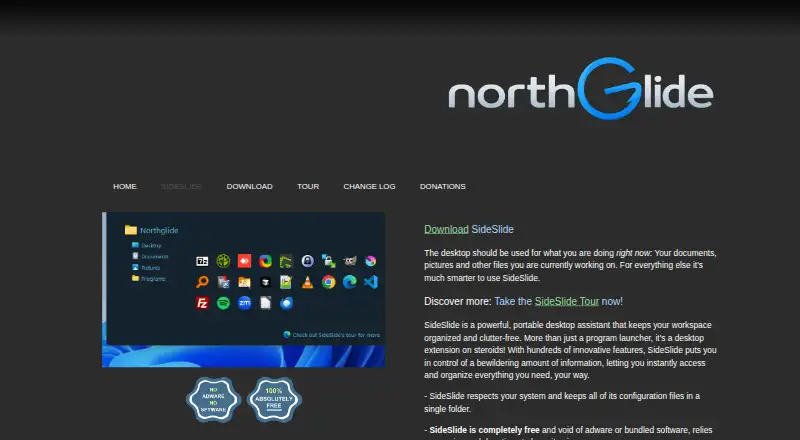
What SideSlide is
SideSlide is a free, portable Windows desktop assistant for organizing shortcuts, information and other items in a customizable workspace. The workspace can dock to a screen edge, hide when unused and return through a mouse gesture or hotkey. Users can add shortcuts, commands, URLs, RSS feeds, pictures, reminders and notes, then arrange them in containers that can be resized, detached, folded, shrunk, repositioned and customized. Its RSS reader supports multiple feeds, keyword highlighting and headline filtering. Weather from Open-Meteo can appear in the Title Bar or Dock Strip. Notes are searchable, and the product tour describes RC4 encryption with an automatic re-encryption option. SideSlide includes mouse and keyboard controls, an expression calculator, a directory navigator and multi-shortcut launching. The maker says it runs from a USB stick and keeps configuration files in one folder. The download page lists Windows 11, 10, 8, 7 and XP. It is free, with optional donations.
Good
- Portable USB operation
- Customizable virtual containers
- Built-in RSS filtering and keyword highlighting
- Searchable notes with encryption option
- No ads, spyware or bundled software
Watch out
- Windows-only software
- SmartScreen may block the program
- No free trial because it is already free
- Weather depends on Open-Meteo
Who it suits
SideSlide suits Windows users who want a portable workspace for shortcuts, feeds, notes and reminders. It also fits people managing items across multiple monitors.
Verdict
SideSlide provides a broad set of desktop organization tools without a purchase price. Its Windows focus and possible SmartScreen warning are the main considerations.
Plans and prices
From SideSlide's own pricing page, checked 8 Oct 2026.
| Plan | Price | What it gives you |
|---|---|---|
| SideSlide | Free | Windows 11, 10, 8, 7, XP · 100% free; donations optional |
The facts
Each one read from SideSlide's own pages, with the date it was checked.
What it does
- Ads and bundled software
- The maker says SideSlide has no ads, spyware, or bundled software.checked 8 Oct 2026
- Containers
- Containers can be resized, detached, folded, shrunk, repositioned, and customized to organize shortcuts, feeds, notes, URLs, and pictures.checked 8 Oct 2026
- Notes
- Notes can be searched, and the tour describes RC4 encryption for notes with an option to re-encrypt them automatically.checked 8 Oct 2026
- Objects
- Users can add shortcuts, commands, URLs, RSS feeds, pictures, reminders, and notes.checked 8 Oct 2026
- Portability
- The maker says SideSlide is fully portable, can run from a USB stick, and keeps configuration files in a single folder.checked 8 Oct 2026
- Purpose
- SideSlide is a portable desktop assistant that organizes shortcuts, information, and other items in a customizable workspace.checked 8 Oct 2026
- Release
- The download page lists SideSlide v6.50 dated September 1, 2026.checked 8 Oct 2026
- RSS
- The built-in RSS reader supports multiple feeds, keyword highlighting, and filtering headlines by keywords.checked 8 Oct 2026
- Signing notice
- The maker says it cannot afford a code signing certificate and warns that SmartScreen may block SideSlide.checked 8 Oct 2026
- Supported systems
- The download page lists Windows 11, 10, 8, 7, and XP as supported operating system versions.checked 8 Oct 2026
- Weather
- Weather information comes from Open-Meteo and can be displayed in the Title Bar or Dock Strip.checked 8 Oct 2026
- Workflow
- SideSlide supports mouse and keyboard controls, a launcher with an expression calculator and directory navigator, and launching multiple shortcuts at once.checked 8 Oct 2026
- Workspace
- The workspace can dock to a screen edge, hide when unused, and reappear with a mouse gesture or hotkey.checked 8 Oct 2026
Alternatives to SideSlide
- 1
BitDock
Free planWindows7.2Free plan - 2

DeskBox
Free planOpen sourceWindows7.0Free plan - 3
iTop Easy Desktop
Free planWindows6.6From $11.99 a year - 4
Tabbles
Free planAPIExtensionWindows6.6From €3 a year - 5

AutoShelf
Free planmacOS6.5$19.99 one-time - 6
Right Click Enhancer
Free planWindows6.5$9.99 one-time