Shroozy Stage
Shroozy Stage turns a Meta Quest headset into a miniature virtual production studio for arranging scenes, directing performers, recording takes, and finishin…
What Shroozy Stage is
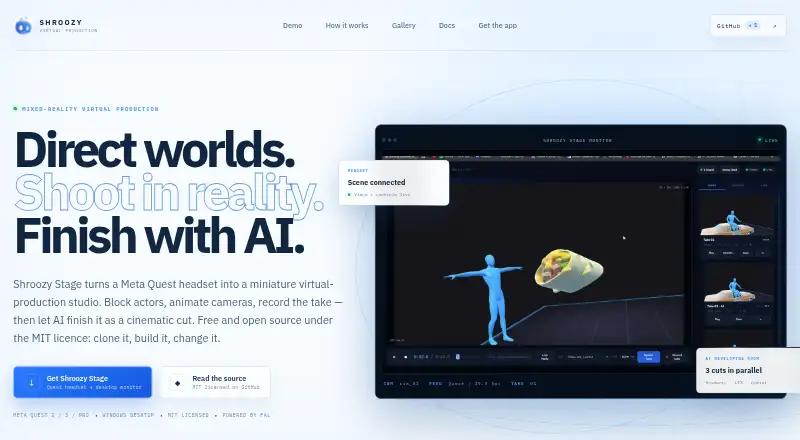
Shroozy Stage turns a Meta Quest headset into a miniature virtual production studio for arranging scenes, directing performers, recording takes, and finishing them with AI. In passthrough, users can place a small set, add actors and props, and position them using tracked controllers. Direction tools include performer posing, timeline keyframes, and camera paths. A desktop companion provides a live headset feed, take recording, automatic headset discovery, and an AI developing room. Recorded takes can be sent through three AI finishing routes via fal for comparison. The Quest app is listed for Meta Quest 2, Quest 3, and Quest Pro, and is installed by sideloading its APK. Desktop builds are listed for Windows, macOS, and Linux. Prebuilt downloads require no account, hosted service, or payment, and the software is MIT-licensed. Optional AI features require a user-supplied fal.ai key, with generated work billed to the user's fal account. Headset video and control connect directly over the local network. The maker says scenes and recordings remain on the user's hardware unless sent to an AI feature.
Good
- Works with Quest 2, Quest 3, and Quest Pro.
- Desktop builds are listed for Windows, macOS, and Linux.
- Prebuilt downloads need no account or hosted service.
- Headset video and control use a direct local connection.
- Scenes and recordings stay on the user's hardware unless sent to AI.
Watch out
- Quest installation requires sideloading an APK.
- AI features require a user-supplied fal.ai key.
- AI-generated work is billed to the user's fal account.
- No guaranteed support, uptime, or release schedule.
Who it suits
Shroozy Stage suits creators who want to block scenes and record takes using a Meta Quest headset with a desktop companion. Users interested in AI finishing need their own fal.ai key and pay fal for generated work.
Verdict
Shroozy Stage provides scene blocking, camera direction, and take recording across a Quest headset and desktop companion. Its core downloads are free, while optional AI finishing carries a separate fal.ai account requirement and billing.
Plans and prices
From Shroozy Stage's own pricing page, checked 7 Oct 2026.
| Plan | Price | What it gives you |
|---|---|---|
| Shroozy Stage | Free | Free and open source under the MIT licence · AI features require your own fal.ai key and are billed by fal.ai |
The facts
Each one read from Shroozy Stage's own pages, with the date it was checked.
What it does
- Account and service
- Shroozy Stage has no account, hosted service or payment requirement for its prebuilt downloads.checked 7 Oct 2026
- AI finishing
- A recorded take can be sent through three AI finishing routes via fal for comparison in the developing room.checked 7 Oct 2026
- Camera privacy
- The Quest app uses the system passthrough layer but does not read or record the headset camera feed; it streams the virtual camera render of the scene.checked 7 Oct 2026
- Desktop monitor
- The desktop companion provides a live headset feed, take recording, automatic headset discovery and an AI developing room.checked 7 Oct 2026
- Direction tools
- The app supports performer posing, timeline keyframes, camera paths and live desktop monitoring of the programme feed.checked 7 Oct 2026
- Headset models
- The Quest app is listed for Meta Quest 2, Quest 3 and Quest Pro and is installed by sideloading its APK.checked 7 Oct 2026
- Integration
- Optional AI features call fal.ai directly using a key supplied by the user; generated AI work is billed to the user's fal account.checked 7 Oct 2026
- License and warranty
- The software is MIT-licensed and provided as-is without warranty; the terms describe it as a hobby-scale creative tool, not a production system.checked 7 Oct 2026
- Local connection
- Headset-to-desktop video and control use a direct WebSocket connection on the local network and are not relayed through the internet.checked 7 Oct 2026
- Mixed reality
- Users can place a miniature set in passthrough, add actors and props, and arrange scenes with tracked controllers.checked 7 Oct 2026
- Privacy
- The maker says the app has no telemetry, analytics or crash reporting, and scenes, takes and recordings remain on the user's hardware unless sent to an AI feature.checked 7 Oct 2026
- Support
- There is no guaranteed support, uptime or release schedule; bug reports and pull requests are welcome on GitHub.checked 7 Oct 2026
- What it does
- Shroozy Stage turns a Meta Quest headset into a miniature virtual production studio for blocking actors, animating cameras, recording takes and finishing them as cinematic cuts with AI.checked 7 Oct 2026
Where it runs
- Desktop platforms
- The project repository lists desktop builds for Windows, macOS and Linux.checked 7 Oct 2026
The company
- Maker
- Shroozy is an independent product company founded by Tiwa Bakre.checked 7 Oct 2026
The full review of Shroozy Stage
Shroozy Stage is a virtual production app for Meta Quest, paired with a desktop companion for monitoring and recording. It suits independent creators who want to block scenes spatially before capturing takes. Its free, local-first workflow is compelling for creative experiments, but the hobby-scale terms rule it out where guaranteed support or uptime matters.
Overview
Stage links miniature set-building in Quest passthrough with desktop monitoring, take recording and optional AI finishing. Users can add actors and props, arrange a scene with tracked controllers, and direct cameras before recording. Live compositing is supported, and the app names six render engines: Seedance 2.0, GPT Image 2, LTX 2.3, Gemini Omni Flash, Kling v3 Motion Control and Veo 3.1.
The workflow is aimed at scene blocking and camera direction rather than dependable production infrastructure. Stage is MIT-licensed and provided as-is without warranty; it has no guaranteed support, uptime or release schedule. That tradeoff is reasonable for personal creative work, but consequential for teams with deadlines or service requirements.
Key features
Mixed-reality blocking and camera direction
Users can place a miniature set in passthrough, position actors and props with tracked controllers, pose performers, and animate cameras using timeline keyframes and paths. This gives creators a way to work through staging and framing spatially before recording, rather than relying only on a desktop view.
Desktop monitoring and take capture
The desktop companion provides a live headset feed, automatic headset discovery and take recording. Headset video and control travel over a direct WebSocket connection on the local network, not through an internet relay. That keeps the connection local, though it also means this is a headset-and-desktop workflow rather than a hosted collaboration service.
Optional AI finishing
Recorded takes can be sent through three AI finishing routes via fal for comparison in the developing room. Those features use a fal.ai key supplied by the user, and generated work is billed to the user's fal account. The core downloads do not require an account, hosted service or payment; AI finishing is therefore an optional expense, not part of the free plan.
Privacy and ownership
The maker says Stage has no telemetry, analytics or crash reporting, and scenes, takes and recordings remain on the user's hardware unless sent to an AI feature. The Quest app uses the system passthrough layer but does not read or record the headset camera feed; it streams the virtual camera render of the scene. This distinction matters for creators concerned about camera access and where project material goes.
Pricing
| Plan | Price | What it includes |
|---|---|---|
| Shroozy Stage | free | Free and open source under the MIT licence; AI features require the user's own fal.ai key and are billed by fal.ai. |
There is no free trial because the core plan is free, and the prebuilt downloads have no account or payment requirement. The main cost caveat is that AI-generated work is billed separately through fal.ai; the free plan does not make that usage free.
Platforms
The project lists desktop builds for Windows, macOS and Linux, plus a web browser platform. The Quest app is listed for Meta Quest 2, Quest 3 and Quest Pro and runs on Android; it must be installed by sideloading its APK. That sideloading step adds setup friction, so Stage is less suitable for someone seeking a conventional store installation.
Who it's for
Stage is best for independent filmmakers, creators and hobbyists who want to block scenes, explore camera paths and record takes using a Quest headset and desktop. Its free, open-source core and local workflow suit experimentation without an account or recurring software charge. It is a poor fit for production teams that need contractual support, reliable uptime, a release schedule or warranty protection.
Pros and cons
- Pros: The free MIT-licensed core includes scene blocking, camera direction and take recording without an account or hosted service.
- Pros: A direct local-network connection handles headset video and control, while the maker says scenes and recordings stay on the user's hardware unless sent to AI.
- Pros: Three AI finishing routes allow comparison of treatments in the developing room.
- Cons: AI finishing requires a user-supplied fal.ai key and incurs separate fal.ai billing.
- Cons: The Quest APK must be sideloaded, adding installation work.
- Cons: As-is terms and the absence of guaranteed support, uptime or releases make it unsuitable where operational commitments matter.
Alternatives
Virtual Production Software is the broader category to explore when Stage's Quest-centered blocking workflow is not the right match.
- Zero Density Reality is worth considering if its free Open Studio License Program fits your eligibility: approval is required, and it is limited to SOHO businesses under $1,000,000 annual gross revenue, academic use or self-learning.
- Grid Studio is an Android and iOS option; its free software watermarks data connections.
- Disguise Designer offers a free Starter plan with full core functionality for learning, training and testing, and project development without connecting to Disguise servers.
- Pixotope has a free, feature-limited Discovery plan with HD configuration and no licensing step; consider it if those constraints suit your work.
- CineBridge is another option to compare.
- SMODE offers a free non-commercial Community license with Full HD input, output, content and export and no watermarks; its Compose FHD plan costs €300 a year.
- PIXERA has a free demo license for building and saving projects without limitation, but its four outputs are watermarked, preventing live production.
- Notch is another option to compare.
Verdict
Choose Shroozy Stage if you want a free, open-source way to block scenes and direct cameras in Quest mixed reality, with desktop capture and optional AI finishing. Its local workflow and lack of account requirements are strong advantages for independent creative work. Look elsewhere if you need guaranteed support or uptime, or if sideloading and separately billed AI usage do not suit your workflow.
Getting started
- Visit https://stage.shroozy.com/.
- Install the Quest APK by sideloading it on a Meta Quest 2, Quest 3 or Quest Pro.
- Get the desktop build for Windows, macOS or Linux from the project repository.
- Connect the headset and desktop on the local network for video and control.
- For optional AI finishing, provide your fal.ai key; generated work is billed to your fal account. Available web browser support is also listed.
Limits worth knowing
Optional AI finishing requires a user supplied fal.ai key, and generated work is billed to that user's fal account.
Questions
Is Shroozy Stage free?
Yes. The prebuilt downloads are free and open source under the MIT licence.
Does it require an account?
No account, hosted service or payment is required for the prebuilt downloads.
Which Quest headsets are listed?
The Quest app is listed for Meta Quest 2, Quest 3 and Quest Pro. Installation is by sideloading its APK.
What desktop platforms are available?
Desktop builds are listed for Windows, macOS and Linux. Web browser is also listed as a supported platform.
Are the AI features included without another account or cost?
AI features call fal.ai directly using a key supplied by the user. Generated AI work is billed to the user's fal account.
Who makes Shroozy Stage?
It is made by Shroozy, an independent product company founded by Tiwa Bakre.
Alternatives to Shroozy Stage
- 1
Grid Studio
Free planAndroidiOS7.5From €5 a year - 2

Disguise Designer
Free planWebmacOSWindows7.1From $1,500 a year - 3
Zero Density Reality
Free planWebLinuxmacOSWindows7.1From $4,888 a year - 4
Lightcraft Jetset
iOSmacOS6.6From $200 a year - 5

Notch
macOSWindows6.6From $279 a year - 6
SMODE
Free planWindows6.6From €300 a year