
show.fm
show.fm is a podcast operations workspace for booking, preparation, publishing, promotion, follow-up, and team coordination.
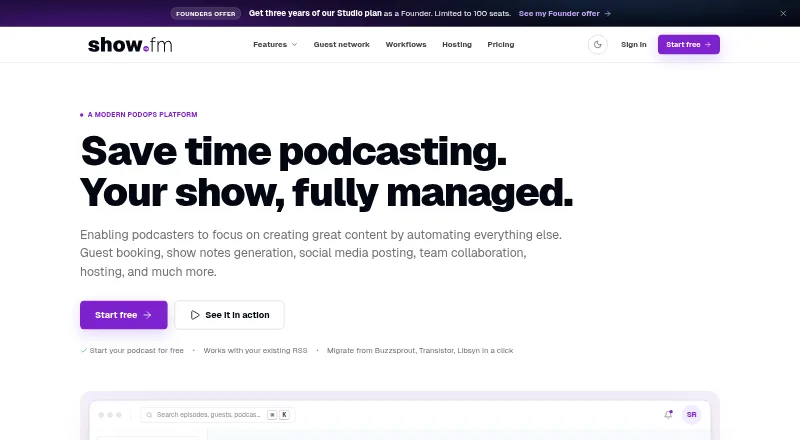
What show.fm is
show.fm is a podcast operations workspace for booking, preparation, publishing, promotion, follow-up, and team coordination. Its AI content pipeline transcribes episodes, drafts show notes, creates social posts, and identifies moments for highlights and audiograms. Booking pages handle time zones, calendar conflicts, intake forms, and confirmation emails; confirmed bookings automatically create an episode. Workflow automations can send reminders, social posts, task nudges, co-host notifications, email, and webhooks. Hosting is included on every plan, and feeds are served from a global edge network. Audio is described as triple-replicated with an external backup. Users can connect feeds from other RSS hosts, and hosting analytics include first-party, IAB-compliant plays and completion data. The maker also describes a REST API with bearer-token authentication, eight endpoints, six webhooks, and HMAC-signed webhooks. The platform supports web and API access.
Good
- Confirmed guest bookings create episodes automatically.
- Hosting is included on every plan.
- Calendar booking supports Google, Apple, and Outlook.
- Episodes and related data can be exported in standard formats.
- Analytics include plays and completion data.
Watch out
- Free plan allows two episodes per month.
- Free plan includes no AI credits.
- Several security and compliance documents are marked coming soon or in drafting.
Who it suits
It is aimed at podcasters, editors, producers, production teams, independent hosts, and small podcast networks. It may suit teams that want booking and episode workflows alongside hosting.
Verdict
show.fm combines podcast scheduling, production workflows, hosting, and promotion in one workspace. Compare the free plan’s episode and AI-credit limits with the workflow you need; paid plans start at $19 a month billed yearly.
Plans and prices
From show.fm's own pricing page, checked 29 Sep 2026.
| Plan | Price | What it gives you |
|---|---|---|
| Free | Free | 1 show · 2 episodes/month · 1 staff seat · unlimited guests · 1 booking link · 3 automation rules · 100 automation actions/month · no AI credits · $0 forever |
| Creator | $19 a month | 6 episodes/month · 1 staff seat · unlimited guests · 5 booking links · 10 automation rules · 1,000 actions/month · 120 AI credits (about 2 hours transcription) · $230 billed yearly |
| Studio | $47 a month | 30 episodes/month · 3 staff seats · unlimited guests · 25 booking links · 50 automation rules · 5,000 actions/month · 300 AI credits (about 5 hours transcription) · $566 billed yearly |
| Production House | $119 a month | 100 episodes/month · 10 staff seats · client workspaces · unlimited booking links and rules · 20,000 actions/month · 1,200 AI credits (about 20 hours transcription) · white-label guest portal · shareable client analytics reports · $1,430 billed yearly |
| Founder | $399 a month | 30 episodes a month · 3 staff seats · 25 booking links · 50 automation rules · 100 seats · Paid once; $49 a month from year four while the Founder subscription remains active |
| Founders | $399, paid once | Studio plan · 30 episodes/month · 3 seats · 25 booking links · 50 automation rules · 100 seats available · $399 once for three years of Studio; from year four, $49/month while the Founder subscription remains active |
| Enterprise | Priced on request | 30+ shows · custom episode volume · unlimited staff seats · white-label on your own domain · SSO · SLA · audit log · Quoted yearly |
The facts
Each one read from show.fm's own pages, with the date it was checked.
What it does
- AI and production
- Its AI content pipeline transcribes episodes, drafts show notes, creates social posts, and surfaces clip-worthy moments for highlights and audiograms.checked 29 Sep 2026
- Analytics
- The hosting page describes first-party, IAB-compliant plays and completion analytics, plus top apps and countries, without a third-party tracker.checked 29 Sep 2026
- API
- The maker describes a REST API with bearer-token authentication, JSON, eight endpoints, six webhooks, and HMAC-signed webhooks.checked 29 Sep 2026
- Automations
- The workflow builder supports event-driven reminders, social posts, task nudges, co-host notifications, email, and webhooks.checked 29 Sep 2026
- Calendar support
- The booking links feature names Google, Apple, and Outlook calendars for calendar holds.checked 29 Sep 2026
- Data portability
- The company says users can export episodes, audio, transcripts, notes, and contacts in standard formats, and use stable feed URLs.checked 29 Sep 2026
- Guest booking
- Booking pages handle time zones, calendar conflicts, intake forms, and confirmation emails, and confirmed bookings automatically create an episode.checked 29 Sep 2026
- Hosting and RSS
- Podcast hosting is included on every plan, with feeds served from a global edge network and audio described as triple-replicated with an external backup.checked 29 Sep 2026
- Integrations
- The hosting page says users can connect feeds from Megaphone, Acast, Buzzsprout, Transistor, RSS.com, Libsyn, and other RSS hosts.checked 29 Sep 2026
- Paid from
- 19checked 20 Sep 2026
- Security and compliance
- The legal centre lists a live privacy policy and terms, while its security disclosure policy, subprocessor list, data processing agreement, and SLA are marked coming soon or in drafting.checked 29 Sep 2026
- Support
- Users can submit a support request without logging in and receive an emailed ticket number; the maker says pricing inquiries are answered within a day, usually faster.checked 29 Sep 2026
- What it does
- show.fm describes itself as a podcast operations platform that brings booking, preparation, publishing, promotion, follow-up, and team coordination into one workspace.checked 29 Sep 2026
- Who it is for
- The maker says it is building show.fm for podcasters, editors, producers, production teams, independent hosts, and small podcast networks.checked 29 Sep 2026
Money
- Free plan
- Yeschecked 20 Sep 2026
The full review of show.fm
show.fm is an operations workspace for podcasters, editors, producers, and small networks. It suits people who want guest scheduling, production, hosting, and promotion connected rather than managed in separate tools. Its broad workflow comes with monthly episode, seat, and AI-credit ceilings that are central to choosing a plan.
Overview
show.fm links guest booking with episode production and follow-up: a confirmed booking creates an episode, and the workspace can support work from preparation through publishing and promotion. Hosting and analytics sit alongside those workflows, giving independent hosts and production teams a single place to coordinate more than guest appointments.
The consolidation is appealing, but show.fm is not an unlimited production service. Paid plans cap episodes and AI credits, and smaller tiers constrain staff seats. Organizations with formal vendor-governance requirements should also weigh that its privacy policy and terms are live, while its security disclosure policy, subprocessor list, data processing agreement, and SLA are coming soon or in drafting.
Key features
Booking and production
Booking pages account for time zones and calendar conflicts, collect details through custom intake forms, and send confirmation emails. Calendar holds work with Google, Apple, and Outlook; confirmed bookings automatically create episodes. Unlimited guests on every plan are useful when a show interviews many people, though the number of booking links and staff seats still depends on the tier.
The AI pipeline transcribes episodes, drafts show notes and social posts, and surfaces moments that could become clips or audiograms. These tools can reduce repetitive post-production work, but the monthly credit allowance limits how much audio a team can process: Creator includes about two hours of transcription, Studio about five, and Production House about twenty.
Automation, hosting, and portability
The workflow builder can trigger reminders, social posts, task nudges, co-host notifications, email, and webhooks. Hosting is included on every plan, with feeds served through a global edge network and audio described as triple-replicated with an external backup. Its hosting can connect feeds from services including Megaphone, Acast, Buzzsprout, Transistor, RSS.com, and Libsyn.
Analytics cover first-party, IAB-compliant plays and completion, plus top apps and countries, without a third-party tracker. Episode, audio, transcript, note, and contact exports in standard formats, along with stable feed URLs, support portability. The REST API uses bearer-token authentication and JSON, with eight endpoints, six webhooks, and HMAC-signed webhooks.
Pricing
The free plan costs $0 forever and includes one show, two episodes per month, one staff seat, unlimited guests, one booking link, three automation rules, and 100 actions per month. It has no AI credits. That is a useful way for a solo host to try the core booking and coordination setup, but the episode cap and lack of AI processing make it a narrow fit for regular production.
Creator costs $19 a month, billed $230 billed yearly. It allows six episodes per month, one staff seat, unlimited guests, five booking links, ten rules, 1,000 actions monthly, and 120 AI credits (about two hours of transcription). It suits an independent show with modest output; the single seat makes it a poor step up for a team that needs shared staff access.
Studio costs $47 a month, billed $566 billed yearly. Its 30 monthly episodes, three staff seats, 25 booking links, 50 rules, 5,000 actions, and 300 AI credits (about five hours of transcription) fit a small production team with more than one active show or a heavier publishing schedule. Production House costs $119 a month, billed $1,430 billed yearly, and raises capacity to 100 episodes, ten staff seats, 20,000 actions, and 1,200 AI credits (about 20 hours of transcription). It also adds client workspaces, unlimited booking links and rules, a white-label guest portal, and shareable client analytics reports, making it the relevant tier for client-facing production operations.
Enterprise offers 30+ shows and unlimited staff seats at custom pricing. Founder is $399 a month, billed Paid once, with 30 episodes monthly, three staff seats, 25 booking links, 50 rules, and 100 seats; it becomes $49 a month from year four while the Founder subscription remains active. Founders is $399, paid once for three years of Studio, with 30 episodes monthly, three seats, 25 booking links, 50 rules, and 100 seats available; from year four it costs $49/month while the Founder subscription remains active. These one-time Founder options have unusual long-term renewal terms, so buyers should compare the year-four charge and seat language carefully with the standard Studio plan. There is no free trial.
Platforms
show.fm supports web and API access. The API may suit teams that want to connect workflows programmatically; the listed platforms do not include a mobile app.
Who it's for
Independent hosts who want scheduling, hosting, and production in one workflow can start with the free tier if two episodes a month and no AI credits are enough. Creator suits a low-volume solo show that needs AI assistance, while Studio is the more practical choice for a small team because it adds staff seats and substantially higher episode, automation, and credit allowances. Production House is aimed at teams serving clients; the Enterprise tier addresses operations spanning at least 30 shows.
It is less compelling for a growing team that expects to stay on a low-cost tier: Creator remains limited to one staff seat and six episodes monthly. Buyers with strict compliance-documentation requirements should also assess whether the pending governance materials meet their needs.
Pros and cons
- Pros: Booking, production, hosting, promotion, and follow-up share one workspace, and confirmed bookings become episodes, reducing handoffs between guest scheduling and production.
- Pros: Unlimited guests are included even on the free tier, and the paid tiers scale booking links, automation, seats, and AI credits for larger workflows.
- Pros: Standard-format exports, stable feed URLs, and first-party analytics support portability and measurement without a third-party tracker.
- Cons: The free plan permits only two episodes monthly and has no AI credits; Creator allows six episodes and still provides just one staff seat.
- Cons: AI capacity is quota-based on paid plans, so teams processing more audio must account for the included credit allowance.
- Cons: Several governance documents remain in drafting or are coming soon, which may be a concern for organizations that require them.
Alternatives
For a broader comparison of scheduling-focused services, browse Podcast Guest Booking Software.
Choose Guestio if finding and booking guests, messaging, press kits, and tracking pitches matter more than an integrated hosting and production workspace; its free plan allows up to five pitches a month, and it also has a free trial. Let's Make A Podcast is a web-based free option for profiles, show discovery, pitching, messaging, and scheduling with calendar invites. For a simple opportunity directory, PodcastGuests.com offers a twice-weekly newsletter on its free plan and a $15 a year Basic plan with one category, one website link, and a directory profile.
Airlist is worth considering for guest-pipeline management: its free plan supports up to 15 guests, follow-up reminders, an episode tracker, and a public booking page. Codie Dog is a free web option with no premium tiers or feature limits. GuestLoop may suit guests seeking show discovery and booking management, with unlimited applications on its free Guest plan. Guest.Market offers basic services free during its public beta. MatchMaker.fm is a paid alternative with Android, iOS, and web access, a 30-day free trial, and a Pro plan at $15 a month after the trial.
Verdict
show.fm is a strong fit for independent podcasters and small production teams that want guest booking, episode workflows, hosting, and promotion under one roof. Its main advantage is connecting those jobs, while its main drawback is that episode, seat, and AI-credit caps make the best fit dependent on workload and team size. Choose it when that connected workflow matters more than uncapped capacity; look elsewhere if you need a simple guest directory, a mobile app, or governance documentation already in place.
Getting started
- Open show.fm on the web
- Create a free account or choose a paid plan
- Set up a show and connect an existing RSS feed if needed
- Create booking links with Google, Apple, or Outlook calendar holds
- Configure intake forms and workflow automations
- Publish episodes using the included hosting and RSS feed
Limits worth knowing
The Free plan includes one show, two episodes per month, one staff seat, one booking link, three automation rules, 100 automation actions monthly, and no AI credits. Creator starts at $19 a month billed yearly and allows six episodes monthly with 120 AI credits.
Questions
Is show.fm free?
Yes. The Free plan costs $0 forever and includes one show.
Does show.fm offer a free trial?
No. The listed plans include a free tier, but no free trial.
Which platforms are supported?
show.fm is available through the web and an API.
What calendars can booking links use?
Booking links name Google, Apple, and Outlook calendars for calendar holds, with two-way calendar sync.
Can I connect another podcast host?
Yes. Feeds can be connected from Megaphone, Acast, Buzzsprout, Transistor, RSS.com, Libsyn, and other RSS hosts.
What does the API provide?
The REST API uses bearer-token authentication and JSON, with eight endpoints, six webhooks, and HMAC-signed webhooks.
Alternatives to show.fm
- 1
Guestio
Free planAndroidiOSWeb7.9From $997 a year - 2

DM-Mi
Free planAndroidiOSWeb7.8From £30 a month - 3
PodcastGuests.com
Free planWeb7.3From $20 a month - 4
Pod Engine
Free planWebAPI7.2From $75 a month - 5
MatchMaker.fm
AndroidiOSWeb6.8From $15 a month - 6

Let's Make A Podcast
Free planWeb6.6From $1,929 a month