SecureWipe
SecureWipe is a free, open-source tool for erasing disks on Linux and Windows 10/11.
What SecureWipe is
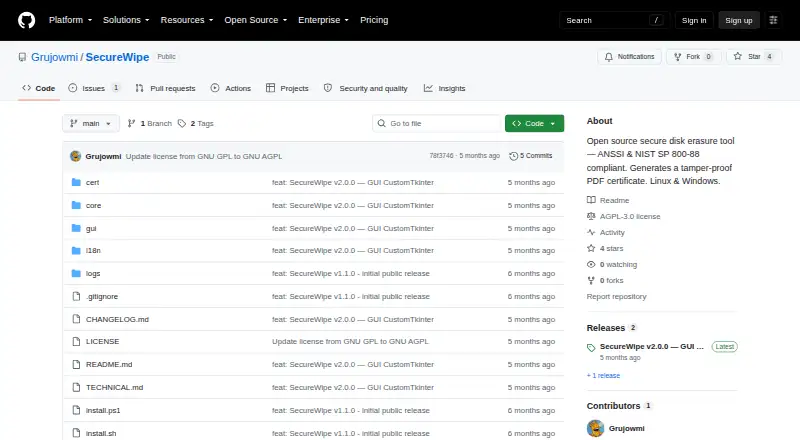
SecureWipe is a free, open-source tool for erasing disks on Linux and Windows 10/11. It identifies HDD, SSD, and NVMe drives by model and serial number, and detects LUKS, BitLocker, and SED encryption. For encrypted drives, it offers Crypto Erase first. Other methods include ANSSI Level 1 and 2, NIST Clear and Purge, and custom two-to-seven-pass wipes for HDDs. Because overwrite passes do not work effectively with SSD and NVMe wear-leveling, SecureWipe blocks them and offers firmware-level or crypto erase options. It also prevents system-disk erasure and disables NIST Purge for USB and other removable drives. After a wipe, it checks a random sample, 10% by default. It creates a timestamped PDF certificate with drive details, the method, the verification result, a watermark, and a SHA-256 QR code, plus a raw text log. SecureWipe offers graphical and terminal modes, supports French and English, and requires Python 3.10 or later; the graphical interface also requires customtkinter. The project identifies its license as GPL v3 and says it comes without warranty.
Good
- Identifies HDD, SSD, and NVMe drives by model and serial.
- Offers multiple erase methods, including Crypto Erase.
- Creates a timestamped PDF certificate and raw text log.
- Supports graphical and terminal modes in French and English.
Watch out
- Requires Python 3.10 or later.
- The graphical interface also requires customtkinter.
- Overwrite passes are blocked for SSD and NVMe drives.
- Provided without warranty.
Who it suits
SecureWipe suits Linux and Windows users who need traceable disk erasure, including professional teams preparing audit or compliance files. Its graphical and terminal modes serve users with different workflows.
Verdict
SecureWipe combines erase options with sampling verification and documentation for each wipe. Users should account for its Python requirement and the different erase options for SSD and NVMe media.
The facts
Each one read from SecureWipe's own pages, with the date it was checked.
What it does
- Audit certificate
- It generates a timestamped PDF certificate with drive details, the wipe method, verification result, SHA-256 QR code, and anti-falsification watermark.checked 11 Oct 2026
- Certificates and logs
- It generates a timestamped PDF certificate with a watermark and SHA-256 QR code, alongside a raw text log.checked 10 Oct 2026
- Compliance claims
- The README says SecureWipe supports ANSSI Level 1/2 and NIST SP 800-88 Rev.2 methods.checked 10 Oct 2026
- Drive detection
- It detects HDD, SSD, and NVMe media and identifies the model and serial number.checked 11 Oct 2026
- Encryption detection
- It detects LUKS, BitLocker, and SED encryption and offers Crypto Erase first.checked 11 Oct 2026
- Intended use
- The maker describes it as addressing secure, traceable disk erasure needs in a professional healthcare environment subject to HDS, NIS2, and GDPR requirements.checked 11 Oct 2026
- Intended users
- The maker describes it as arising from a healthcare environment subject to HDS, NIS2, and GDPR requirements, with certificates intended for audits or compliance files.checked 10 Oct 2026
- Interfaces and language
- It provides GUI and terminal modes and supports French and English with automatic locale detection.checked 11 Oct 2026
- Interfaces and languages
- It offers GUI and terminal modes and supports French and English with automatic locale detection.checked 10 Oct 2026
- License and warranty
- The README states that SecureWipe is licensed under GPL v3 and is provided without warranty.checked 11 Oct 2026
- Logs and sessions
- It creates a raw text log alongside the PDF certificate and supports multiple drives in one session.checked 11 Oct 2026
- Purpose
- SecureWipe is an open-source tool for securely erasing storage media.checked 11 Oct 2026
- Requirements
- It requires Python 3.10 or later and Linux or Windows 10/11.checked 11 Oct 2026
- Safety controls
- It blocks wiping the system disk and disables NIST Purge for USB or removable drives.checked 10 Oct 2026
- Safety limits
- It blocks wiping the system disk and disables NIST Purge on USB or removable drives.checked 11 Oct 2026
- SSD and NVMe limitation
- Because overwrite passes are ineffective with SSD/NVMe wear-leveling, the tool blocks them and offers firmware-level or crypto erase options.checked 10 Oct 2026
- Supported media
- It detects HDD, SSD, and NVMe storage, including the model and serial number.checked 10 Oct 2026
- Verification
- After wiping, it verifies a random sample of sectors, with 10% as the default sample.checked 11 Oct 2026
- Wipe methods
- Its wipe modes include ANSSI Level 1 and 2, NIST Clear and Purge, Crypto Erase, and configurable two-to-seven-pass wiping for HDDs.checked 11 Oct 2026
Alternatives to SecureWipe
- 1
Active@ KillDisk
Free planLinuxmacOSWindows7.6$64.95 one-time - 2

BitRaser Drive Eraser
WebLinuxmacOSWindows7.2$99 one-time - 3
HDShredder
Free planLinuxSelf-hostedWindows6.8€19.90 one-time - 4

Blackwire Drive Eraser & Sanitizer
Free planWindows6.5$9.99 one-time - 5
WipeDrive
LinuxmacOSWindows6.5$19.95 one-time - 6
nwipe
Free planLinuxSelf-hosted6.4Free plan