SecureRecovery
SecureRecovery is data recovery software for locating files that have been deleted, reformatted, corrupted, or made inaccessible.
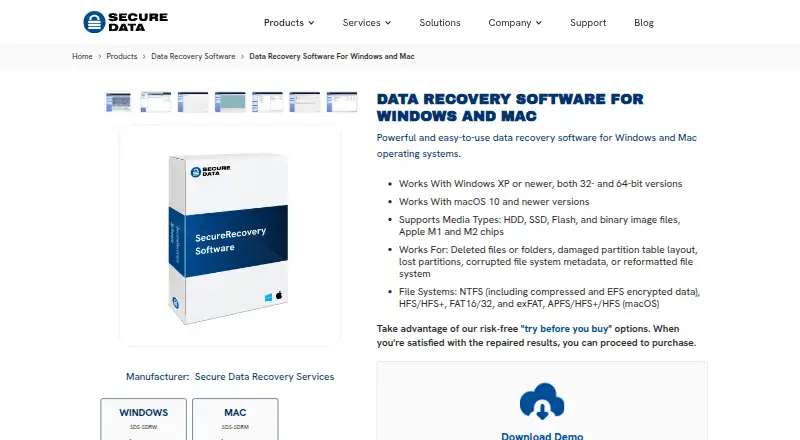
What SecureRecovery is
SecureRecovery is data recovery software for locating files that have been deleted, reformatted, corrupted, or made inaccessible. It works with HDDs, SSDs, flash media, partitions, and binary image files, and supports NTFS, HFS/HFS+, FAT16/32, exFAT, and APFS. Search, file previews, and recovery-probability estimates help identify data that may be recoverable; the software also offers media-health analysis, imaging, and multiple-file recovery. It can recover compressed and encrypted files, including NTFS alternative data streams. Windows features include support for BitLocker, Windows Storage Spaces, dynamic disks, several RAID configurations, Linux LVM/LVM2 and mdadm RAID, and VMDK, VHD, VHDX, and VDI formats. The macOS version supports encrypted APFS recovery, FileVault, Fusion Drive, and other listed Mac storage configurations. The demo shows data that can be recovered before purchase. Windows costs 39.95 USD once, and Mac costs 49.95 USD once. The software addresses logical corruption; it cannot recover data from physically damaged devices.
Good
- Supports HDDs, SSDs, flash media, partitions, and images.
- Previews and recovery-probability estimates are available.
- Demo lists data that may be recovered.
- Windows version supports BitLocker and multiple storage formats.
- Online repair option can return a repaired copy.
Watch out
- Cannot recover data from physically damaged devices.
- No free plan is listed.
- Windows costs 39.95 USD once.
- Mac costs 49.95 USD once.
Who it suits
SecureRecovery may suit individuals and businesses trying to recover files from supported drives, partitions, or image files. The Standard licence permits one installation for individuals or small businesses; the Business licence permits three installations for small or medium businesses.
Verdict
SecureRecovery offers recovery tools for a range of file systems and storage configurations, with a demo to inspect recoverable data before buying. It is not intended for physically damaged devices, so consider that limitation first.
Plans and prices
From SecureRecovery's own pricing page, checked 20 Sep 2026.
| Plan | Price | What it gives you |
|---|---|---|
| Windows license | $39.95, paid once | Windows version · Price per licence · Price per Licence |
| macOS license | $49.95, paid once | macOS version · Price per licence · Price per Licence |
| SecureRecovery for Windows | $39.95, paid once | Windows XP or newer · 32-bit and 64-bit · standard licence one installation · Price per Licence |
| Windows | $39.95, paid once | Windows XP or newer · 32-bit and 64-bit · Price per Licence |
| Mac | $49.95, paid once | macOS 10 or newer · Apple M1 and M2 chips · Price per Licence |
| SecureRecovery for Mac | $49.95, paid once | macOS 10 or newer · Apple M1/M2 · business licence three installations · Price per Licence |
The facts
Each one read from SecureRecovery's own pages, with the date it was checked.
What it does
- Additional storage support
- The Windows version supports BitLocker, Windows Storage Spaces, dynamic disks, Linux LVM/LVM2 and mdadm RAID, Intel software RAID, and VMDK/VHD/VHDX/VDI formats.checked 1 Oct 2026
- API and extensibility
- The published manuals and support materials document desktop GUI workflows but provide no public API, SDK, integration or self-hosting instructions.checked 14 Oct 2026
- BBB complaints
- BBB lists 19 complaints in three years, including disputes about pricing, recovery quality, refunds, shipping and customer service.checked 14 Oct 2026
- Business licence
- The Business licence is intended for small or medium businesses and permits three installations.checked 1 Oct 2026
- Demo
- The demo can be run repeatedly, previews recoverable data and limits the number or size of files recovered until a licence is purchased.checked 14 Oct 2026
- Disk imaging
- Users can create binary images of drives or volumes and later scan those images instead of the original media.checked 14 Oct 2026
- Documentation and support
- Documentation consists of Windows and macOS user manuals, while the support site provides web, email and phone assistance.checked 14 Oct 2026
- Encrypted data
- SecureRecovery can recover compressed and encrypted files and alternative data streams from NTFS partitions.checked 1 Oct 2026
- File systems
- Windows support covers NTFS, including compressed and EFS-encrypted data, HFS/HFS+, FAT16/32 and exFAT; macOS adds APFS.checked 14 Oct 2026
- Independent support guidance
- SanDisk support directs users to Secure Data for SecureRecovery installation and troubleshooting, while describing its deleted-file, damaged-partition, health-check and imaging functions.checked 14 Oct 2026
- Legal name and founder
- Crunchbase identifies the legal company as SecureData, Inc. and names Dmitri Kardashev as founder.checked 14 Oct 2026
- Licence copyright
- The macOS manual is marked copyright 2025 SecureData Inc., states all rights are reserved and requires written permission for copying.checked 14 Oct 2026
- Licence terms
- Standard licensing permits one installation and excludes third-party recovery services; business licensing permits three installations.checked 14 Oct 2026
- Limit: pricing and results
- Trustpilot summaries and reviews mention unexpectedly high prices, difficulty getting devices returned and dissatisfaction with some recovery results.checked 14 Oct 2026
- Limit: UK pricing complaint
- A UK reviewer described a £1,236.05 quote later reduced to £357, plus a requested £25 return fee after declining service.checked 14 Oct 2026
Where it runs
- Apple app distinction
- SecureData Inc. has an iPhone/iPad customer-portal app for recovery cases, but Apple says there are insufficient ratings to show an overview; it is not the desktop SecureRecovery software.checked 14 Oct 2026
- Mac capabilities
- The macOS version supports encrypted APFS recovery, Apple Disk Utility RAID, CoreStorage, FileVault, Fusion Drive, and read-only DMG files.checked 1 Oct 2026
- macOS features
- The Mac edition supports encrypted APFS, Finder metadata, extended attributes, UNIX permissions, Apple RAID, CoreStorage, FileVault, Fusion Drive and read-only DMG files.checked 14 Oct 2026
- Mac requirements
- The Mac manual lists Intel or Apple Silicon Macs running OS X 10.4 through macOS 15 Sequoia, with administrator access and storage for output.checked 14 Oct 2026
The company
- Company compliance
- SecureData states that it maintains SSAE 18 SOC 2 Type II and SOC 3 audited processes, an ISO 4 Class 10 cleanroom, GSA contract-holder status, and FIPS 140-2 Level 3 validated products.checked 1 Oct 2026
- Company facts
- LinkedIn describes SecureData as a privately held Los Angeles IT-services company founded in 2007 with 51–200 employees.checked 14 Oct 2026
- Company scope
- SecureData says its offerings serve businesses of all sizes, government agencies, personal computer users, and others.checked 1 Oct 2026
- Founded
- 2007checked 28 Sep 2026
- Headquarters
- West Hollywood, California, United Stateschecked 28 Sep 2026
Alternatives to SecureRecovery
- 1
EaseUS Data Recovery Wizard
Free planAndroidiOSmacOSWindows8.2Free plan - 2
DoYourData Recovery
Free planiOSmacOSWindows7.8From $69 a year - 3

Disk Drill
Free planmacOSWindows7.6From $89 a year - 4
DiskGenius
Free planWindows7.5From $99.90 a year - 5
MiniTool Power Data Recovery
Free planmacOSWindows7.5From $89 a year - 6
AOMEI FastRecovery
Free planWindows7.4Free plan