SD Photo Rescue
SD Photo Rescue is a free command-line tool for recovering photos and videos from formatted SD cards.
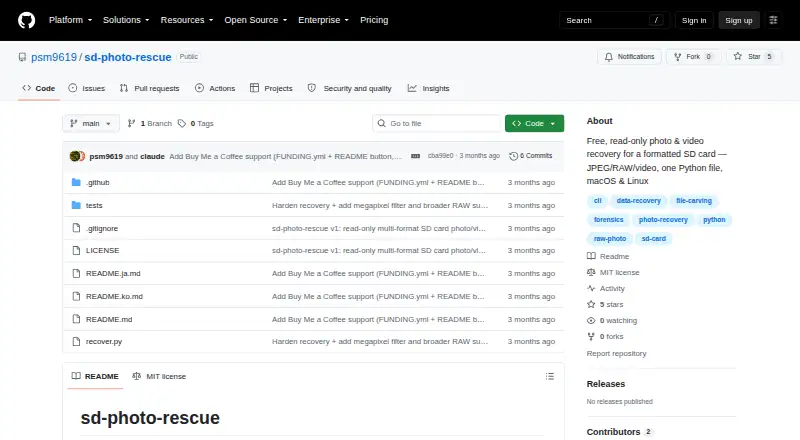
What SD Photo Rescue is
SD Photo Rescue is a free command-line tool for recovering photos and videos from formatted SD cards. It can also scan raw disk-image files. The project provides a single Python file that uses only the standard library, so installation is not required. Recoverable media includes JPEG and HEIC photos, camera RAW files, and MP4 and MOV video. Named RAW formats include CR2/CR3, NEF, ARW, RAF, ORF, RW2, DNG, PEF, and SRW; Sigma X3F and Phase One IIQ are not handled yet. Users can filter by file type and capture-date range, and optionally use camera megapixels to distinguish full-size files from thumbnails. The tool opens cards read-only and says it does not write to, format, or modify them. It unmounts cards first on macOS and Linux, warning if Linux unmounting fails. Reading a card requires sudo; raw image files do not. Recovered files use capture time as their name when readable, and partially rebuilt files go into a _partial folder. The software is available for Linux and macOS and released under the MIT License.
Good
- Free and requires no installation.
- Opens cards read-only.
- Can scan raw disk-image files.
- Supports JPEG, HEIC, RAW, MP4, and MOV.
Watch out
- Reading an SD card requires sudo.
- Sigma X3F and Phase One IIQ are not handled.
- Some split files may only be partially rebuilt.
- Command-line tool.
Who it suits
SD Photo Rescue suits users who need a command-line recovery tool for formatted SD cards or raw disk images on Linux or macOS. It supports several common photo and video formats, but not Sigma X3F or Phase One IIQ.
Verdict
SD Photo Rescue offers free, read-only recovery for formatted SD cards and raw images, with broad listed media support. Users should note the unsupported RAW formats, sudo requirement for cards, and possibility of partial recovery.
Plans and prices
From SD Photo Rescue's own pricing page, checked 11 Oct 2026.
| Plan | Price | What it gives you |
|---|---|---|
| Free | Free | Free tool; read-only recovery for formatted SD cards |
The facts
Each one read from SD Photo Rescue's own pages, with the date it was checked.
What it does
- Card handling
- On macOS the card is unmounted first; on Linux the tool unmounts it and warns if it cannot.checked 11 Oct 2026
- File naming
- Recovered files are named by capture time when readable because formatting erases the original name table.checked 11 Oct 2026
- How to run
- The project provides a single Python file using only the Python standard library, with no installation required.checked 11 Oct 2026
- License
- The software is released under the MIT License.checked 11 Oct 2026
- Partial recovery
- Files split into pieces may only be partially rebuilt and are placed in a _partial folder.checked 11 Oct 2026
- Prerequisites
- Running against a card requires sudo to read it; recovering from a raw image file does not.checked 11 Oct 2026
- Purpose
- The command-line tool scans formatted SD cards and rebuilds recoverable photos and videos.checked 11 Oct 2026
- RAW formats
- Named RAW formats include CR2/CR3, NEF, ARW, RAF, ORF, RW2, DNG, PEF, and SRW; Sigma X3F and Phase One IIQ are not handled yet.checked 11 Oct 2026
- Read-only
- The tool opens the card read-only and says it never writes to, formats, or modifies it.checked 11 Oct 2026
- Recovery filters
- Users can select file types, a capture-date range, and optionally camera megapixels to sort full-size files from thumbnails.checked 11 Oct 2026
- Support
- The maker invites bug reports, feature requests, and pull requests through GitHub issues and contributions.checked 11 Oct 2026
- Supported media
- It can recover JPEG and HEIC photos, camera RAW files, and MP4 and MOV video.checked 11 Oct 2026
The company
- Maker
- The repository license names Soomin Park (psm9619) as copyright holder.checked 11 Oct 2026
Alternatives to SD Photo Rescue
- 1
EaseUS Data Recovery Wizard
Free planAndroidiOSmacOSWindows9.0Free plan - 2
DoYourData Recovery
Free planiOSmacOSWindows8.6From $69 a year - 3

Disk Drill
Free planmacOSWindows8.4From $89 a year - 4
AOMEI FastRecovery
Free planWindows8.2Free plan - 5
MiniTool Power Data Recovery
Free planmacOSWindows8.2From $89 a year - 6
DiskGenius
Free planWindows8.0From $99.90 a year