Scratch
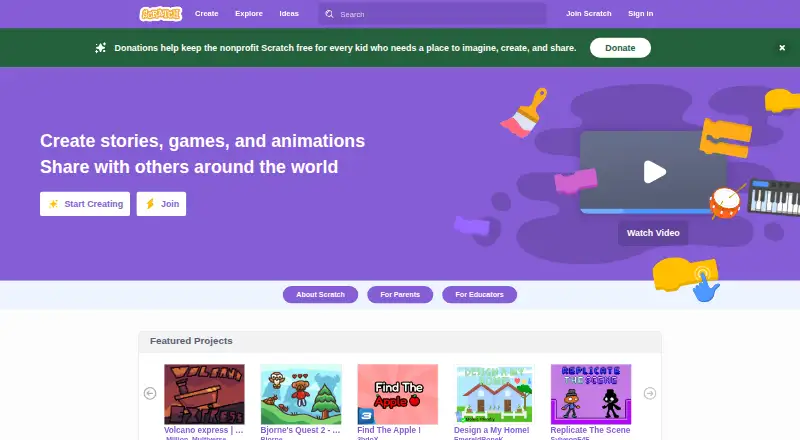
Scratch is a programming platform for creating and sharing interactive stories, games, and animations.
What Scratch is
Scratch is a programming platform for creating and sharing interactive stories, games, and animations. Designed especially for ages 8 to 16, it also serves people of all ages and aims to build creative thinking, systematic reasoning, and collaboration through project-based learning. Scratch is available on the web and on Android, macOS, and Windows; app downloads are listed for Windows 10+, macOS 10.13+, ChromeOS, and Android tablets running Android 6.0+. The app works offline, but projects created offline are not accessible by Scratch. Extensions add blocks for connecting projects to hardware devices or web services. Scratch is a project of the Lifelong Kindergarten Group at the MIT Media Lab, and it says it is used in more than 150 countries and available in more than 40 languages. The platform is free. Optional Annual Membership costs $35 a year, and Lifetime Membership costs $150, paid once; both are donations and include early or exclusive content, tutorials, merchandise, and store discounts.
Good
- Free platform for creating and sharing projects
- Project-based learning with creative and collaborative goals
- Offline app use is available
- Extensions connect projects to hardware or web services
Watch out
- Offline-created projects are not accessible by Scratch
- Android app downloads are listed for tablets
- Memberships require donations of 35.00 USD yearly or 150.00 USD once
Who it suits
Scratch suits young learners, especially ages 8 to 16, who want to make projects while developing programming and collaboration skills. Its web and app access also accommodates people of all ages.
Verdict
Scratch combines project creation and sharing with learning goals for young people. Its free platform works across web and several app platforms, though projects made offline are not accessible by Scratch.
Plans and prices
From Scratch's own pricing page, checked 30 Sep 2026.
| Plan | Price | What it gives you |
|---|---|---|
| Scratch platform | Free | Free digital platform for creating and sharing projects |
| Annual Membership | $35 a year | Early and exclusive content · members-only tutorials · merchandise and discounts · $35 membership donation per year |
| Lifetime Membership | $150, paid once | Early and exclusive content · members-only tutorials · merchandise and discounts · $150 one-time membership donation |
The facts
Each one read from Scratch's own pages, with the date it was checked.
What it does
- Audience
- Scratch is designed especially for ages 8 to 16, and is also used by people of all ages.checked 30 Sep 2026
- Community safety
- Scratch asks community members to keep personal information private and report content that violates its community guidelines.checked 30 Sep 2026
- Extensions
- Scratch extensions add blocks that connect projects to hardware devices or web services.checked 30 Sep 2026
- Global reach
- Scratch says it is used in more than 150 countries and is available in more than 40 languages.checked 30 Sep 2026
- Learning goals
- Scratch aims to help young people think creatively, reason systematically, and work collaboratively.checked 30 Sep 2026
- Membership benefits
- Scratch Membership offers early or exclusive content, including new sprites, members-only tutorials, merchandise, and store discounts.checked 30 Sep 2026
- Offline use
- The Scratch app can be used offline, and projects made in it are not accessible by Scratch.checked 30 Sep 2026
- Organization
- Scratch is a project of the Lifelong Kindergarten Group at the MIT Media Lab.checked 30 Sep 2026
- Privacy
- Scratch says it does not sell or rent account information, and limits information collected during signup and made public on the website.checked 30 Sep 2026
- Privacy limitation
- Scratch states that no security system is impenetrable and it cannot completely guarantee database security or prevent interception during internet transmission.checked 30 Sep 2026
- Purpose
- Scratch lets users program interactive stories, games, and animations and share creations in its online community.checked 30 Sep 2026
- Security
- Scratch says it uses administrative, physical, and technical safeguards, including SSL/TLS for data transfers and restricted access to its servers.checked 30 Sep 2026
- Support
- Parents can contact Scratch staff through the Contact Us link and ask questions in the discussion forums.checked 30 Sep 2026
Where it runs
- Download platforms
- The Scratch app download information lists Windows 10+, macOS 10.13+, ChromeOS, and Android tablets running Android 6.0+.checked 30 Sep 2026
The company
- Founded
- 2007checked 28 Sep 2026
Money
- Free plan
- Yeschecked 23 Sep 2026
The full review of Scratch
Scratch is a visual programming environment for making interactive stories, games, and animations. It suits children, families, and educators who want programming taught through creative projects, especially learners aged 8 to 16. The free platform is an excellent starting point for sharing work and learning core ideas, while its offline workflow and deliberately introductory scope make it less suitable for professional development.
Overview
Scratch combines block-based programming with an online community. Learners build a project, see an immediate interactive result, and can publish it for others to view and respond to. That project-centered cycle supports Scratch’s goals of creative thinking, systematic reasoning, and collaboration more effectively than lessons that leave concepts detached from a finished creation.
Scratch is a project of the Lifelong Kindergarten Group at the MIT Media Lab. It is used in more than 150 countries and offered in more than 40 languages, making it practical for international classrooms and multilingual families. Although the emphasis is on ages 8 to 16, people of all ages use it; the design remains focused on introductory learning rather than workplace software development.
Key features
Creative programming and sharing
Users program interactive stories, games, and animations in the Scratch language, then share those creations through the online community. The visible result gives beginners a concrete reason to practice sequencing, logic, and iteration. Sharing also supports peer learning, but families and teachers should treat community participation as part of the learning environment and reinforce responsible posting.
Extensions
Extensions add blocks that connect projects to hardware devices or web services. This expands projects beyond the screen and offers a route into physical computing or connected services without abandoning Scratch’s block-based approach.
Offline app and account safeguards
The Scratch app supports offline work, which helps when internet access is unreliable. Projects created offline in the app are not accessible by Scratch, so learners who need community sharing or continuity across devices should work online or manage their files carefully. Scratch says it limits information collected during signup and made public on its website, does not sell or rent account information, and uses administrative, physical, and technical safeguards including SSL/TLS for data transfers. It also acknowledges that no security system is impenetrable and cannot completely prevent database compromise or interception during transmission.
Community members are asked to keep personal information private and report material that violates community guidelines. Parents can contact staff through the Contact Us link or ask questions in discussion forums.
Pricing
The Scratch platform costs free. It is the core digital platform for creating and sharing projects, so schools, families, and individual learners can begin without a subscription or seat charge.
Annual Membership costs $35 a year, billed as a $35 membership donation each year. It adds early or exclusive content, members-only tutorials, merchandise, and store discounts; it does not replace or unlock the basic creation platform.
Lifetime Membership costs $150, paid once, billed as a one-time membership donation. It provides the same stated membership benefits as the annual option without an annual renewal. Choose it only if those extras justify the higher upfront contribution; the free plan already covers project creation and sharing.
Platforms
Scratch is available on web, Windows, macOS, and Android. Download information specifies Windows 10 or later, macOS 10.13 or later, ChromeOS, and Android tablets running Android 6.0 or later. Mobile apps and the mixed learning format make it workable across home and classroom devices, while the offline app’s inaccessible projects are an important limitation for cross-device use.
Who it's for
Scratch is the strongest choice for learners roughly 8–16, teachers introducing computer science through projects, and families seeking a creative first programming environment. Its visual language, sharing community, and hardware or web-service extensions support progression from simple animations to more ambitious experiments. Older learners seeking text-based languages, production tooling, or career-oriented course structure should look beyond Scratch once its introductory model stops being challenging.
Pros and cons
- Pro: Free access includes both creation and online sharing, removing a cost barrier for classrooms and families.
- Pro: Stories, games, and animations turn programming concepts into visible projects, reinforcing creative and systematic learning.
- Pro: Extensions can connect projects to hardware devices or web services, broadening project possibilities.
- Pro: More than 40 languages and use in over 150 countries support international and multilingual learning.
- Con: Offline app projects are not accessible by Scratch, which can disrupt sharing and continuity between offline and online work.
- Con: The platform is intentionally introductory and is not a substitute for a professional development environment.
- Con: Online participation requires privacy awareness; Scratch cannot guarantee complete database or transmission security.
Alternatives
Hopscotch is a freemium alternative with Android, iOS, macOS, web, and Windows support, a free account for creating games, and a Play Pass for additional access; choose it when that platform mix and game-focused model fit better.
MIT App Inventor is free and runs on Android, iOS, Linux, macOS, web, and Windows, with app-building aimed at packaged mobile applications; choose it when making installable Android or iOS apps is the priority.
Progate is a freemium learning service with introductory free lessons and a paid 12-month option; choose it for a more lesson-led path.
CodeHS offers a permanent free teacher plan with more than 100 courses and a browser code editor; choose it for structured classroom course management.
Codecademy has a free Basic tier with limited courses and AI Learning Assistant access, plus a paid Plus tier at custom pricing; choose it for a broader course catalog.
Kodable is a freemium option for younger children, with paid monthly and yearly plans; choose it when child profiles and an early-years focus matter most.
Mimo is a freemium mobile and web learning service with limited free access and paid Pro access; choose it for bite-sized course progression.
ScratchJr is a free app for iPads, Android tablets, and Chromebooks; choose it for a simpler tablet-first introduction.
For broader comparisons, see Coding Learning Software, Code Playground Software, and Coding Playgrounds.
Verdict
Choose Scratch if you want a free, creative way for children or beginners to learn programming by building and sharing projects. Its community, multilingual reach, and extensions give the platform unusual breadth for an introductory tool. Look elsewhere when offline projects must sync reliably, or when the learner needs text-based, professional, or tightly structured career training.
Alternatives to Scratch
- 1

Codecademy
Free planAndroidiOSWeb8.1Free plan - 2

Kodable
Free planAndroidiOSWeb8.1From $119.99 a year - 3
Khan Academy
Free planAndroidiOSWeb7.7From $10 a year - 4

CodeHS
Free planAndroidiOSWeb7.6From $990 a year - 5
CodeMonkey
AndroidiOSWeb6.9From $11 a month - 6

freeCodeCamp
Free planAndroidiOSWeb6.9Free plan