Roslynator
Roslynator is a set of C# code analysis tools built around Roslyn for refactoring and addressing compiler diagnostics.
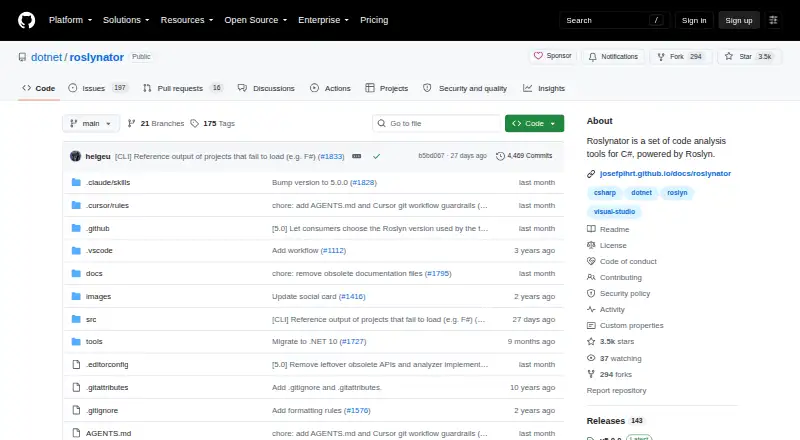
What Roslynator is
Roslynator is a set of C# code analysis tools built around Roslyn for refactoring and addressing compiler diagnostics. Its IDE extensions provide refactorings and fixes, while analyzers are distributed separately as NuGet packages. The project lists extensions for Visual Studio 2026 and 2022, VS Code, and Open VSX. The VS Code extension requires legacy OmniSharp configured with `dotnet.server.useOmnisharp` set to true, and it is not compatible with C# Dev Kit. A command-line tool can be installed with `dotnet tool install -g roslynator.dotnet.cli`; the CLI is also integrated into MegaLinter for CI. EditorConfig settings cover analyzer, refactoring, and compiler-fix configuration, and a testing framework supports tests for analyzers, refactorings, and code fixes. Its .NET client libraries extend the Roslyn API but do not bundle analyzers or refactorings. Roslynator is free and open source under Apache License 2.0, with tools for C# and Visual Basic and support for project-level, batch refactoring.
Good
- IDE extensions provide refactorings and compiler-diagnostic fixes.
- CLI integrates with MegaLinter for CI.
- EditorConfig can configure analysis and fixes.
- Testing framework covers analyzers, refactorings, and code fixes.
Watch out
- VS Code requires legacy OmniSharp, not C# Dev Kit.
- Analyzers are separate NuGet packages, not IDE extensions.
- Visual Studio 2022 extensions are out of security support.
- Versions below 5.0 are out of security support.
Who it suits
Roslynator suits developers working with C# or Visual Basic in Roslyn-based environments who want analysis, refactoring, and compiler-diagnostic fixes. It also offers CLI and testing tools for development workflows.
Verdict
Roslynator brings IDE, CLI, configuration, and testing tools to Roslyn-based code analysis and refactoring. Check the VS Code requirement and security-support scope against your environment before choosing it.
Plans and prices
From Roslynator's own pricing page, checked 3 Oct 2026.
| Plan | Price | What it gives you |
|---|---|---|
| Free of charge | Free | Roslynator tools and extensions; donations welcome |
The facts
Each one read from Roslynator's own pages, with the date it was checked.
What it does
- Analyzers
- Analyzers are not included in the IDE extensions and are provided through NuGet packages.checked 3 Oct 2026
- Audience
- The tools are for C# code analysis, refactoring, and compiler diagnostic fixes in Roslyn-based development environments.checked 3 Oct 2026
- CI integration
- The Roslynator CLI is integrated in MegaLinter, an open-source linter aggregator for CI.checked 3 Oct 2026
- CLI
- The command-line tool installs with dotnet tool install -g roslynator.dotnet.cli.checked 3 Oct 2026
- Client libraries
- Its .NET client libraries extend the Roslyn API and do not include analyzers or refactorings.checked 3 Oct 2026
- Configuration
- EditorConfig settings can configure analyzers, refactorings, and compiler diagnostic fixes.checked 3 Oct 2026
- Editor support
- The project lists extensions for Visual Studio 2026, Visual Studio 2022, VS Code, and Open VSX.checked 3 Oct 2026
- IDE features
- Its IDE extensions provide refactorings and fixes for compiler diagnostics.checked 3 Oct 2026
- License
- The repository states that its files are licensed under Apache License 2.0.checked 3 Oct 2026
- Purpose
- Roslynator is a set of code analysis tools for C#, powered by Roslyn.checked 3 Oct 2026
- Security support
- The security policy supports version 5.x, CLI 0.x, and the Visual Studio 2026 and VS Code extensions; versions below 5.0 and Visual Studio 2022 extensions are out of support.checked 3 Oct 2026
- Testing
- The project provides a testing framework for unit testing analyzers, refactorings, and code fixes.checked 3 Oct 2026
- VS Code requirement
- The VS Code extension requires legacy OmniSharp with dotnet.server.useOmnisharp set to true; it does not work with C# Dev Kit.checked 3 Oct 2026
- Vulnerability reporting
- The project asks users to report suspected vulnerabilities through GitHub issues and says it will release a patch as soon as possible once confirmed.checked 3 Oct 2026
The full review of Roslynator
Roslynator is a free toolkit for C# analysis and refactoring in Roslyn-based development environments. It is best suited to developers who want configurable diagnostics and refactorings across editor and command-line workflows. Its breadth is useful, but the VS Code extension depends on legacy OmniSharp, and security support excludes some older releases.
Overview
Roslynator brings together IDE extensions, NuGet analyzers, a command-line tool, a testing framework, and .NET client libraries that extend the Roslyn API. That range can serve both people applying code fixes and developers building or testing analysis tooling. The components are not interchangeable: analyzers are separate from the IDE extensions, while the client libraries do not include analyzers or refactorings.
The repository’s files are licensed under Apache License 2.0. Roslynator supports C# and Visual Basic, with project-level refactoring, batch refactoring, and AST-based analysis. It is a desktop, self-hosted toolset rather than an AI-assisted coding product.
Key features
- IDE refactorings and fixes: Extensions provide refactorings and fixes for compiler diagnostics. EditorConfig settings can tune analyzers, refactorings, and diagnostic fixes, giving teams control over what fits their codebase.
- Separate analyzers: Analyzers are delivered through NuGet packages, not bundled in the IDE extensions. That separation lets developers choose the analyzer packages they need, but requires a distinct setup from installing an editor extension.
- CLI and CI: Install the command-line tool with dotnet tool install -g roslynator.dotnet.cli. Its integration in MegaLinter, an open-source CI linter aggregator, makes it a practical option for teams that want Roslynator in automated checks as well as editor work.
- Testing and client libraries: The testing framework supports unit tests for analyzers, refactorings, and code fixes, a useful foundation for developers maintaining their own tooling. The .NET client libraries extend the Roslyn API, but do not provide Roslynator analyzers or refactorings.
Pricing
Roslynator is free and open source. The Free of charge plan costs nothing and includes the tools and extensions; donations are welcome. There is no free trial because the software is already free, and no paid tier or seat quota is stated. This suits individual developers and teams seeking a no-cost toolset, though it does not come with a paid support tier described here.
Platforms
Roslynator offers extensions for Visual Studio 2026, Visual Studio 2022, VS Code, and Open VSX, with Linux, macOS, and Windows support. The VS Code extension requires legacy OmniSharp and dotnet.server.useOmnisharp set to true; it does not work with C# Dev Kit. Developers standardized on C# Dev Kit should therefore choose another editor workflow or another tool.
Security support covers version 5.x, CLI 0.x, and the Visual Studio 2026 and VS Code extensions. Versions below 5.0 and Visual Studio 2022 extensions are out of support, an important constraint for teams that need supported versions across an existing installation. Suspected vulnerabilities should be reported through GitHub issues; confirmed issues are to receive a patch as soon as possible.
Who it's for
Roslynator is a strong fit for C# developers and teams working in Roslyn-based environments who want refactorings, compiler-diagnostic fixes, configurable analyzers, or a CLI that can also run in CI. Its testing framework also makes it relevant to people writing analyzer and refactoring tools. It is less suitable when VS Code must use C# Dev Kit, or when a team needs security support for Visual Studio 2022 extensions or releases below 5.0.
Pros and cons
- Pros: A free, Apache-licensed toolkit combines IDE fixes, separately installable analyzers, CLI use, and testing support, so developers can apply it to more than one part of a code-analysis workflow.
- Pros: EditorConfig customization and batch refactoring offer control over how analysis and changes fit a project.
- Cons: NuGet analyzers must be added separately from the IDE extensions, so installing the extension alone does not provide the full analyzer set.
- Cons: The VS Code extension requires legacy OmniSharp and excludes C# Dev Kit; support also excludes Visual Studio 2022 extensions and versions below 5.0.
Alternatives
CodeRush may suit readers who want a commercial product with a free plan: all versions are free for commercial use, with the same features and updates across free and paid subscriptions.
ReSharper is worth considering for readers who want a non-commercial free option for C# in VS Code and compatible editors, or a paid plan at 389.00 USD per.
OpenRewrite is a free alternative for readers seeking an Apache-licensed recipe framework that runs one repository at a time.
Coccinelle, CodART, Sourcery, and Spoon are other listed code-refactoring alternatives.
Verdict
Choose Roslynator if you want a free, configurable set of Roslyn-based tools spanning IDE fixes, NuGet analyzers, command-line checks, and testing your own analysis tooling. Its chief advantage is that breadth without a software fee; look elsewhere if your VS Code setup depends on C# Dev Kit or you need support for Visual Studio 2022 extensions or pre-5.0 versions.
Alternatives to Roslynator
- 1

Sourcery
Free planWebAPIExtensionLinux7.9From $12 a month - 2

Moderne
WebAPILinuxmacOS7.3From $2,000 a month - 3

ast-grep
Free planWebAPIExtensionLinux7.0Free plan - 4

ReSharper
Free planExtensionLinuxmacOSWindows6.8From $389 a year - 5
jSparrow
LinuxmacOSWindows6.4From $1,325 a year - 6

CodeRush
Free planExtensionLinuxmacOSWindows6.3Free plan