
Revision Screenwriter
Revision Screenwriter is screenwriting software for people who want to write, with tools for tracking script changes, comparing drafts, collaborating and pre…
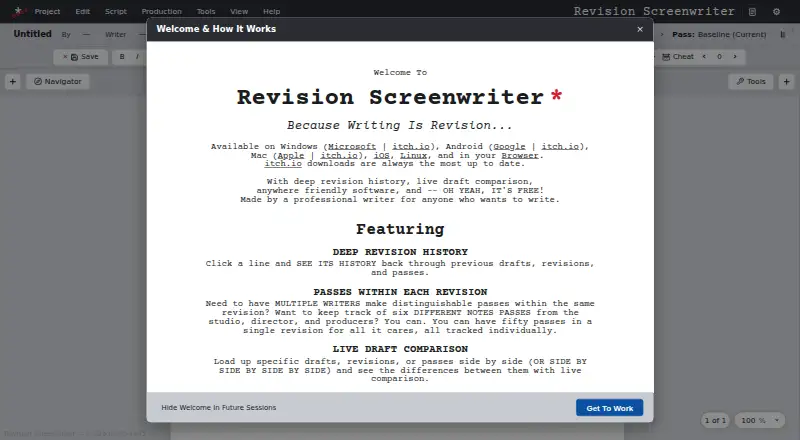
What Revision Screenwriter is
Revision Screenwriter is screenwriting software for people who want to write, with tools for tracking script changes, comparing drafts, collaborating and preparing production materials. Its version history keeps drafts, revisions and passes, and lets writers inspect the history of individual script elements. Drafts can be compared side by side, including when scenes have moved. Live Collaboration supports working on one script over the internet or a local network, but a desktop app is needed to host a session. Writers can tag script elements and scene details and generate a Movie Magic Scheduling .msd file; this production feature is described as experimental. The desktop app can read scripts aloud with custom voices and create MP3 or WAV recordings, with a separate voice-engine download required. Exports include PDF, .Fountain, .Fadein and .FDX. Autosave, optional parallel backup files and recovery checkpoints provide additional ways to preserve work. Revision Screenwriter is free and is listed for Android, iOS, Linux, macOS, web and Windows. Its collaboration connections transmit the full script and every keystroke between participants.
Good
- Free, with no plan limits listed.
- Tracks changes to individual script elements.
- Compares drafts even when scenes have moved.
- Exports PDF, Fountain, Fade In and FDX.
- Autosave, backups and recovery checkpoints are available.
Watch out
- A desktop app must host collaboration sessions.
- The .msd production feature is experimental.
- The voice engine requires an additional download.
- Collaboration transmits the entire script and every keystroke.
Who it suits
It suits screenwriters who want revision history and side-by-side draft comparison, or who need to collaborate across a local network or the internet. Writers preparing production materials may also use its tagged script information and experimental .msd export.
Verdict
Revision Screenwriter combines script revision history and draft comparison with collaboration, exports and production-oriented tools. Note the desktop-host requirement for collaboration and the experimental status of its .msd generation.
Plans and prices
From Revision Screenwriter's own pricing page, checked 15 Oct 2026.
| Plan | Price | What it gives you |
|---|---|---|
| Free | Free | all listed screenwriting, revision, collaboration, tagging, table-read and export features · no paid tier stated |
The facts
Each one read from Revision Screenwriter's own pages, with the date it was checked.
Where it runs
- Apple compatibility
- The App Store listing requires iOS 15 or later on iPhone and iPad, macOS 10.13 or later on Mac, and visionOS 1.0 or later on Apple Vision.checked 15 Oct 2026
- Apple privacy
- Apple's listing states that the developer does not collect data from the app.checked 15 Oct 2026
What it does
- Audience
- The maker says the software is made for anyone who wants to write and hopes it encourages people to write their stories.checked 4 Oct 2026
- Backups
- The app offers autosave, optional parallel backup files in .fountain, .fadein, and .fdx formats, and recovery checkpoints.checked 4 Oct 2026
- Collaboration
- Live collaboration works over the internet or a local network, with hosts controlling guest permissions.checked 15 Oct 2026
- Collaboration hosting
- Only desktop clients can host a collaboration session; guests can join from supported platforms.checked 15 Oct 2026
- Collaboration relay
- The maker provides instructions for running a personal internet collaboration relay.checked 15 Oct 2026
- Connection details
- The site says collaboration uses direct network connections and transmits the entire script and every keystroke between collaborators.checked 4 Oct 2026
- Draft comparison
- Users can compare multiple drafts, revisions or passes side by side, including when scenes have moved.checked 15 Oct 2026
- Draft import
- Multiple existing drafts can be imported into one revision tree.checked 15 Oct 2026
- Exports
- The application exports scripts to PDF, Fountain, Fade In and Final Draft FDX formats.checked 15 Oct 2026
- File formats
- The site says users can export to PDF, .Fountain, .Fadein, and .FDX.checked 4 Oct 2026
- File recovery
- The software maintains automated recovery checkpoints and can save parallel Fountain, Fade In and FDX backups.checked 15 Oct 2026
- Formatting
- Script page setup, element settings, key bindings, enter/tab behavior and color schemes are customizable.checked 15 Oct 2026
- Google Play developer
- Google Play identifies the developer as QUIXOTIC UNIVERSE, INC.checked 15 Oct 2026
- Google Play privacy
- Google Play says the app may share messages and files or documents, uses encryption in transit and cannot delete data.checked 15 Oct 2026
- Google Play update
- The Android listing reports an update on August 24, 2026.checked 15 Oct 2026
- Independent reaction
- Reddit commenters described the software as looking good and compared it favorably to WriterSolo, while noting they were still trying it.checked 15 Oct 2026
- Licence
- The opened official and store pages do not state an open-source licence or provide source-code terms.checked 15 Oct 2026
- Limit: collaboration data flow
- Live collaboration sends the complete script and every keystroke between participants over direct network connections.checked 15 Oct 2026
- Limit: maturity
- The maker calls the software brand new and asks users to report bugs, including platform-specific layout and key-binding problems.checked 15 Oct 2026
- Limit: scheduling export
- The maker describes .msd generation as experimental and tested end to end only with Movie Magic Scheduling 6 version 06.00.374.checked 15 Oct 2026
The company
- Legal maker
- A California business directory lists Quixotic Universe, Inc. as an active general corporation filed on January 4, 2023.checked 15 Oct 2026
- Maker headquarters
- The Google Play developer record gives Quixotic Universe, Inc.'s address as 339 Medea Creek Lane, Oak Park, California 91377, United States.checked 15 Oct 2026
The full review of Revision Screenwriter
Revision Screenwriter is a free screenwriting application for writers who need a detailed record of how a script changes. It is best suited to revision-heavy projects, from solo rewrites to collaborative work, provided a desktop computer can host collaboration sessions. Its broad production and reading tools add value, while the experimental scheduling export and direct-connection model deserve caution.
Overview
Revision Screenwriter treats a script as an evolving set of drafts, revisions, and passes rather than a single document. Its version history reaches individual script elements, making it easier to trace when a scene, line, or other component changed. That is more useful for substantial rewrites than a basic sequence of saved files.
The application is free and has no paid tier or trial period. Alongside writing and revision management, it includes side-by-side comparison, live collaboration, production tagging, table reads, exports, autosave, and recovery checkpoints. The range is unusually wide for a no-cost screenwriting tool, although some features have operational qualifications that matter in daily use.
Key features
Revision history and draft comparison
Version files retain drafts, revisions, and passes, with a history for each script element. You can compare drafts, revisions, or passes side by side, even when scenes have moved. That makes the comparison view appropriate for restructures and reordered sequences, not merely line edits in an unchanged script.
Collaboration
Live Collaboration supports work over the internet or a local network on the same script. A desktop application must host the session, so an all-mobile group or a team without a participating desktop user will find setup less convenient. Connections are direct and transmit the entire script plus every keystroke between collaborators; teams should consider that exposure before using it for sensitive material.
Production and table-reading tools
Script elements and scene information can be tagged for production breakdown, then exported as a populated Movie Magic Scheduling .msd file. The maker labels .msd generation experimental, so it is better treated as a useful starting point than as a dependable final scheduling workflow.
The desktop app can read scripts aloud with custom voices and create MP3 or WAV recordings. The voice engine requires an additional download, adding a setup step, but the result can support solo table-read preparation or review away from the editor.
Files and recovery
Exports include PDF, .Fountain, .Fadein, and .FDX, covering common handoff and interchange needs. Autosave, optional parallel backup files in .fountain, .fadein, and .fdx, and recovery checkpoints reduce the risk of losing work and give writers several ways to restore or move a project.
Pricing
Free — free. The software is free, with no free trial because there is no paid plan. No seat quotas, project caps, export restrictions, or other free-plan limits are stated, so the full described feature set is available without a subscription. That makes it a practical choice for writers who want revision tracking and production tools without recurring cost.
Platforms
Revision Screenwriter supports web, Windows, macOS, Linux, iOS, and Android. The cross-platform list is useful for drafting and review on different devices, but live collaboration still needs a desktop app to host a session, and table-read voice generation is a desktop feature.
Who it's for
This is a strong fit for screenwriters who make frequent passes, need to inspect changes after scenes move, or want one free application that spans writing, breakdown, reading, export, and backup. It also suits collaborators comfortable with direct network connections and a desktop host. Writers who require a mature scheduling pipeline, avoid transmitting every keystroke, or work entirely without desktop access should look elsewhere.
Pros and cons
Pros
- Element-level revision history: tracks the evolution of individual script components instead of only whole-file snapshots.
- Move-aware comparisons: side-by-side review remains useful after scenes are rearranged.
- Broad free toolkit: collaboration, production tags, table reads, exports, autosave, and recovery are included without a subscription.
- Flexible interchange: PDF, Fountain, Fade In, and Final Draft exports support common workflows.
- Wide device coverage: web, desktop, and mobile platforms are supported.
Cons
- Desktop host required: mobile-only collaborators cannot independently host a live session.
- Full-script, keystroke transmission: direct collaboration connections may not suit confidential projects.
- Experimental .msd generation: Movie Magic Scheduling output should be checked before production use.
- Extra voice-engine download: desktop table reads require an additional installation.
Alternatives
Browse the Screenwriting Software directory for more options. Choose Celtx if you want a cloud-based editor with real-time collaboration and a free studio limited to one project, plus a trial. Choose OpenDraft for a free, no-account, no-subscription application with no feature gating, including self-hosting. ScreenWeaver is an alternative when unlimited projects and pages with PDF and Final Draft export matter more than Revision Screenwriter's version history. Story Architect suits readers who prefer an open-core project with MIT-licensed core code. Choose WriterDuet if three free projects are enough and you want a separate paid tier with unlimited projects and real-time collaboration. DramaQueen offers unlimited-time free writing, formatting, and outlining on desktop platforms. Arc Studio Pro is a fit for users who need a polished free tier with two scripts and watermarked PDF export on iOS, macOS, or Windows. Scriptum is a free, open-source option with no subscription.
Verdict
Choose Revision Screenwriter if your priority is understanding and managing script revisions without paying, especially when scene moves and production notes are part of the workflow. Its main reason to look elsewhere is the collaboration design: desktop hosting and transmission of the complete script and every keystroke may conflict with your team, privacy requirements, or device setup.
Alternatives to Revision Screenwriter
- 1

Story Architect
Free planOpen sourceAndroidiOSLinuxmacOS8.6From $4.17 a month - 2

Celtx
Free planAndroidiOSWebExtension8.2From $11.24 a month - 3

ScreenWeaver
Free planAndroidiOSWebAPI8.2Free plan - 4

WriterDuet
Free planAndroidiOSWebLinux8.2From $9.99 a month - 5
TalkingDraft
Free planAndroidiOSWeb7.9From $79 a year - 6
Studiovity
AndroidiOSWebAPI7.8