PUSH Video Wallpaper
PUSH Video Wallpaper is a Windows app for setting videos, animated GIFs, or YouTube clips as desktop backgrounds, and it can also show videos, animations, im…
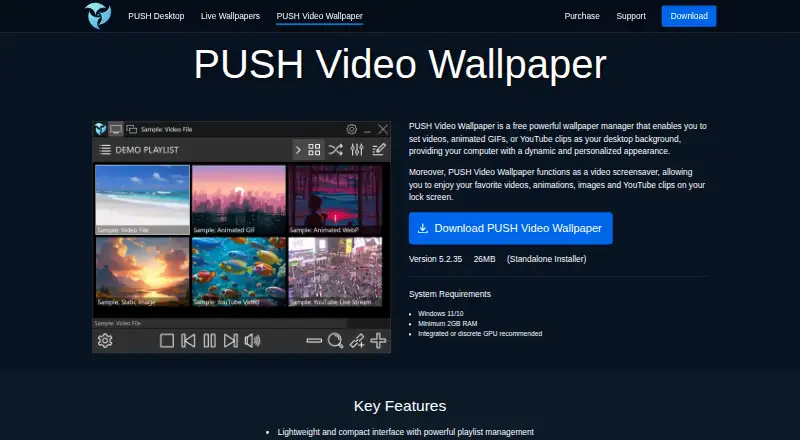
What PUSH Video Wallpaper is
PUSH Video Wallpaper is a Windows app for setting videos, animated GIFs, or YouTube clips as desktop backgrounds, and it can also show videos, animations, images, or YouTube clips as a screensaver. It supports MP4, GIF, WebP, images, direct video URLs, YouTube links, and playlists sourced from local files, folders, subfolders, ZIP archives, or YouTube playlists. Playlist controls include alignment, playback speed, looping, per-item duration, anti-aliasing, and default YouTube quality. For multi-monitor setups, users can duplicate or extend video, assign separate playlists, disable monitors independently, or stretch one playlist across screens. The app can pause during fullscreen games or video playback, reduce activity on battery, or stop rendering to free resources. The product page says an internet connection is not needed after setup. Requirements list Windows 10 or 11 and at least 2 GB RAM, with a GPU recommended. The free version enables all features but has a visible watermark. Paid licenses are perpetual, non-commercial, and include free updates for future versions.
Good
- Supports video, GIF, WebP, YouTube, and images.
- Playlist sources include local folders and ZIP archives.
- Multi-monitor options include separate playlists and spanning screens.
- Can pause during fullscreen games or video playback.
- Works offline after setup.
Watch out
- Free version displays a visible watermark.
- Windows 10 or 11 is required.
- Paid licenses are limited to non-commercial use.
- A GPU is recommended.
Who it suits
PUSH Video Wallpaper suits Windows users who want moving backgrounds or screensavers and control over playlists across multiple monitors. It may also fit users who want the app to reduce activity while gaming or on battery.
Verdict
PUSH Video Wallpaper offers several media sources, playlist controls, and multi-monitor arrangements for Windows desktops. The free version includes all features but adds a watermark, while paid licenses are for non-commercial use.
Plans and prices
From PUSH Video Wallpaper's own pricing page, checked 3 Oct 2026.
| Plan | Price | What it gives you |
|---|---|---|
| Free Version | Free | All features enabled · visible watermark |
| Home License | — | Home use · up to 5 PCs · non-commercial use · One-time payment; perpetual license |
| Personal License | — | Individual use · 1 PC · non-commercial use · One-time payment; perpetual license |
The facts
Each one read from PUSH Video Wallpaper's own pages, with the date it was checked.
What it does
- License terms
- Paid licenses are perpetual, include free updates for future versions, support offline activation, and are for non-commercial use only.checked 3 Oct 2026
- Multi-monitor
- The multi-monitor engine can duplicate or extend video, show separate playlists, enable or disable monitors independently, and stretch one playlist across screens.checked 3 Oct 2026
- Offline use
- The product page says no internet connection is required after setup.checked 3 Oct 2026
- Payment security
- The maker says payments are securely processed by FastSpring, its authorized reseller, and also lists PayPro Global as an alternative authorized reseller.checked 3 Oct 2026
- Performance controls
- The app can pause during fullscreen games or video playback, reduce activity on battery, or stop rendering to free resources.checked 3 Oct 2026
- Playlist controls
- Playlist settings include alignment, playback speed, looping, per-item duration, anti-aliasing, and default YouTube playback quality.checked 3 Oct 2026
- Playlist sources
- Playlists can use local media, folders and subfolders, ZIP archives, YouTube links, and YouTube playlists.checked 3 Oct 2026
- Privacy
- The privacy policy says the maker does not sell personal information and does not store full payment card information on its servers.checked 3 Oct 2026
- Privacy safeguards
- The privacy policy says reasonable measures are taken to protect personal information, while noting that no transmission or storage method can be guaranteed completely secure.checked 3 Oct 2026
- Refunds
- Refund requests may be submitted within 30 days of purchase and are evaluated individually for digital downloads.checked 3 Oct 2026
- Support
- The support page invites users to contact the maker about product problems, enhancement ideas, questions, comments, or requests through a web form.checked 3 Oct 2026
- Supported media
- The product page lists support for MP4, GIF, WebP, YouTube, images, and direct video URLs.checked 3 Oct 2026
- System requirements
- The listed requirements are Windows 11 or 10 and at least 2 GB RAM; an integrated or discrete GPU is recommended.checked 3 Oct 2026
- Wallpaper and screensaver
- The app sets videos, animated GIFs, or YouTube clips as desktop backgrounds and can show videos, animations, images, and YouTube clips as a screensaver.checked 3 Oct 2026
Alternatives to PUSH Video Wallpaper
- 1

Backdrops
Free planAndroidiOSWebmacOS8.0$1.99 one-time - 2

Vivid Walls
Free planWebmacOSWindows7.5$9.99 one-time - 3

DesktopHut
Free planAndroidWebExtensionmacOS7.3Free plan - 4
Hydra
Free planOpen sourceWebAPILinuxSelf-hosted7.3Free plan - 5
EarthDesk
iOSmacOSWindows7.2From $14.99 a year - 6
Day & Night
Free planmacOS7.1$0.99 one-time