ProctorDIY
ProctorDIY is remote exam-proctoring software for instructors who want to monitor their own students online with AI assistance.
What ProctorDIY is
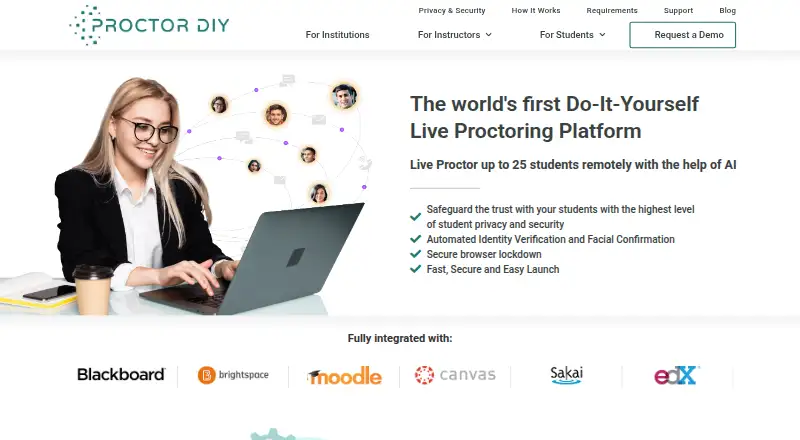
ProctorDIY is remote exam-proctoring software for instructors who want to monitor their own students online with AI assistance. Instructors or teaching assistants can oversee up to 25 students live. Identity checks use face, ID, and knuckle scans matched against a stored biometric profile. During exams, the software checks for blacklisted applications and devices, captures screenshots and webcam data, and flags possible policy violations. Processed sessions and time-stamped flags reach the instructor dashboard within 48 hours. ProctorDIY connects with LTI-compatible learning systems, including Canvas, Blackboard, D2L, Sakai, and Moodle. Students launch an application that the maker says takes under a minute to download and does not require administrative rights. It is offered for Android, macOS, Windows, web, as an extension, and self-hosted; Chromebook support depends on the LMS and product level. Pricing is on request. During exams, the software may access connected devices, the screen, webcam, system logs, and keystrokes. Student data is typically deleted 90 days after the final course submission date.
Good
- Live proctoring supports up to 25 students.
- Integrates with named LTI-compatible learning systems.
- Processed sessions return within 48 hours.
- 24x7x365 support is available through four channels.
Watch out
- Pricing is available on request.
- Chromebook support is limited to select LMSs and product levels.
- Exam monitoring may access keystrokes and system data.
- Student data is typically retained for 90 days after submission.
Who it suits
ProctorDIY suits K-12 instructors and teaching assistants who need remote exam monitoring with identity checks and LMS connections. It may also suit institutions that require cloud-based or on-premise data management.
Verdict
ProctorDIY combines live monitoring, biometric identity checks, and flagged session review for remote exams. Consider its exam-time data access and Chromebook limitations when assessing fit.
The facts
Each one read from ProctorDIY's own pages, with the date it was checked.
What it does
- Compliance
- The privacy page lists HIPAA, FERPA, GDPR, and SOC 2 Type 2 among its compliance standards.checked 8 Oct 2026
- Data access
- During an exam, the application may access connected devices, the desktop screen, webcam, process and system logs, and keystrokes for proctoring.checked 8 Oct 2026
- Deployment
- A company blog post says ProctorDIY offers cloud-based or on-premise data management.checked 8 Oct 2026
- Exam monitoring
- The application checks for blacklisted applications and devices, captures screenshots and webcam data, and flags potential policy violations.checked 8 Oct 2026
- Exam review
- The instructor dashboard receives processed sessions within 48 hours, with violations pre-flagged and time-stamped.checked 8 Oct 2026
- Identity checks
- Students can be verified with face, ID, and knuckle scans measured against a stored biometric profile.checked 8 Oct 2026
- Identity verification
- The student workflow uses face, ID, and knuckle scans to verify identity against a stored biometric profile.checked 8 Oct 2026
- Integrations
- The product integrates with LTI-compatible learning management systems and names Canvas, Blackboard, D2L, Sakai, and Moodle.checked 8 Oct 2026
- Intended users
- The maker describes the product as enabling K-12 instructors to monitor their own students during online exams.checked 8 Oct 2026
- Live monitoring
- The maker says an instructor can live proctor up to 25 students remotely with AI assistance.checked 8 Oct 2026
- Live proctoring
- Instructors or teaching assistants can live-proctor up to 25 students remotely with AI assistance.checked 8 Oct 2026
- Pricing
- The maker's site offers a demo request but does not state plan prices on the pages reviewed.checked 8 Oct 2026
- Privacy and retention
- The privacy page says student data is typically deleted 90 days after the final course submission date.checked 8 Oct 2026
- Purpose
- ProctorDIY provides remote exam proctoring that lets instructors monitor their own students with AI assistance.checked 8 Oct 2026
- Review turnaround
- The instructor page says processed sessions and pre-flagged violations are returned to the instructor dashboard within 48 hours.checked 8 Oct 2026
- Security
- The site states SOC 2 Type 2, HIPAA, FERPA, and GDPR compliance and says student data is typically deleted 90 days after the course grade submission deadline.checked 8 Oct 2026
- Student installation
- Students are prompted to launch a lightweight application that the maker says downloads in under one minute and requires no administrative rights.checked 8 Oct 2026
- Support
- Support is available 24x7x365 by live chat, phone, email, and support ticket.checked 8 Oct 2026
- System requirements
- The requirements page lists macOS Sierra 10.12 or later and Windows 7 or later; Chromebook support is limited to select LMSs and product levels.checked 8 Oct 2026
The company
- Headquarters
- New York, New York, United Stateschecked 28 Sep 2026
Where it runs
- Mobile app
- The privacy page says that if the ProctorDIY mobile app is used, the phone’s webcam records and uploads scans.checked 8 Oct 2026
Alternatives to ProctorDIY
- 1
Respondus Monitor
Free planAndroidiOSWebExtension8.1From $15 a year - 2
SMOWL
AndroidiOSWebAPI7.7From $7,500 a year - 3

Proctorio
Free planAndroidiOSWebAPI7.6Free plan - 4
ThinkExam
Free planAndroidiOSWeb7.5From $3,125 a month - 5
Gauge Online
AndroidiOSWebAPI6.9From $750 a year - 6
ProctorU Proctoring Platform
AndroidiOSWebAPI6.7