PrintMaster 10
PrintMaster 10 is desktop publishing software for Windows and macOS.
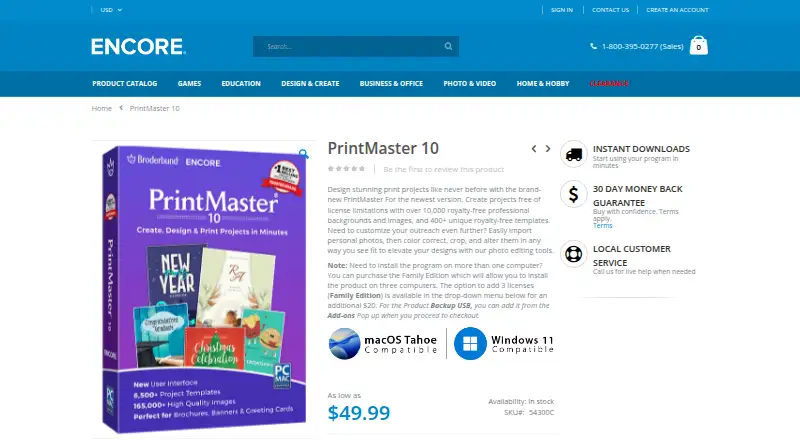
What PrintMaster 10 is
PrintMaster 10 is desktop publishing software for Windows and macOS. It creates greeting cards, invitations, postcards, calendars, brochures, banners, signs, business cards, and newsletters. You can begin with one of more than 6,500 templates or build a project from scratch, then adjust fonts, colors, photos, and other elements. Its artwork library lists over 165,000 clip art images, more than 10,000 royalty-free images, and over 400 royalty-free business templates. Photo tools support one-click edits, importing, color correction, and cropping. A built-in address book and mail merge help personalize mailings. Projects export to JPG, PNG, or PDF, with iCloud Drive saving and PDF sharing by email or iMessage. PrintMaster 10 costs $49.99, paid once and has no free plan. Family Edition adds installation on three computers for an additional $20. Windows and macOS use an internet connection under the listed requirements.
Good
- 6,500+ templates for projects
- 165,000+ clip art images
- Mail merge and address book
- Exports JPG, PNG, and PDF
- Windows and macOS support
Watch out
- Paid software with no free plan
- Internet connection required
- Family Edition costs an additional $20
Who it suits
It suits consumers and professionals creating print projects for home or business use. It is useful for people wanting templates, stock artwork, photo tools, and mailing features on Windows or macOS.
Verdict
PrintMaster 10 combines templates, stock artwork, photo editing, mailing tools, and several export formats. Its paid, desktop-only setup fits Windows and macOS users planning print projects.
Plans and prices
From PrintMaster 10's own pricing page, checked 9 Oct 2026.
| Plan | Price | What it gives you |
|---|---|---|
| PrintMaster 10 | $49.99, paid once | Family Edition adds 3 licenses for an additional $20 · Windows and macOS system requirements |
The facts
Each one read from PrintMaster 10's own pages, with the date it was checked.
What it does
- Artwork library
- The product page lists 165,000+ clip art images, 10,000+ royalty-free images, and 6,500+ templates, including 400+ royalty-free templates for business.checked 9 Oct 2026
- Design tools
- Users can start from a template or create a design from scratch, then customize fonts, colors, photos, and other elements.checked 9 Oct 2026
- Export formats
- Projects can be exported as JPG, PNG, or PDF files.checked 9 Oct 2026
- Integrations and sharing
- The product page lists iCloud Drive saving, email sharing of projects as PDFs, and sending project PDFs to iMessage contacts.checked 9 Oct 2026
- Intended users
- Encore describes its software as serving consumers and professionals, including people working on business or home projects.checked 9 Oct 2026
- Internet requirement
- The listed Windows and Mac system requirements include an internet connection.checked 9 Oct 2026
- Licenses
- The Family Edition option allows installation on three computers for an additional $20.checked 9 Oct 2026
- Mailing tools
- PrintMaster 10 includes a built-in address book and mail merge for personalized mailings.checked 9 Oct 2026
- Operating systems
- The page lists Windows 11, 10, 8/8.1, and 7, and macOS Catalina through Tahoe among its system requirements.checked 9 Oct 2026
- Photo editing
- The page describes one-click picture editing tools and options to import, color-correct, and crop personal photos.checked 9 Oct 2026
- Privacy and security
- Encore's privacy policy says personal information is stored on controlled, secure servers and that transmitted information such as credit card numbers is protected using encryption such as SSL.checked 9 Oct 2026
- Purpose
- PrintMaster 10 creates projects such as greeting cards, invitations, postcards, calendars, brochures, banners, signs, business cards, and newsletters.checked 9 Oct 2026
- Refund limit
- Encore says its 30-day money-back guarantee applies if software has not been downloaded, installed, or activated, and requires a completed Electronic Letter of Destruction or Letter of Destruction within 30 days.checked 9 Oct 2026
- Support
- Encore lists technical support by request form and online support through its Knowledge Base.checked 9 Oct 2026
The company
- Headquarters
- Novato, California, United Stateschecked 28 Sep 2026
Alternatives to PrintMaster 10
- 1

Blurb BookWright
Free planiOSWebAPImacOS8.1Free plan - 2

Flipsnack
Free planAndroidiOSWebAPI8.1Free plan - 3
InPage
Free planAndroidiOSWebLinux8.0From $50 a year - 4
VivaDesigner
Free planWebAPILinuxmacOS7.7Free plan - 5
Scribus
Free planOpen sourceAPILinuxmacOSSelf-hosted7.5Free plan - 6

Adobe InDesign
APImacOSSelf-hostedWindows7.3From $19.99 a month