
Planning.Wedding
Planning.Wedding is an online wedding planning platform for couples, families, and professional planners.
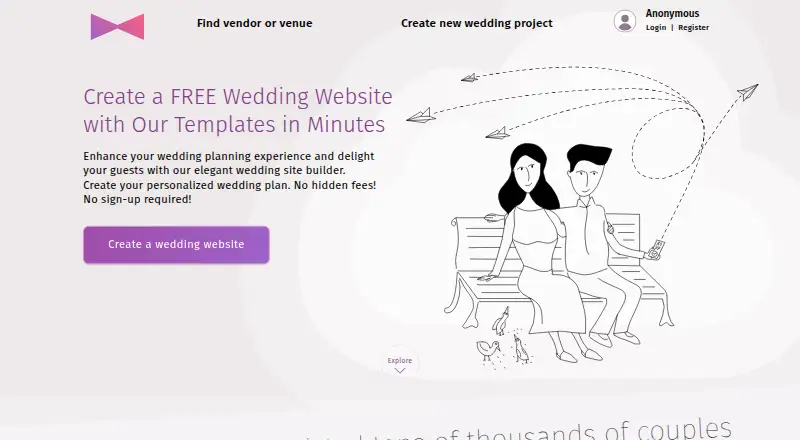
What Planning.Wedding is
Planning.Wedding is an online wedding planning platform for couples, families, and professional planners. Its tools cover guest lists, RSVPs, a wedding website, checklist, budget calculator, itinerary, timeline, vendor directory, seating charts, stationery, notes, and a guest photo album. Partners, family, and friends can collaborate in real time without creating accounts, and projects are stored in the cloud and synced when group members make updates. The website builder includes customizable templates, drag-and-drop sections, RSVP forms, password protection, and widgets for event details, travel, accommodation, FAQs, and registries. Couples can use a free custom URL and QR code in one of three domain formats, or connect a custom domain. Website RSVP responses link to the guest list for managing attendance, plus-ones, VIP events, and reminders. Android and Apple mobile apps share projects across devices. The Basic plan is free; Premium costs $29, paid once per project. The terms state that active projects and content are removed one year after the last update, while archived projects are removed after five years.
Good
- Guest list and website RSVP responses are connected
- Collaborators can contribute without creating accounts
- Basic plan includes a wedding website and checklist
- Mobile apps share projects across devices
Watch out
- Active projects are removed one year after their last update
- Archived projects are removed after five years
- Premium costs $29, paid once per project
Who it suits
Planning.Wedding suits couples, families, and professional planners coordinating wedding details. The maker also identifies venues as an intended audience, while noting the service is not meant to replace professional wedding planners.
Verdict
Planning.Wedding combines planning tools, collaboration, and a customizable wedding website, with a free Basic plan. Review the project retention terms before relying on it for long-term storage.
Plans and prices
From Planning.Wedding's own pricing page, checked 11 Oct 2026.
| Plan | Price | What it gives you |
|---|---|---|
| Basic | Free | Guest list · RSVPs · Wedding website · Checklist · Budget · Event itinerary · Vendors & venues · Notes · Files · 30 post-wedding photos · Custom vendors · Multi-language support |
| Business profile | $19 a month | Business profile membership · 30-day free trial · per month |
| Premium | $29, paid once | Unlimited PDF and Excel export · High-resolution seating charts and supplies · 5 AI credits · Advanced wedding website features · Guest photo storage for up to 1000 photos · per project |
| White-Label Integration | $120 a month | Custom subdomain and branding · Premium features included in every project · 14-day free trial · per month |
The facts
Each one read from Planning.Wedding's own pages, with the date it was checked.
What it does
- Collaboration
- Partners, family, and friends can collaborate on a project in real time without creating accounts.checked 11 Oct 2026
- Integrations
- The maker says a custom domain can be connected to a wedding website and that Cloudflare acts as a proxy to issue its SSL certificate.checked 11 Oct 2026
- Notable limit
- The terms say active wedding projects and their content are automatically removed one year after the last update, while archived projects are removed after five years.checked 11 Oct 2026
- Purpose
- Planning.Wedding describes itself as an all-in-one online wedding planning platform for couples, families, and professional planners.checked 11 Oct 2026
- RSVP management
- Website RSVP responses connect to the guest list tool, where users can manage attendance, plus-ones, VIP events, and reminders.checked 11 Oct 2026
- Security and storage
- The maker says projects are stored in the cloud and synced when group members make updates.checked 11 Oct 2026
- Support
- The site directs users with questions to its contact form or Telegram community group.checked 11 Oct 2026
- Website builder
- The wedding website builder offers customizable templates, drag-and-drop sections, RSVP forms, password protection, and widgets for event details, travel, accommodation, FAQs, and registries.checked 11 Oct 2026
- Website URLs
- Each couple can use a free custom URL and QR code, with three provided domain formats, or connect a custom domain.checked 11 Oct 2026
- Who it is for
- The maker says the service is intended for couples, planners, and venues and is not meant to replace professional wedding planners.checked 11 Oct 2026
Where it runs
- Mobile apps
- The maker says its app is available for Android phones and tablets and for iPhone and iPad, with projects shared across devices.checked 11 Oct 2026
Money
- Planning tools
- Its tools include guest lists, RSVPs, a wedding website, checklist, budget calculator, itinerary, timeline, vendor directory, seating charts, stationery, notes, and a guest photo album.checked 11 Oct 2026
The full review of Planning.Wedding
Planning.Wedding is a shared workspace for coordinating guests, schedules, budgets, and a couple’s wedding website. It suits couples who want family and friends to help without account setup; its broad free toolkit is appealing, but project deletion deadlines make it a poor long-term archive.
Overview
The platform connects website RSVPs to its guest list, where couples can track attendance, plus-ones, VIP events, and reminders. That link helps keep guest responses alongside the rest of the planning, while tools for budgets, timelines, vendors, seating, stationery, notes, and photos cover much of the event workflow in one place. It is meant to support professional planners, not replace them.
Partners, relatives, and friends can make real-time updates without creating accounts. Projects are stored in the cloud and sync as group members contribute. The important trade-off is retention: active projects and their content are removed one year after the last update, and archived projects after five years. Couples who need lasting records should keep copies elsewhere.
Key features
Planning and collaboration
The toolkit combines guest lists, RSVPs, a checklist, budget calculator, itinerary, timeline, vendor directory, seating charts, stationery, notes, and a guest photo album. This breadth is most useful when several people are coordinating logistics; it is less compelling for couples who only need a simple invitation page. Account-free collaboration makes it easier to involve occasional helpers, though the service still positions itself as a planning aid rather than a substitute for a professional.
Website and guest management
The website builder has customizable templates, drag-and-drop sections, password protection, RSVP forms, and widgets for event details, travel, accommodation, FAQs, and registries. Each couple gets a free custom URL and QR code in one of three formats, with an option to connect a custom domain. RSVP responses feed into guest management, including plus-ones, VIP events, and reminders, so this is more than a standalone website builder. Cloudflare acts as a proxy to issue the SSL certificate for a connected custom domain.
Photos and support
The free Basic plan includes 30 post-wedding photos, while Premium raises guest photo storage to 1,000. Questions can be directed to a contact form or the Telegram community group.
Pricing
Planning.Wedding uses a freemium model. Basic costs nothing and includes guest lists, RSVPs, a wedding website, checklist, budget, event itinerary, vendors and venues, notes, files, 30 post-wedding photos, custom vendors, and multi-language support. It is a substantial starting point for couples who want core planning and a site without paying; the clear photo cap is the main stated limit.
Premium costs $29, paid once, billed per project. It adds unlimited PDF and Excel exports, high-resolution seating charts and supplies, 5 AI credits, advanced website features, and storage for up to 1,000 guest photos. It makes sense for couples who need exportable records or greater photo capacity, but the one-time project charge is not a recurring monthly membership.
Business profile costs $19 a month, billed monthly, and includes Business profile membership plus a 30-day free trial. It is aimed at wedding businesses seeking a profile rather than couples buying extra planning capacity. White-Label Integration costs $120 a month, billed monthly, with custom subdomain and branding, Premium features in every project, and a 14-day free trial. That higher recurring price is suited to organizations that need branded projects across clients, not an individual couple.
There is also a custom-domain option, but no separate price is given for it. Whatever plan they choose, couples should account for the one-year inactivity deletion rule for active projects and the five-year limit for archived projects.
Platforms
Planning.Wedding is available on web, Android phones and tablets, and iPhone and iPad. Projects are shared across devices, which helps people coordinate from different screens without splitting planning work between separate project copies.
Who it's for
This is a strong fit for couples who want a website and RSVP management tied to a fuller planning toolkit, especially when family and friends will contribute. Planners and venues may find the business profile or white-label option more relevant. Couples who need a permanent archive, or who only want a minimal wedding page, should consider alternatives.
Pros and cons
- Pros: The free Basic plan combines guest management, a wedding website, budgeting, schedules, vendor tools, and other planning features, making it useful before a paid upgrade is necessary.
- Pros: Helpers can collaborate in real time without accounts, reducing setup friction for family and friends.
- Pros: RSVP forms connect to guest records, including plus-ones, VIP events, and reminders, keeping responses within the planning workflow.
- Cons: Active projects are removed after a year without updates, and archived projects after five years; it should not be treated as a permanent records store.
- Cons: Basic photo capacity is capped at 30 post-wedding photos, so couples expecting a larger shared album need Premium or another storage plan.
- Cons: White-label integration is a recurring $120 a month commitment, a poor fit for couples seeking only personal planning tools.
Alternatives
Wedding Website Builders is the broader category directory for comparing other wedding-site options.
Wedence is worth considering for couples who want a free option with an animated invite, two designs, unlimited guest lists, per-event RSVPs, and a guestbook.
Joy (WithJoy) may suit couples who want a free wedding website alongside a registry, mobile app, online RSVPs, and digital invitations.
The Knot Wedding Websites is another free choice for core website features, customizable templates, RSVP collection, registry links, and guest messaging.
Vowesta is a free alternative.
Duva is a web-based free platform for websites, RSVPs, guest lists, checklists, budgets, and vendor tracking, with messaging available for a one-time charge.
Git Hitched is a free alternative for readers considering a self-hosted or web-based option.
Kleap may fit someone building a broader site: its free plan includes publishing on a Kleap address, hosting, SSL, and 5 AI credits per day up to 30 per month.
RSVP Hub is a free alternative for readers focused on event RSVPs, QR tickets, and check-in across unlimited events.
Verdict
Choose Planning.Wedding if you want guest management, event planning, and a customizable wedding website in one shared workspace, particularly with account-free collaboration for helpers. Its free Basic plan covers a lot of core work, while Premium adds meaningful export and photo capacity. Look elsewhere if you need a dependable long-term archive: the project-retention deadlines are the platform’s most consequential drawback.
Getting started
- Open the Planning.Wedding website
- Create a wedding project on the free Basic plan
- Add guests, tasks, budget, itinerary, vendors, and other planning details
- Build a website with templates, sections, forms, and event widgets
- Share the project with partners, family, or friends
- Install the Android or iOS app to access the project on mobile
Limits worth knowing
The free Basic plan includes 30 post-wedding photos. Active projects and content are automatically removed one year after the last update, while archived projects are removed after five years.
Questions
Is Planning.Wedding free?
Yes. The Basic plan costs nothing, and Premium costs 29.00 USD once per project.
Which platforms are supported?
Planning.Wedding supports Android, iOS, and web access. Its apps are available for Android phones and tablets and for iPhone and iPad.
Can guests or collaborators work without accounts?
Partners, family, and friends can collaborate in real time without creating accounts.
Can I use my own domain?
Yes. Each couple gets a free custom URL and QR code, and a custom domain can also be connected.
What does Premium add?
Premium includes unlimited PDF and Excel export, high-resolution seating charts and supplies, five AI credits, advanced wedding website features, and storage for up to 1000 guest photos.
Alternatives to Planning.Wedding
- 1

Joy (WithJoy)
Free planAndroidiOSWeb8.0$0.39 one-time - 2
RSVP Hub
Free planAndroidiOSWeb7.9From C$5 a month - 3
The Knot Wedding Websites
Free planAndroidiOSWeb7.9From $19.99 a year - 4

Vowesta
Free planAndroidiOSWebAPI7.9From $19.99 a year - 5

Minted Wedding Websites
Free planiOSWeb7.7Free plan - 6
Drops
Free planWebAPI7.4From $2.99 a month