Plagiarisma
Plagiarisma is an originality checker that scans text against web sources, books, and academic papers.
What Plagiarisma is
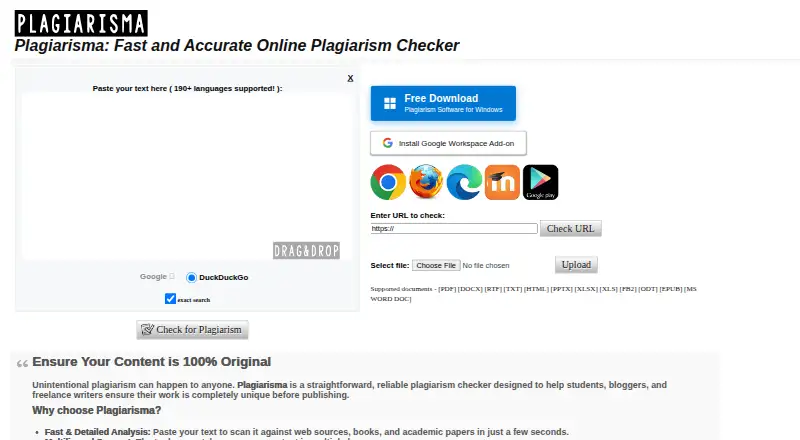
Plagiarisma is an originality checker that scans text against web sources, books, and academic papers. You can paste text, enter a URL, or upload a document; supported formats include PDF, DOCX, RTF, TXT, HTML, PPTX, XLSX, XLS, FB2, ODT, EPUB, and DOC. Its homepage says the checker supports more than 190 languages. The service is available on the web, and a Windows desktop download is listed as version 2.0 for .NET on Windows x86/x64. Desktop tools include plagiarism scanning, AI content detection, paraphrasing, and APA citation generation. A Google Docs add-on offers checking, paraphrasing, summarizing, and AI detection; its listing allows five free scans per day, with paid features available by monthly subscription. The company says it does not store private texts in public databases. Its FAQ says premium membership orders can be refunded within three days of purchase, while trial orders are not refundable. A free plan is listed, including a free Windows desktop checker.
Good
- Accepts pasted text, URLs, and document uploads.
- Homepage says the checker supports over 190 languages.
- Desktop version includes APA citation generation.
- Company says private texts are not stored in public databases.
Watch out
- Google Docs add-on allows five free scans per day.
- Trial orders are not refundable.
- Desktop download is listed for Windows.
Who it suits
Plagiarisma is aimed at students, bloggers, and freelance writers who want to check text originality. Its Windows tools and Google Docs add-on may also suit people who want paraphrasing or AI detection alongside plagiarism checking.
Verdict
Plagiarisma offers several ways to submit text, plus web, desktop, and Google Docs options. Review the free scan allowance and refund terms if you plan to use paid features.
Plans and prices
From Plagiarisma's own pricing page, checked 30 Sep 2026.
| Plan | Price | What it gives you |
|---|---|---|
| Plagiarisma Desktop Plagiarism Checker | Free | Free · Windows 11, 10, 8.1, 8, 7 |
| Standard checks | Free | Paste text, upload files, or check a URL · standard checks · No registration required |
| One-day subscription | $2, paid once | Pricing reported by independent review · One-time payment |
| One-month subscription | $10, paid once | Pricing reported by independent review · One-time payment |
| Three-month subscription | $25, paid once | Pricing reported by independent review · One-time payment |
| Six-month subscription | $49, paid once | Pricing reported by independent review · One-time payment |
| One-year subscription | $99 a year | Pricing reported by independent review · One-time payment |
| Paid features | — | Free scans up to 5 documents per day · paid features · Small monthly fee; amount not stated |
The facts
Each one read from Plagiarisma's own pages, with the date it was checked.
Money
- Add-on free limit
- The Marketplace listing says users can scan documents five times per day for free, with paid features available by monthly subscription.checked 30 Sep 2026
What it does
- AI detector
- The site provides a separate detector that estimates whether text resembles model-generated writing.checked 15 Oct 2026
- Chat tool
- Plagiarisma provides a free chat assistant without requiring a paid OpenAI account.checked 15 Oct 2026
- Chrome extension API use
- The Chrome listing instructs users to obtain an API key from the Plagiarisma members area to authorize the extension.checked 15 Oct 2026
- Chrome rating
- The Chrome Web Store listing shows 3.0 out of 5 from 2 ratings.checked 15 Oct 2026
- Citation tool
- The APA Citation Generator is described as following APA 7 formatting patterns.checked 15 Oct 2026
- Data handling
- The company says standard-check submissions are not added to a public database or shared with other users.checked 15 Oct 2026
- Desktop features
- The Windows desktop page lists plagiarism scanning, an AI content detector, an AI paraphrasing tool, and an APA citation generator.checked 30 Sep 2026
- Desktop version
- The listed desktop download is version 2.0 for .NET on Windows x86/x64.checked 30 Sep 2026
- File formats
- Supported uploads include PDF, DOCX, RTF, TXT, HTML, PPTX, XLSX, XLS, FB2, ODT, EPUB, and MS Word DOC.checked 30 Sep 2026
- Google Docs integration
- The Google Workspace Marketplace listing describes a Docs add-on with plagiarism checking, paraphrasing, summarizing, and AI detection.checked 30 Sep 2026
- Google Play rating
- The Android app is rated 3.4 out of 5 from 11.5K reviews and has 1M+ downloads.checked 15 Oct 2026
- Google Workspace integration
- The Google Workspace Marketplace listing provides a Docs add-on combining plagiarism checking, paraphrasing, summarization, and AI detection.checked 15 Oct 2026
- Grammar checker
- The product includes a grammar checker for spelling, punctuation, grammatical, and stylistic issues.checked 15 Oct 2026
- Input formats
- The web tool accepts PDF, DOCX, RTF, TXT, HTML, PPTX, XLSX, XLS, FB2, ODT, EPUB, and DOC files.checked 15 Oct 2026
- Input methods
- Users can paste text, check a URL, or upload a document.checked 30 Sep 2026
- Institutional limitation
- The company says its report is an aid and is not a substitute for institutional systems such as Turnitin.checked 15 Oct 2026
- Intended users
- The homepage describes the checker as designed for students, bloggers, and freelance writers.checked 30 Sep 2026
- Languages
- The homepage says the checker supports more than 190 languages.checked 30 Sep 2026
Where it runs
- Android features
- The Android listing says the app converts numerous document formats, saves results as HTML/PDF/EPUB, supports Google Voice, and can install to an SD card.checked 15 Oct 2026
The company
- Company controller
- The UK company-data listing names Yevgeniy Yekimov as the person with significant control.checked 15 Oct 2026
- Company record
- A UK company-data listing gives Plagiarisma Ltd. company number 10976393, incorporation date 22 September 2017, and a dormant-company SIC code.checked 15 Oct 2026
- Company registration
- The official site identifies the operator as Plagiarisma Ltd., formed in 2010, with a registered office at 71-75 Shelton Street, London.checked 15 Oct 2026
- Headquarters
- 71-75 Shelton St, London WC2H 9JQ, United Kingdomchecked 28 Sep 2026
The full review of Plagiarisma
Plagiarisma checks submitted writing against web sources, books, and academic papers, with web and Windows options. It suits students, bloggers, and freelance writers who want flexible submission methods and extra writing tools. Its broad file and language support is useful, but the free allowance is clearly capped only for the Google Docs add-on.
Overview
Users can paste text, submit a URL, or upload a document, making Plagiarisma adaptable to both finished files and material already online. The checker says it supports more than 190 languages. That breadth may help multilingual writers, though language count alone does not establish the quality of matching in any particular language.
Plagiarism checking is available through the online checker, a Windows desktop download, and a Google Docs add-on. The company says it does not store private texts in public databases, a meaningful assurance for students and writers handling client work, but not a complete account of data handling.
Key features
Uploads cover PDF, DOCX, RTF, TXT, HTML, PPTX, XLSX, XLS, FB2, ODT, EPUB, and DOC. This range accommodates common office documents as well as ebook formats, reducing the need to convert files before checking. Source coverage includes web, academic, and publisher material; the checker’s stated purpose also covers books and academic papers.
The Windows desktop page describes plagiarism scanning alongside an AI content detector, AI paraphrasing tool, and APA citation generator. The listed download is version 2.0 for .NET on Windows x86/x64. Those extras make the desktop edition more appealing to writers who need citation or AI-related tools as well as originality checks, though they are tied to the Windows option.
The Google Workspace Marketplace add-on brings plagiarism checking, paraphrasing, summarizing, and AI detection into Docs. It allows five free document scans per day, with paid features offered through a monthly subscription. That daily cap is workable for occasional checking but may constrain frequent classroom or editorial use.
Plagiarisma also offers LMS integrations and API access, which may suit institutions or services seeking a way to incorporate checking into existing workflows.
Pricing
Plagiarisma uses a freemium model. The Windows desktop plan is free: free, for Windows 11, 10, 8.1, 8, and 7. That makes it a no-cost option for Windows users, but does not establish a scan quota or other limits for the desktop plan.
The Docs add-on provides five free scans per day, while its paid features require a monthly subscription. The premium membership FAQ says orders are refundable within three days of purchase; trial orders are not refundable. Readers considering a trial should treat that exclusion as important, and check the subscription terms before paying.
Platforms
Plagiarisma supports web and Windows use. Its Google Docs add-on is another route for Workspace users, and the stated LMS integrations and API access may extend its reach into institutional or software workflows. The desktop download supports Windows x86/x64.
Who it's for
Students, bloggers, and freelance writers are the clearest fit: they can submit text in several ways, work across many file formats, and use the free Windows option or Docs add-on for occasional checks. Windows writers who also want paraphrasing, AI detection, or APA citation assistance may value the bundled desktop tools.
It is less compelling for users who need a clearly defined high-volume allowance or detailed subscription pricing before choosing. The daily free cap is explicit for Docs, but no equivalent desktop quota is given, and the paid add-on features are subscription-based.
Pros and cons
- Pros: Paste, URL, and file submission options accommodate different kinds of source material.
- Pros: Broad format support and more than 190 stated languages make it flexible for varied writing workflows.
- Pros: The free Windows plan and Docs add-on’s five daily free scans provide no-cost ways to get started.
- Cons: The five-scan daily allowance applies to the Docs add-on, so it may be restrictive for regular or batch checking.
- Cons: Paid Docs features use a monthly subscription, and trial orders are not refundable.
- Cons: The company’s privacy assurance addresses public databases, not other aspects of data handling.
Alternatives
Noplag is worth considering when a reader wants a stated free allowance of three checks per month, with up to 2,500 words per check, and web plus Common Crawl coverage; its listed platforms also include Linux, macOS, Windows, API, and self-hosting.
Plagium may suit mobile users who want Android or iOS access, or those who prefer a stated five free daily searches with a 4,000-character limit; its free account excludes Deep Search and API access.
PlagAware is a fit for readers who want a free monthly allowance of 10 pages and monitoring for up to 30 URLs with a Content Protection Banner.
PrePostSEO Plagiarism Checker may appeal to users seeking a wider toolset across web, mobile, desktop, and API platforms, with its Basic annual plan priced at $4.17 a year.
Copyscape is an alternative for readers prioritizing URL scans and site protection; its free scans are limited per website and return up to 10 results per search.
Plagiarism Checker X is a Windows-only option with a free Basic plan and a Professional license priced at 39.95 USD once for perpetual use.
Proofademic may suit users who want a short trial combining multilingual AI detection, plagiarism checking, and report export; its free offer includes 1,000 words and a three-day trial.
SmallSEOTools Plagiarism Checker is another web, extension, and API option, with a free allowance of up to 1,000 words per scan.
Browse AI Plagiarism Checkers, Plagiarism Checkers, or Plagiarism Detection Software to compare more options by category.
Verdict
Choose Plagiarisma if you want flexible text and document submissions, broad language and format support, and a free Windows route, especially if its Docs and desktop writing tools fit your workflow. Look elsewhere if you need a clearly stated high-volume quota or want fuller clarity on paid subscription terms before committing.
Alternatives to Plagiarisma
- 1

Noplag
Free planOpen sourceWebAPILinuxmacOS8.3From $9.99 a month - 2
Dolos
Free planOpen sourceWebAPILinuxmacOS7.7Free plan - 3

Originality.ai
Free planWebAPIExtension7.6From $12.95 a month - 4
Copyscape
Free planWebAPISelf-hosted7.5From $4.95 a month - 5

PlagAware
Free planWebAPI7.4Free plan - 6
Copyleaks AI Detector
WebAPIExtensionSelf-hosted7.2