Pixso
Pixso is a workspace for teams building digital products, combining UI/UX design, prototyping, whiteboarding, feedback, design systems, and developer handoff.
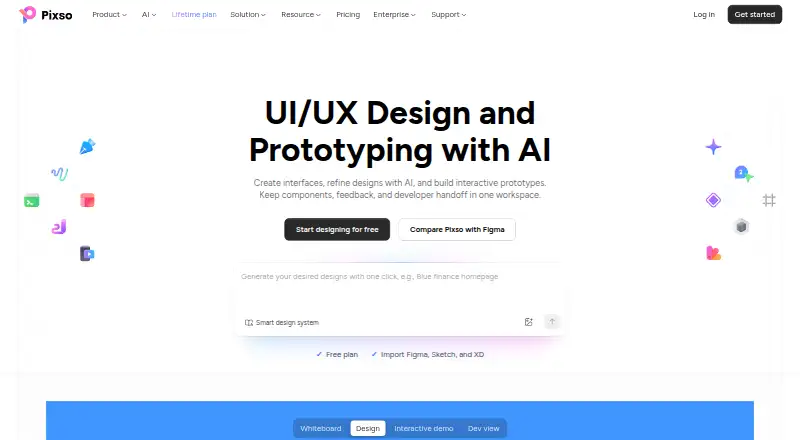
What Pixso is
Pixso is a workspace for teams building digital products, combining UI/UX design, prototyping, whiteboarding, feedback, design systems, and developer handoff. Designers, developers, product managers, and teammates can collaborate in real time, comment on work, and design and prototype in the same file. Its AI tools support design editing and can generate mind maps, brainstorming sessions, and information summaries. Pixso imports Figma, Sketch, Adobe XD, Axure, and SVG files, and can run imported Figma plugin code. A Dev view lets developers inspect specifications, copy code references, and export supported code and assets. The service offers an OpenAPI, public-cloud and private-deployment endpoints, and single-node or clustered deployment across intranet, private cloud, or public cloud. Private deployments include consulting, deployment support, and online training. The free plan includes unlimited viewer seats and draft files, but limits teams to one project, with three design files per project, three pages per design file, and three whiteboard files per project. Paid options include monthly team seats, annual enterprise seats, lifetime purchases, and on-premise deployment.
Good
- Real-time collaboration and comments support team reviews.
- Imports Figma, Sketch, Adobe XD, Axure, and SVG files.
- Dev view exposes specifications, code references, and supported exports.
- Private deployments include consulting, deployment support, and training.
- Free plan includes unlimited viewer seats and draft files.
Watch out
- Free teams are limited to one project.
- Free projects allow three design files and three whiteboard files.
- Desktop support requires Windows 10 64-bit or later, or macOS 12 or later.
Who it suits
Pixso suits product teams that want design, prototyping, collaboration, and developer handoff in one workspace. Private deployment options may be relevant to organizations needing intranet or private-cloud setups.
Verdict
Pixso combines collaborative design work with whiteboarding and developer handoff, and offers both cloud and private deployment paths. Review the free-plan project and file limits before choosing it for a larger team.
Plans and prices
From Pixso's own pricing page, checked 15 Oct 2026.
| Plan | Price | What it gives you |
|---|---|---|
| Free | Free | Unlimited viewer seats · Unlimited draft files · 3 free design files · 3 free whiteboard files · Limited-time free MCP |
| Team Collaborator seat | $4 a month | Unlimited projects · Unlimited files · Unlimited pages · Unlimited version history · Team resource libraries · Team font libraries · Private files · $4/month/seat |
| Team Developer seat | $8 a month | Unlimited projects · Unlimited files · Unlimited pages · Unlimited version history · Team resource libraries · Team font libraries · Private files · $8/month/seat |
| Team Creator seat | $12 a month | Unlimited projects · Unlimited files · Unlimited pages · Unlimited version history · Team resource libraries · Team font libraries · Private files · $12/month/seat |
| Enterprise Collaborator seat | $90 a year | Advanced permissions · Member seat management · Collaboration logs · Enterprise resource libraries · Enterprise font libraries · Enterprise security · Custom domain · Private files · SSO · On-premise · $90 /year/seat |
| Enterprise Developer seat | $120 a year | Advanced permissions · Member seat management · Collaboration logs · Enterprise resource libraries · Enterprise font libraries · Enterprise security · Custom domain · Private files · SSO · On-premise · $120 /year/seat |
| Lifetime purchase (1 team member) | $240, paid once | 1 professional team workspace · unlimited projects and folders · unlimited editable design files · unlimited editable whiteboard files · 500 total AI credits |
| Enterprise Creator seat | $280 a year | Advanced permissions · Member seat management · Collaboration logs · Enterprise resource libraries · Enterprise font libraries · Enterprise security · Custom domain · Private files · SSO · On-premise · $280 /year/seat |
| Lifetime purchase (3 team members) | $720, paid once | 1 professional team workspace · unlimited projects and folders · unlimited editable design files · unlimited editable whiteboard files · 1500 total AI credits |
| On-premise | Priced on request | On-premise deployment · Custom feature development · Core data encryption · Dedicated custom solutions · Dedicated technical consultant · Contact us |
The facts
Each one read from Pixso's own pages, with the date it was checked.
What it does
- AI
- Pixso’s design editor AI supports design editing, while Whiteboard AI can generate mind maps, brainstorming sessions, and information summaries.checked 30 Sep 2026
- AI credits
- Personal, team and enterprise AI credits are separate, non-transferable pools, and AI availability depends on seat type and editing permissions.checked 15 Oct 2026
- Changelog
- Release 3.0.6 dated September 18, 2026 added AI requirement clarification, freeform vector selection, multi-object node editing, MCP setup guides and design checks.checked 15 Oct 2026
- Collaboration
- Teams can review work through comments and real-time collaboration and design and prototype in the same file.checked 30 Sep 2026
- Design systems
- Pixso supports components, variants, design tokens, shared styles, team libraries and a Pixso DSM workspace.checked 15 Oct 2026
- Desktop support
- Pixso’s desktop app supports Windows 10 64-bit and above and macOS 12 Monterey and above.checked 30 Sep 2026
- Developer handoff
- Dev view exposes design specifications, code references, exportable assets, Ready for dev sections and canvas annotations.checked 15 Oct 2026
- Documentation depth
- The developer documentation includes editor, node, style, library, storage, font, import/export, event and tool APIs with typed signatures and examples.checked 15 Oct 2026
- File compatibility
- Pixso can import Figma, Sketch, Axure, Adobe XD and SVG files.checked 15 Oct 2026
- Funding
- Crunchbase lists Pixso as a private Series A company with three funding rounds, but the displayed amounts are obscured.checked 15 Oct 2026
- Integrations
- Pixso provides an OpenAPI with public-cloud and private-deployment endpoints and enterprise application credentials.checked 30 Sep 2026
- Licence
- Pixso is distributed under a proprietary end-user licence that grants personal, non-transferable, non-exclusive use; the EULA is a licence rather than a sale.checked 15 Oct 2026
- Limit: advanced capability depth
- A G2 reviewer says the platform is beginner-friendly but lacks advanced features for complex work.checked 15 Oct 2026
- Limit: migration and export
- AppSumo reviews report buggy Figma imports, missing imports for some other formats and problems exporting AI-generated designs.checked 15 Oct 2026
- Limit: support responsiveness
- An AppSumo reviewer reports support replies can take about a week and issue resolution can stretch for months; Pixso replied that it normally responds within 24 hours.checked 15 Oct 2026
- MCP extensibility
- Pixso documents local and remote MCP connections for IDEs and agents supporting Streamable HTTP, including Codex, Claude Code and Cursor.checked 15 Oct 2026
- OpenAPI
- Pixso documents an OpenAPI authorization flow with the public-cloud endpoint https://api.pixso.net and recommends keeping access tokens server-side.checked 15 Oct 2026
Where it runs
- Browser rendering
- Pixso uses WebGL and recommends Chrome with hardware acceleration enabled; disabled acceleration can make editing slower.checked 15 Oct 2026
- Limit: iPhone app compatibility
- Apple reviewers report server-address synchronization problems and that the app was not adapted to iPhone 16 sizing.checked 15 Oct 2026
The company
- Company legal name
- The official site identifies the developer as Shenzhen Pixso Technology Co., Ltd.; Crunchbase lists the legal name Shenzhen Bosi Yunchuang Technology Co., Ltd.checked 15 Oct 2026
- Company size
- Crunchbase lists Pixso as having 11–50 employees.checked 15 Oct 2026
- Headquarters
- Crunchbase lists Pixso in Shenzhen, Guangdong, China.checked 15 Oct 2026
Money
- Free-plan limit
- The Free plan allows one project per team, three design files per project, three pages per design file, and three whiteboard files per project.checked 30 Sep 2026
- Free use
- Individuals can use Pixso without charge to create projects and files and invite teammates for online collaboration.checked 15 Oct 2026
The full review of Pixso
Pixso is a shared workspace for interface design, prototyping, whiteboarding and developer handoff. It fits product teams where designers, developers and managers need to review and build in the same environment. The broad workflow and deployment choices are its strongest arguments; the free tier is constrained enough that larger teams will need a paid plan quickly.
Overview
Pixso combines UI and UX design, interactive prototypes, collaborative whiteboards, feedback and design systems in one workspace. Comments and real-time collaboration keep review close to the work, while design and prototyping can remain in the same file. That consolidation is useful for cross-functional product groups that otherwise move between separate design, planning and handoff tools.
Its deployment range is unusually broad. Teams can use the public cloud, private cloud or intranet options, including single-node and clustered private deployments. Enterprise customers receive deployment support, technical consulting, one-to-one service and online training. Those options make Pixso more plausible for organizations with infrastructure or data-location requirements than a cloud-only editor.
Key features
Whiteboard AI can create mind maps, brainstorming sessions and information summaries, and the design editor includes AI-assisted design editing. This gives teams a route from early ideation to interface work without changing products, although the published capabilities do not define the depth of the editor AI or a general AI-credit allowance.
Migration is a practical strength. Pixso imports Figma, Sketch, Adobe XD, Axure and SVG files, and it can run imported Figma plugin code. That can reduce switching friction for established teams, though compatibility does not promise identical behavior for every file or plugin.
Dev view supports inspection of design specifications, copying code references, and exporting supported code and assets. Design tokens, asset handoff and version history reinforce a designer-to-developer workflow rather than leaving developers to infer implementation details from screens.
An OpenAPI exposes public-cloud and private-deployment endpoints with enterprise application credentials. Enterprise security controls add advanced permissions, member and seat management, collaboration logs, audit logs, permission control, SSO and custom domains. These are meaningful governance features, but they are tied to enterprise pricing rather than the free workspace.
Pricing
Pixso uses a freemium structure. The Free plan costs nothing and includes unlimited viewer seats and unlimited draft files, but allows only one project per team, three design files per project, three pages per design file and three whiteboard files per project. It is suitable for learning the workflow or a small proof of concept, not a growing production library.
Team seats are billed monthly. A Collaborator seat is $4 a month, a Developer seat is $8 a month and a Creator seat is $12 a month. Each lists unlimited projects, files, pages and version history, plus private files. The tier choice therefore reflects a person's role; the stated inclusions do not describe additional feature differences, so teams should match seats carefully rather than assume every member needs the top tier.
Enterprise seats are billed annually: Collaborator costs $90 a year, Developer $120 a year and Creator $280 a year. All include advanced permissions, member and seat management, collaboration logs, SSO and a custom domain. On-premise pricing is custom and includes on-premise deployment, custom feature development, core data encryption and a dedicated technical consultant.
Two lifetime purchases are offered: 240.00 USD once for one team member, or 720.00 USD once for three. Each provides one professional team workspace, unlimited projects and folders, unlimited editable design and whiteboard files, and AI credits totaling 500 or 1,500 respectively. These are most relevant to small permanent teams that prefer an upfront cost; they do not replace enterprise governance features.
Platforms
Pixso supports Android, API access, macOS, self-hosted deployment, web and Windows. The desktop app requires Windows 10 64-bit or later, or macOS 12 Monterey or later. The combination suits mixed-device teams and organizations that need a private installation path.
Who it's for
Pixso is a strong fit for product teams spanning design, development and product management, especially when shared review, whiteboarding and handoff should live together. It also suits organizations that need private-cloud or intranet deployment and enterprise access controls. Solo users and small teams can evaluate it for free, but the one-project cap and per-project file limits make the free tier a poor long-term base for active product work.
Pros and cons
Pros
- One workspace covers UI design, prototyping, whiteboarding and developer handoff, reducing context switching for cross-functional teams.
- Import support for Figma, Sketch, Adobe XD, Axure and SVG, plus Figma plugin code compatibility, lowers migration barriers.
- Dev view, design tokens, code references, asset export and version history give developers a defined handoff path.
- Private-cloud, intranet and on-premise routes, with enterprise security controls, address stricter deployment requirements.
Cons
- The Free plan allows one project and only three design and three whiteboard files per project, limiting sustained team use.
- Role-based Team pricing means costs rise with each collaborator, developer and creator seat.
- Enterprise governance and on-premise support require higher-tier or custom pricing.
- AI features are described by function, while broader usage allowances are only stated for the lifetime plans' fixed credits.
Alternatives
Figma Dev Mode is the better choice when you want a dedicated Figma development workflow, broad platform coverage and a free Starter tier with unlimited drafts.
Mockplus suits teams seeking a free plan with 10 users, 10 active projects and unlimited designs rather than Pixso's single-project Free cap.
UXPin is worth considering for a prototype-focused workflow with a 14-day trial and a limited post-trial plan that includes two prototypes and 50 AI credits.
Justinmind is an alternative for free UI design and wireframing with one project, unlimited screens and viewers.
ProtoPie is suited to users who prefer a free prototype plan capped at two cloud prototypes, eight scenes each and 50MB of storage.
Lunacy fits teams wanting a free desktop-oriented option with up to 10 cloud documents, 10 editors or exporters and 30 days of version history.
Zeplin Flows is preferable when handoff centers on one free project with 100 screens and unlimited members.
Marvel is a simpler alternative whose free plan is limited to one user and one project.
See more options in Developer Handoff Software, Design Collaboration Software and Game UI Design Software.
Verdict
Choose Pixso if your product team wants design, whiteboarding and developer handoff in one workspace, particularly with Figma imports or private deployment requirements. Look elsewhere if you need a generous free workspace or a narrowly focused prototyping tool; Pixso's free caps and role-based seat costs make those priorities better served by alternatives.
Alternatives to Pixso
- 1

UXPin
Free planAndroidiOSWebmacOS8.4From $29 a month - 2

Justinmind
Free planAndroidiOSWebAPI8.3From $19 a month - 3

Mockplus
Free planAndroidiOSWebExtension8.3From $2.98 a month - 4

ProtoPie
Free planAndroidiOSWebAPI7.9From $25 a month - 5

Proto.io
Free planAndroidiOSWeb7.7From $29 a month - 6

Moqups
Free planWebAPIExtension7.6From $11 a month