PixelZen
PixelZen is an iOS color-by-number app built around pixel-art canvases.
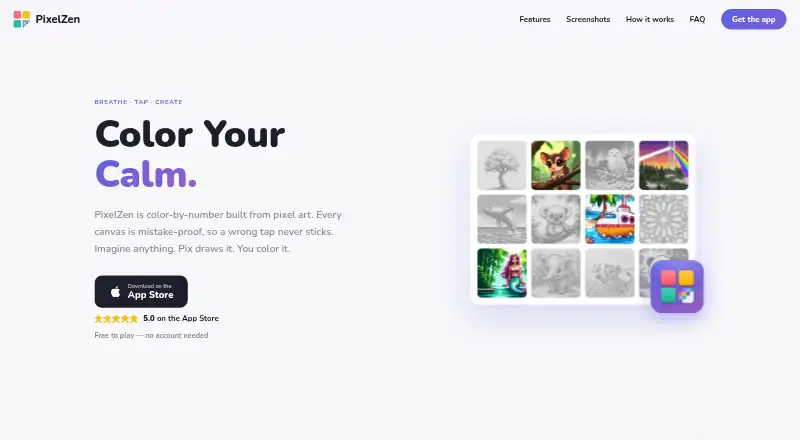
What PixelZen is
PixelZen is an iOS color-by-number app built around pixel-art canvases. Its canvases use numbered colors, and taps with the wrong color do not stick. Pix’s Workshop can turn a typed prompt or uploaded photo into a numbered canvas; each generation uses 1–3 orbs according to difficulty. The app also has themed collections of hand-picked canvases, with new books arriving regularly. Most are free, while some unlock with gems. A shared daily canvas offers a bonus reward and a separate streak; login streaks allow missed days without a reset. Hint, Bucket, Bomb, and Prism each come with one free daily charge. Premium adds unlimited power tools and Instant Finish. Completing a canvas plays back the coloring process, and finished art can be saved or shared in high resolution. Users can play as guests or sign in with Apple, Google, or email to keep progress across devices. PixelZen requires an internet connection to load books, save progress, and use Pix’s Workshop, and has no offline mode. Premium costs $9.99 a month.
Good
- Wrong-color taps do not stick.
- Pix’s Workshop accepts prompts and uploaded photos.
- Most themed canvases are free.
- Finished art can be saved or shared in high resolution.
Watch out
- Requires internet; there is no offline mode.
- Some books unlock only with gems.
- Premium costs $9.99 a month.
Who it suits
PixelZen suits iOS users who enjoy numbered pixel-art coloring and want to make canvases from prompts or photos. Its guest option works for people who do not want to create an account.
Verdict
PixelZen combines numbered pixel-art coloring with prompt- and photo-based canvas creation. The free plan includes core coloring and daily tool charges, while Premium adds unlimited power tools and other listed extras.
Plans and prices
From PixelZen's own pricing page, checked 30 Sep 2026.
| Plan | Price | What it gives you |
|---|---|---|
| Free | Free | Core coloring, books, daily challenge, streaks, achievements, and daily tool charges |
| PixelZen Premium | $9.99 a month | Unlimited power tools and Instant Finish · premium brush · 50 orbs every month · no banner ads · Billed monthly; renews automatically unless canceled at least 24 hours before the current period ends |
The facts
Each one read from PixelZen's own pages, with the date it was checked.
What it does
- Account options
- Users can play as guests without an account or optionally sign in with Apple, Google, or email to keep progress across devices.checked 30 Sep 2026
- Advertising and data
- The policy says Google AdMob uses the device advertising identifier for ads, and personalizes ads only if the user allows tracking; the maker says it does not sell personal information.checked 30 Sep 2026
- Age rating
- The maker’s support page says PixelZen is rated 13+ on the App Store.checked 30 Sep 2026
- AI canvas creation
- Pix’s Workshop turns a typed prompt or uploaded photo into a numbered pixel canvas, and each generation costs 1–3 orbs depending on difficulty.checked 30 Sep 2026
- Coloring books
- The app offers themed collections of hand-picked canvases, with new books arriving regularly; most are free and some unlock with gems.checked 30 Sep 2026
- Daily challenge
- A shared daily canvas has a bonus reward and its own streak, while login streaks allow missed days without resetting the streak.checked 30 Sep 2026
- Gallery and sharing
- Finishing a canvas plays back the coloring journey, and users can save or share high-resolution art.checked 30 Sep 2026
- Internet requirement
- PixelZen requires an internet connection to load books, save progress, and power Pix’s Workshop; it has no offline mode.checked 30 Sep 2026
- Privacy of creations
- The maker says creations from Pix’s Workshop are private to the user; prompts and uploaded images are sent to RetroDiffusion for generation and stored with the account alongside the result.checked 30 Sep 2026
- Support
- The maker directs users to [email protected] for help and purchase issues.checked 30 Sep 2026
- Third-party services
- The privacy policy lists Google Firebase for authentication, database, hosting, and cloud functions; Google AdMob for ads; Apple for in-app purchases; RetroDiffusion for AI image generation; and Capgo for live updates.checked 30 Sep 2026
- Tools
- Hint, Bucket, Bomb, and Prism each have one free charge daily; Premium includes unlimited power tools and Instant Finish.checked 30 Sep 2026
- What it does
- PixelZen is an iOS color-by-number app in which each canvas is pixel art and incorrect-color taps do not stick.checked 30 Sep 2026
Alternatives to PixelZen
- 1
Coloring Book: Color by Number
Free planAndroidiOSmacOSWindows7.9From $49.99 a year - 2
InColor
Free planAndroidiOSmacOS7.8From $29.99 a year - 3

Colorfy
Free planAndroidiOS7.1$7.99 one-time - 4
Pixel Color
Free planAndroidiOS7.0From $3.99 a month - 5
Fine Artist
Free planAndroidiOS6.9$0.99 one-time - 6

Paint by Number
Free planAndroidiOSWindows6.9Free plan