Fine Artist
Fine Artist is a pixel art coloring app for Android and iOS, with numbered-cell coloring and a separate free drawing mode described in its App Store listing.
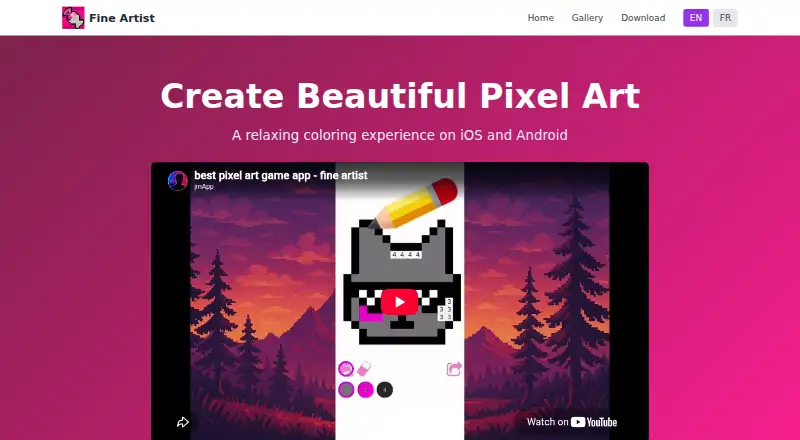
What Fine Artist is
Fine Artist is a pixel art coloring app for Android and iOS, with numbered-cell coloring and a separate free drawing mode described in its App Store listing. In numbered mode, users choose a palette color and apply it to cells carrying the matching number; swiping across matching cells can speed up coloring. The Color Splash booster fills the area around a selected cell, while Magic Wand colors neighboring cells with the same number. Completed artworks can be shared with friends and family. The free drawing mode offers a brush and paint bucket, custom color selection, and no numbered cells. The listing also describes recording a drawing and sharing it as a video. Fine Artist is free to download and play, with an optional Pro subscription for unlimited access. Listed one-time in-app purchases include No Ads Forever for 0.99 USD, Full Access for 1.99 USD, Pro Access for 19.99 USD, Premium Version for 34.99 USD, and Lifetime Premium for 39.99 USD. Apple lists multiple Pro Access prices. On iPhone and iPod touch, the App Store lists an iOS 15.0 minimum; on iPad, it lists iPadOS 15.0 or later.
Good
- Matching cells can be colored by swiping.
- Includes brush-and-bucket free drawing mode.
- Completed artwork can be shared.
- Free to download and play.
Watch out
- Optional in-app purchases are listed.
- iOS devices require iOS 15.0 or later.
- iPad requires iPadOS 15.0 or later.
Who it suits
Fine Artist may suit people who want to color numbered pixel art or make freeform drawings on Android or iOS. Its sharing options also suit users who want to share finished artwork or drawing videos.
Verdict
Fine Artist offers both numbered pixel coloring and a free drawing mode, with sharing for finished work. The app is free to play, while several optional purchases are listed.
Plans and prices
From Fine Artist's own pricing page, checked 8 Oct 2026.
| Plan | Price | What it gives you |
|---|---|---|
| Free | Free | Free to play; optional Pro subscription for unlimited access |
| No Ads Forever | $0.99, paid once | In-app purchase |
| Full Access | $1.99, paid once | In-app purchase |
| Pro Access | $19.99, paid once | In-app purchase; Apple lists multiple Pro Access prices |
| Premium Version | $34.99, paid once | In-app purchase |
| Lifetime Premium | $39.99, paid once | In-app purchase |
The facts
Each one read from Fine Artist's own pages, with the date it was checked.
Where it runs
- Android data safety
- Google Play says the app does not share data with third parties, may collect device or other IDs, encrypts data in transit, and does not allow data deletion.checked 8 Oct 2026
- Android distribution
- The maker's site links to Google Play for Android downloads.checked 8 Oct 2026
- iOS compatibility
- The App Store lists compatibility with iPhone, iPad, and iPod touch, requiring iOS 15.0 or later on iPhone and iPod touch and iPadOS 15.0 or later on iPad.checked 8 Oct 2026
What it does
- Coloring workflow
- Users select colors from a palette and apply them to matching numbered cells, and can swipe across cells with the same number to color faster.checked 8 Oct 2026
- Color Splash
- The Color Splash booster fills the area around the selected cell.checked 8 Oct 2026
- Developer
- Google Play identifies the developer as MEYER JULIEN THIERRY and lists an address in Saint-André-de-l'Eure, France.checked 8 Oct 2026
- Magic Wand
- The Magic Wand booster colors neighboring cells with the same number.checked 8 Oct 2026
- Purpose
- Fine Artist is a relaxing pixel art coloring app where users color numbered cells by matching them with colors.checked 8 Oct 2026
- Sharing
- Users can share completed pixel artworks with friends and family.checked 8 Oct 2026
- Support
- Google Play lists [email protected] as the support email.checked 8 Oct 2026
- Timelapse sharing
- The App Store listing says users can record their drawing and share it as a video.checked 8 Oct 2026
Money
- Free access
- The app is free to download and play, with an optional Pro subscription for unlimited access.checked 8 Oct 2026
- Free drawing mode
- The App Store listing describes a free coloring mode with a brush and paint bucket, custom color choice, and no numbers required.checked 8 Oct 2026
The full review of Fine Artist
Fine Artist combines numbered pixel-art coloring with a separate free-drawing mode, making it suitable for casual users who want either guided, low-pressure sessions or more direct painting. It is a good fit on Android and iOS for relaxing completion and quick sharing, but readers seeking a full pixel-art editor should look elsewhere.
Overview
The primary workflow is deliberately structured: select a color in the palette, then fill cells carrying the matching number. Swiping across cells with the same number reduces repetitive tapping, so larger sections can be completed efficiently. This format keeps the next action obvious and rewards steady progress, although it confines creativity to the supplied numbered pictures.
Fine Artist also includes a free coloring mode with a brush, paint bucket, and custom color selection, without numbered cells. On iOS, drawing sessions can be recorded and shared as video. Completed pixel artworks can be shared with friends and family, giving finished pictures a social use beyond the coloring session.
Key features
Numbered coloring and boosters
Color Splash fills the area around a selected cell, while Magic Wand colors neighboring cells with the same number. These boosters are practical shortcuts when a picture contains adjoining matching areas; they speed completion rather than turning the app into an unrestricted art tool.
Free drawing
The brush, bucket, and custom colors provide a less constrained alternative to numbered coloring. That makes Fine Artist more versatile than a number-only app, while the available description does not position it as a professional drawing workspace.
Sharing
Sharing finished work is built into the experience, and iOS users can share a recorded drawing as a video. This will appeal to users who want to show progress or completed pieces rather than keep them entirely private.
Pricing
Fine Artist is free to download and play. The Free plan costs nothing and includes free play, with an optional Pro subscription described as providing unlimited access. Several one-time in-app purchases are also offered: No Ads Forever costs 0.99 USD once; Full Access costs 1.99 USD once; Pro Access costs 19.99 USD once; Premium Version costs 34.99 USD once; and Lifetime Premium costs 39.99 USD once. Apple lists multiple Pro Access prices, so that option warrants checking before purchase. The lower-cost purchases suit readers who want a narrowly defined upgrade, while the premium and lifetime options are aimed at committed users; the published plan names do not establish identical inclusions across those purchases.
Platforms
The app supports Android and iOS. On iPhone and iPod touch it requires iOS 15.0 or later; iPad requires iPadOS 15.0 or later. Google Play says Fine Artist does not share data with third parties, may collect device or other IDs, encrypts data in transit, and does not allow data deletion. Android support is distributed through Google Play.
Who it's for
Choose Fine Artist for a relaxing, guided coloring routine with the option to switch to brush-based painting and share results. It is less suitable for artists who need layers, an expansive editing toolkit, or a canvas built from scratch, because its defining experience remains numbered pixel artwork.
Pros and cons
- Pro: Number matching and swipe coloring make repetitive cell filling clear and manageable.
- Pro: Color Splash and Magic Wand provide useful shortcuts for adjacent areas.
- Pro: Free drawing adds brush, bucket, and custom-color control beyond numbered pictures.
- Pro: Finished art and, on iOS, drawing timelapses can be shared.
- Con: The core mode depends on preset numbered cells, limiting original pixel-art creation.
- Con: Multiple paid options, including differently priced Pro Access listings, make the best upgrade less immediately clear.
Alternatives
Coloring Apps is the broader category to browse when you want to compare more coloring software. Pick Coloring Book: Color by Number instead if Windows support matters or a free tier with ads and weekly or monthly subscriptions suits you. InColor is the better choice for macOS access, a free trial, and a monthly subscription option. Choose Paint by Number for Windows support and a free trial. Colorfy offers Android and iOS access with a free, ad-supported download and an optional subscription. Coloring is worth considering if 60-plus free pictures and no free trial meet your needs. Pixel Color suits users wanting a free trial and an option that unlocks all content and features through Pixel Pro. Pixel Paint is the alternative for a free Android, iOS, and web app. Color Tap is a free iOS and macOS option with all content included in the download.
Verdict
Fine Artist is a sensible pick for casual colorers who value numbered guidance, quick boosters, and a free-drawing escape on a phone or tablet. Its main reason to choose it is the combination of structured pixel coloring and optional creative painting without an upfront charge. Look elsewhere if you need a clearer single subscription, broad desktop coverage, or a serious pixel-art editing environment.
Alternatives to Fine Artist
- 1
Coloring Book: Color by Number
Free planAndroidiOSmacOSWindows7.9From $49.99 a year - 2
InColor
Free planAndroidiOSmacOS7.8From $29.99 a year - 3

Colorfy
Free planAndroidiOS7.1$7.99 one-time - 4
Pixel Color
Free planAndroidiOS7.0From $3.99 a month - 5

Paint by Number
Free planAndroidiOSWindows6.9Free plan - 6
Coloring
Free planAndroidiOS6.7Free plan