
Pixea
Pixea is a macOS image editor and media viewer for browsing, adjusting, and playing images and video.
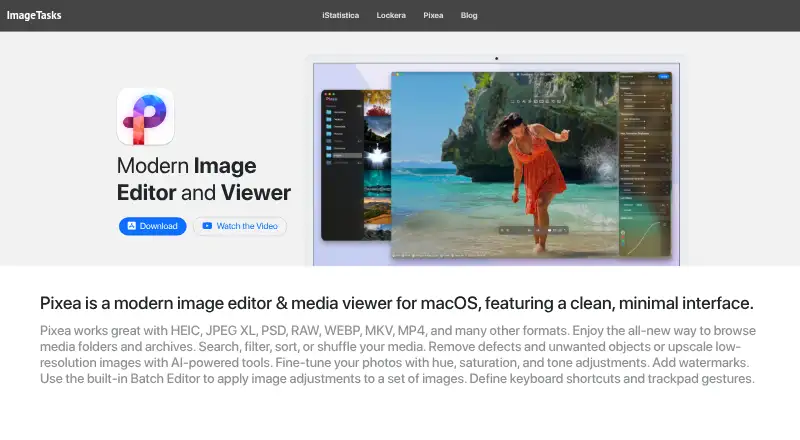
What Pixea is
Pixea is a macOS image editor and media viewer for browsing, adjusting, and playing images and video. It handles image formats including HEIC, JPEG XL, PSD, RAW, WebP, and AVIF, as well as MP4 and MKV video. Its browser can search, filter, sort, or shuffle media in folders and archives. Image tools cover exposure and color adjustments, crop, rotate, resize, sharpening, denoising, perspective correction, and watermarking. The Batch Editor supports global or per-image adjustments, presets, resizing, and upscaling, but the free version limits batch editing to three images. Machine-learning tools include object removal and 2× or 4× upscaling; object removal requires macOS 13 or later. The built-in video player offers audio-track and subtitle selection, resume playback, repeat modes, aspect-ratio changes, and speeds from 0.5× to 2×. Pixea requires macOS 11 or later and supports Apple Silicon and Intel Macs. Pixea Plus adds customizable shortcuts and gestures, expanded filtering and sorting, unlimited batch editing, and 4× upscaling. The free plan is free; Plus costs $1.99 a month, $14.99 a year, or $19.99, paid once.
Good
- Opens RAW, HEIC, JPEG XL, and AVIF images.
- Browser can search, filter, sort, or shuffle media.
- Includes exposure, color, crop, and watermark tools.
- Video player supports subtitles and audio-track selection.
- Supports Apple Silicon and Intel Macs.
Watch out
- Free batch editing is limited to three images.
- Object removal requires macOS 13 or later.
- Requires macOS 11 or later.
Who it suits
Pixea suits Mac users who want to browse and edit image collections alongside video playback. Its free plan may work for occasional batch edits, while Plus is relevant to users who need unlimited batch editing or expanded controls.
Verdict
Pixea brings media browsing, image adjustment, batch tools, and video playback together for macOS. Check the batch-editing limit and macOS requirements, especially if you need object removal.
Plans and prices
From Pixea's own pricing page, checked 11 Oct 2026.
| Plan | Price | What it gives you |
|---|---|---|
| Pixea Free | Free | Batch editing limited to 3 images · filtering by type only · 2× upscaling |
| Pixea Plus — monthly | $1.99 a month | Unlocks Plus features · Pixea Plus - 1 Month $1.99 |
| Pixea Plus — yearly | $14.99 a year | Unlocks Plus features · Pixea Plus - 1 Year $14.99 |
| Pixea Plus — lifetime | $19.99, paid once | Unlocks Plus features · Pixea Plus - Lifetime $19.99 |
The facts
Each one read from Pixea's own pages, with the date it was checked.
What it does
- AI tools
- Machine-learning features include object removal and 2× or 4× image upscaling.checked 11 Oct 2026
- Batch editing
- The Batch Editor applies global and per-image adjustments, presets, resizing, and upscaling; the free version limits batch edits to three images.checked 11 Oct 2026
- Browsing
- Its media browser can search, filter, sort, or shuffle media in folders and archives.checked 11 Oct 2026
- Editing
- Image tools include exposure, color adjustments, crop, rotate, resize, sharpening, denoising, perspective correction, and watermarking.checked 11 Oct 2026
- Formats
- It supports image formats including HEIC, JPEG XL, PSD, RAW, WebP, and AVIF, plus video formats including MP4 and MKV.checked 11 Oct 2026
- Object removal requirement
- The product page says object removal is based on macOS machine-learning functionality and requires macOS 13 or later.checked 11 Oct 2026
- Plus features
- Pixea Plus adds features including customizable shortcuts and gestures, expanded filtering and sorting, unlimited batch editing, and 4× upscaling.checked 11 Oct 2026
- Privacy
- The maker's privacy policy says the app does not collect, log, or store personal information during normal use and does not require registration.checked 11 Oct 2026
- Product
- Pixea is an image editor and media viewer for macOS with a clean, minimal interface.checked 11 Oct 2026
- Seller
- The App Store identifies ImageTasks Inc as Pixea's developer and seller.checked 11 Oct 2026
- Support
- The maker directs users to contact [email protected] or reach out on X at @imagetasks.checked 11 Oct 2026
- Video playback
- The built-in player supports audio-track and subtitle selection, resume playback, repeat modes, aspect-ratio changes, and playback speeds from 0.5× to 2×.checked 11 Oct 2026
Where it runs
- Platform requirement
- Pixea requires macOS 11 or later and supports Apple Silicon and Intel Macs.checked 11 Oct 2026
Alternatives to Pixea
- 1

ImageGlass
Free planOpen sourceAPILinuxmacOSWindows7.9From $9.99 a month - 2
Pineapple Pictures
Free planOpen sourceLinuxmacOSSelf-hostedWindows7.3Free plan - 3

ApolloOne
Free planmacOS7.2From $14.99 a year - 4

Pictureflect Photo Viewer
Free planWindows7.2$4.99 one-time - 5
FastStone Image Viewer
Free planWindows6.8$34.95 one-time - 6
IrfanView
Free planWindows6.8Free plan