Piano Chord Finder
Piano Chord Finder is a free interactive web page for identifying a piano chord from notes you select, play, or type.
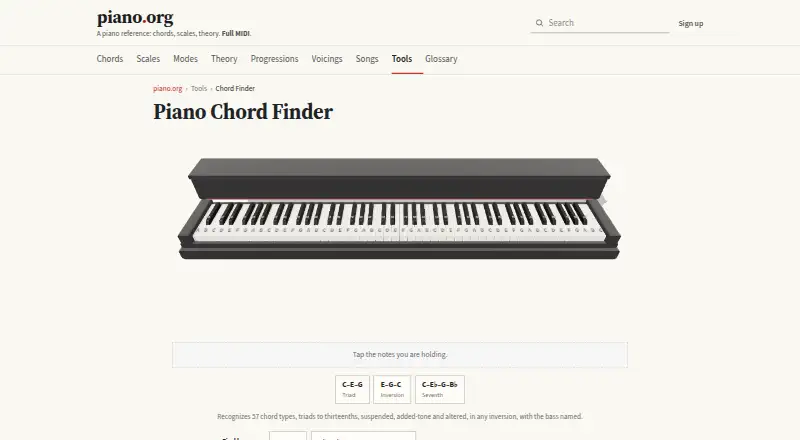
What Piano Chord Finder is
Piano Chord Finder is a free interactive web page for identifying a piano chord from notes you select, play, or type. You can tap its piano keyboard, enter note names with or without octave numbers, use MIDI note numbers, or connect a MIDI keyboard. The tool recognizes 57 chord types, covering triads through thirteenths as well as suspended, added-tone, and altered forms. It names inversions according to the lowest note as the bass, so E–G–C is identified as C/E. The displayed keyboard starts at C3–C5, with controls for changing its range. Piano.org describes the page as part of a piano reference and educational resource, and its reference content works without an account. Chord Finder names one chord; the separate What Am I Playing? tool listens live. Reverse chord lookup and voicing exploration are listed, while progression generation and chart export are not. The page is free, with no mobile apps and piano as its supported instrument.
Good
- Free web access with no account required
- Recognizes 57 chord types
- Accepts note names and MIDI numbers
- Identifies inversions by bass note
- Supports connected MIDI keyboards
Watch out
- Supports piano only
- No progression generator
- No chord chart export
- No mobile apps
Who it suits
It suits piano learners, players, and educators who need browser-based chord identification or voicing reference. It is also useful when you know the notes but not the chord name.
Verdict
Piano Chord Finder focuses on naming and examining individual piano chords through several input methods. It is a practical free reference, but it does not build progressions or export charts.
The facts
Each one read from Piano Chord Finder's own pages, with the date it was checked.
What it does
- Access
- The chord finder is available as an interactive web page; the site says its reference content works without an account.checked 8 Oct 2026
- Audience
- The maker describes piano.org as a piano reference and educational resource, and says its tools are intended to help users understand what they are playing.checked 8 Oct 2026
- Chord coverage
- It recognizes 57 chord types, from triads to thirteenths, including suspended, added-tone, and altered chords.checked 8 Oct 2026
- Chord identification
- The tool identifies a chord from notes selected on the piano or entered as text.checked 7 Oct 2026
- Data collection
- The privacy policy says the site uses Google Analytics 4 with analytics consent and also maintains aggregate usage tallies; its tool page does not specify separate Chord Finder data practices.checked 8 Oct 2026
- Development
- Justin Evans says piano.org is built in his spare time, nights and weekends.checked 7 Oct 2026
- Input methods
- You can tap notes on its piano keyboard, type note names or MIDI numbers, or connect a MIDI keyboard and play.checked 8 Oct 2026
- Input options
- Notes can be entered as note names, octave-specific note names, or MIDI note numbers.checked 7 Oct 2026
- Inversions
- It recognizes chords in any inversion and names the bass note; the page gives E–G–C as C/E.checked 8 Oct 2026
- Keyboard range
- The displayed keyboard initially covers C3–C5 and has controls to move its range.checked 8 Oct 2026
- MIDI keyboard
- The page says a connected MIDI keyboard can be used to play notes.checked 7 Oct 2026
- Pricing
- The maker says piano.org does not currently sell products and has no active checkout.checked 8 Oct 2026
- Privacy
- The privacy policy says the live What Am I Playing tool processes playing entirely in the browser and never records it.checked 8 Oct 2026
- Privacy limits
- The privacy policy says that when a combination cannot be named or a displayed name is flagged as wrong in What Am I Playing?, the anonymous note pattern and, for flags, the displayed name may be logged without a user identifier, account ID or IP address.checked 7 Oct 2026
- Product distinction
- Chord Finder names one chord, while the separate What Am I Playing tool listens live.checked 8 Oct 2026
- Purpose
- Piano Chord Finder identifies a chord from notes you select, play, or type.checked 8 Oct 2026
- Scope
- Chord Finder names one chord, while the separate What Am I Playing? tool listens live.checked 7 Oct 2026
- Support
- The maker invites users to report mistakes or contact the site.checked 8 Oct 2026
The company
- Maker background
- Justin Evans says he studied jazz piano, taught, and has a computer graphics degree from Purdue.checked 7 Oct 2026
Alternatives to Piano Chord Finder
- 1
ChordU
Free planAndroidiOSWeb7.9From $50 a year - 2
Chord Analyser
Free planAndroidiOS7.6$3.49 one-time - 3

Chordio
Free planiOSmacOS7.5$14.99 one-time - 4
Chordify
AndroidiOSWebAPI7.3From $2 a month - 5

Chord ai
Free planAndroidiOS7.1From $69 a year - 6
Reverse Chord Finder Pro
iOSmacOS7.1From $0.99 a month