
PhotoTaken
PhotoTaken is a desktop photo browser for organizing and culling large shoots before selected images go to an editing application.
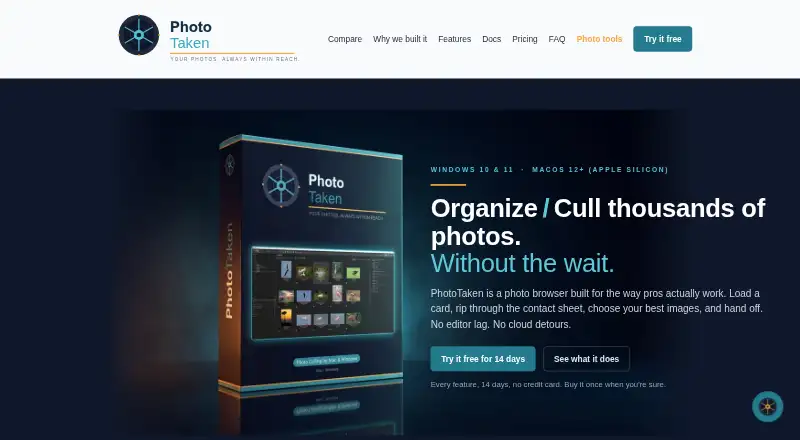
What PhotoTaken is
PhotoTaken is a desktop photo browser for organizing and culling large shoots before selected images go to an editing application. Its contact sheets load thumbnails in the background, and images can be sorted or filtered by color tag, rating, and file type. Search covers metadata such as camera, lens, ISO, aperture, date, captions, copyright, and location. RAW and JPEG versions of a shot remain paired when renamed, moved, or dragged. Color tags and star ratings are written to standard XMP for use in compatible tools, including Lightroom, Bridge, and Photo Mechanic. The app can display online-only photos from OneDrive, Dropbox, and Google Drive, plus iCloud on Mac, downloading an item when opened. Full includes ingest to two destinations, editing, batch renaming, export, conversion, and watermarks; Light omits several of these tools. PhotoTaken Light costs $69, paid once, and Full costs $189, paid once. An upgrade from Light to Full costs $120, paid once.
Good
- Contact sheets load thumbnails in the background.
- Pairs RAW and JPEG shots during file operations.
- Writes color tags and ratings to standard XMP.
- Full supports copying a card to two destinations.
- Displays online-only photos from supported cloud services.
Watch out
- Light lacks whole-library search and filter builder.
- Light omits dual-destination ingest.
- Light omits batch rename, export, and conversion.
- Full costs $189, paid once.
Who it suits
PhotoTaken suits photographers handling large shoots, including weddings, sports, and events. It is for people who want to sort and select images before editing them elsewhere.
Verdict
PhotoTaken focuses on browsing, searching, and culling image-heavy shoots, with Full adding ingest and file-management tools. Choose between Light and Full based on whether you need the features Light leaves out.
Plans and prices
From PhotoTaken's own pricing page, checked 4 Oct 2026.
| Plan | Price | What it gives you |
|---|---|---|
| PhotoTaken Light | $69, paid once | Up to two of your own computers · Windows or Mac · free updates within the 1.x release line · one-time license |
| Upgrade from Light to Full | $120, paid once | For existing Light license holders · license key does not change · upgrade to Full |
| PhotoTaken Full | $189, paid once | Up to two of your own computers · Windows or Mac · free updates within the 1.x release line · one-time license |
The facts
Each one read from PhotoTaken's own pages, with the date it was checked.
What it does
- Audience
- The maker describes PhotoTaken as a workflow app for professional photographers, including people shooting weddings, sports, and events or handling high volumes of images.checked 4 Oct 2026
- Cloud files
- It can show online-only photos from OneDrive, Dropbox, and Google Drive, plus iCloud on Mac, and download an item when opened.checked 4 Oct 2026
- Contact sheet
- It builds a contact sheet with thumbnails that load in the background and supports sorting and filtering by color tag, rating, and file type.checked 4 Oct 2026
- Formats and editing
- The app browses 26 RAW formats and supports IPTC and EXIF editing, batch renaming, export, format conversion, and watermarks in Full.checked 4 Oct 2026
- Ingest and backup
- Full supports copying from a card to two destinations simultaneously and rolls back the primary copy if the backup copy fails.checked 4 Oct 2026
- Integrations
- Color tags and star ratings are written to standard XMP for use in Lightroom, Bridge, Photo Mechanic, and other tools that read XMP.checked 4 Oct 2026
- Metadata search
- It searches photo metadata such as camera, lens, ISO, aperture, date, captions, copyright, and location, with a point-and-click filter builder.checked 4 Oct 2026
- Notable limit
- Light does not include whole-library search, the point-and-click filter builder, most IPTC and EXIF editing, dual-destination ingest, batch rename, or export and conversion.checked 4 Oct 2026
- Privacy
- The maker says photos, tags, ratings, and project files stay on the user's computer and the app does not include telemetry or crash reporting that sends data off-device.checked 4 Oct 2026
- Purpose
- PhotoTaken is a desktop photo browser for organizing and culling large shoots before handing selected images to an editing application.checked 4 Oct 2026
- RAW and JPEG
- It pairs RAW+JPEG shots as one item so renaming, moving, or dragging them keeps both files together.checked 4 Oct 2026
- Security
- The maker says the Mac app is signed with its Apple Developer ID and notarized by Apple, and the Windows app is code-signed by LorMarSoft, LLC.checked 4 Oct 2026
- Support
- Email support is available at [email protected].checked 4 Oct 2026
The company
- Maker
- LorMarSoft, LLC says it is a US-based software company founded by Mark Freedman.checked 4 Oct 2026
Alternatives to PhotoTaken
- 1

ImageGlass
Free planOpen sourceAPILinuxmacOSWindows7.9From $9.99 a month - 2
Pineapple Pictures
Free planOpen sourceLinuxmacOSSelf-hostedWindows7.3Free plan - 3

ApolloOne
Free planmacOS7.2From $14.99 a year - 4

Pictureflect Photo Viewer
Free planWindows7.2$4.99 one-time - 5
FastStone Image Viewer
Free planWindows6.8Free plan - 6
IrfanView
Free planWindows6.8Free plan