Photopus
Photopus is Windows software for batch editing photos, with tools to convert, resize, rename, watermark, rotate, flip, crop, touch up, and apply color adjust…
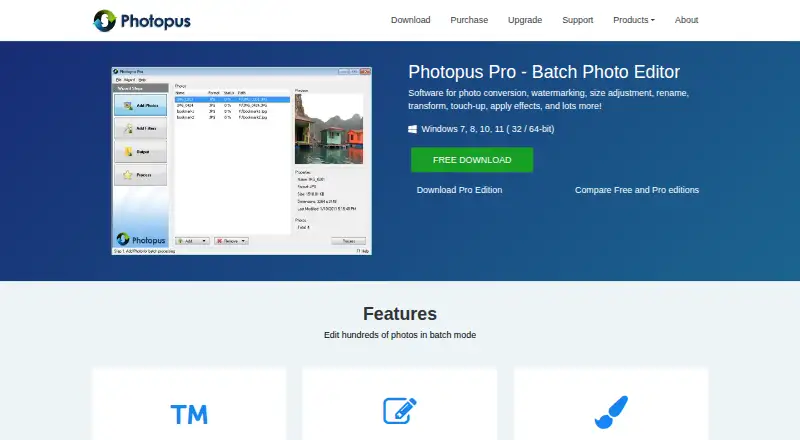
What Photopus is
Photopus is Windows software for batch editing photos, with tools to convert, resize, rename, watermark, rotate, flip, crop, touch up, and apply color adjustments and effects. Batch mode can process hundreds of photos, and the product lists support for 90 image formats, including RAW camera images. It preserves image metadata after processing and can create multi-page PDF or TIFF files from multi-page images. The free edition is available, while Photopus Pro costs 19.95 USD once and includes one year of free upgrades and a 30-day money-back guarantee. Format access varies by edition: the comparison lists PDF and multi-page PDF, PNG, RAW camera formats, and additional image formats as Pro features. A Pro evaluation trial is available, but expires after 9 executions. Listed system requirements are a 1 GHz CPU, 1 GB RAM, and 100 MB disk space. Support is by email; the maker says regular telephone support is not provided.
Good
- Batch mode handles hundreds of photos.
- Supports 90 formats, including RAW camera images.
- Retains metadata after processing.
- Can create multi-page PDF or TIFF files.
Watch out
- Some formats are listed as Pro features.
- The Pro trial expires after 9 executions.
- Regular telephone support is not provided.
Who it suits
Photopus suits Windows users who need to apply repeated edits across a photo collection, including resizing, renaming, or watermarking. It may also fit users who need batch conversion or metadata retention.
Verdict
Photopus focuses on batch photo work, with a broad set of editing tools and metadata retention. Check the edition comparison if you need particular formats, since some are listed as Pro features.
Plans and prices
From Photopus's own pricing page, checked 7 Oct 2026.
| Plan | Price | What it gives you |
|---|---|---|
| Photopus | Free | Free edition; Windows 7, 8, 10, 11 |
| Photopus Pro | $19.95, paid once | Windows 7, 8, 10, 11 · 1 year free upgrades · 30-day money-back guarantee |
The facts
Each one read from Photopus's own pages, with the date it was checked.
What it does
- Batch editing
- The product can edit hundreds of photos in batch mode.checked 7 Oct 2026
- Editing features
- Features include text and image watermarks, resize, rotate, flip, crop, color adjustments, and image effects.checked 7 Oct 2026
- Image formats
- Photopus supports more than 90 image formats, including RAW camera images.checked 7 Oct 2026
- Metadata
- The product maintains image metadata after processing.checked 7 Oct 2026
- PDF and TIFF
- It can create multi-page PDF or TIFF files from multi-page images.checked 7 Oct 2026
- Product
- Photopus is batch photo editing software for converting, watermarking, resizing, renaming, transforming, touching up, and applying effects to images.checked 7 Oct 2026
- Purchase protections
- The maker's purchase page advertises advanced encryption and fraud protection for financial data, a 30-day money-back guarantee, and one year of free upgrades.checked 7 Oct 2026
- Support
- The maker lists email support and says it does not provide telephone support on a regular basis.checked 7 Oct 2026
- System requirements
- The download page lists a 1 GHz CPU, 1 GB RAM, and 100 MB disk space for Photopus and Photopus Pro.checked 7 Oct 2026
The company
- Company address
- The contact page lists Softdiv Software Sdn Bhd at 216, Jalan Permai, Taman Bukit Gambier, 11700 Gelugor, Penang, Malaysia.checked 7 Oct 2026
- Headquarters
- Gelugor, Penang, Malaysiachecked 28 Sep 2026
Money
- Free edition limits
- The edition comparison lists PDF and multi-page PDF, PNG, RAW camera formats, and additional image formats among Pro features.checked 7 Oct 2026
- Trial limit
- The Photopus Pro evaluation trial expires after 9 executions.checked 7 Oct 2026
Alternatives to Photopus
- 1

Convertio
Free planAndroidiOSWebAPI8.3From $6.99 a month - 2
FreeConvert GIF Maker
Free planAndroidiOSWebAPI8.2From $12.99 a month - 3
Zamzar API
Free planAndroidiOSWebAPI8.2From $25 a month - 4
Aspose.Imaging
Free planAndroidiOSWebAPI8.1$999 one-time - 5

CloudConvert Audio Converter
Free planAndroidiOSWebAPI8.1From $10 a month - 6
XnConvert
Free planAndroidLinuxmacOSWindows7.9€6.50 one-time