Aspose.Imaging
Aspose.Imaging provides browser-based image conversion alongside APIs and cross-platform image-processing apps.
What Aspose.Imaging is
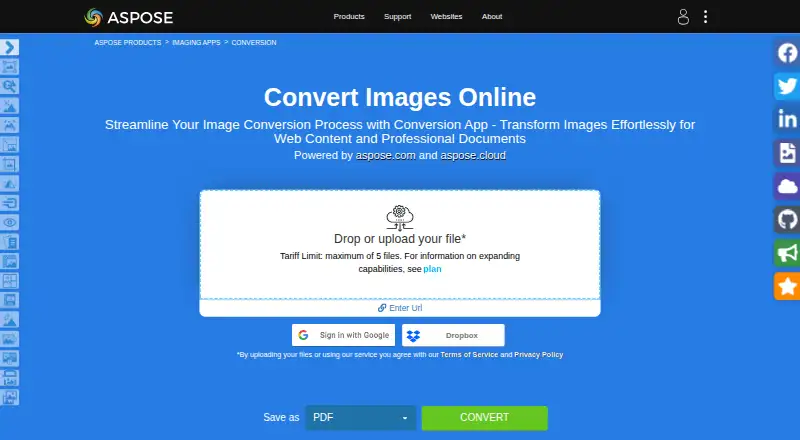
Aspose.Imaging provides browser-based image conversion alongside APIs and cross-platform image-processing apps. Its Conversion app changes raster and vector images into formats including PDF, PSD, GIF, PNG, DICOM, JPG, SVG, APNG, BMP, TIFF, WEBP, HTML5 Canvas, EMF, and WMF. One conversion operation can include up to 10 files. The web service works in a browser on any operating system and does not require installation. Other tools in the product family cover watermarking, reverse image search, object detection, compression, resizing, cropping, rotation, merging, deskewing, and background removal. Developers can use .NET and Java APIs or cloud REST APIs, with Cloud SDKs for C#, Python, PHP, Java, Android, Node.js, and Ruby. Listed integrations include Microsoft SharePoint and JasperReports. The browser conversion plan is free, while the API plan is listed at $999, paid once. Uploaded files are deleted from the servers after 24 hours, and download links then stop working.
Good
- Converts raster and vector images to numerous formats.
- Browser conversion needs no software installation.
- Cloud SDKs are available for several programming languages.
- Free technical support is available.
Watch out
- A conversion operation is limited to 10 files.
- Uploaded files and download links expire after 24 hours.
- API plan is listed at $999, paid once.
Who it suits
Aspose.Imaging suits people who need browser-based image conversion or developers adding image processing through APIs. Its web converter can be used without installing software.
Verdict
Aspose.Imaging offers a free browser converter and a broader set of image-processing tools and APIs. Keep the 10-file operation limit and 24-hour file retention in mind.
Plans and prices
From Aspose.Imaging's own pricing page, checked 14 Oct 2026.
| Plan | Price | What it gives you |
|---|---|---|
| Online Conversion | Free | browser app · maximum 5 uploaded files · output formats include PDF, PSD, JPG, PNG, GIF, TIFF, WEBP and SVG |
| Aspose.Imaging Conversion | Free | Free browser app · maximum 10 files per operation · uploaded files deleted after 24 hours |
| Developer Small Business (Python via .NET) | $999, paid once | 1 developer · 1 deployment · free support · US$999 |
| Aspose.Imaging API | $999, paid once | .NET, Java, SharePoint, JasperReports, Python via .NET · family pack from US$1399 |
| Aspose.Imaging platform license | $999, paid once | .NET, Java, SharePoint, JasperReports or Python via .NET · native image APIs · from US$999 |
| Family pack | $1,399, paid once | all Aspose.Imaging platforms in one family license · from US$1399 |
| Developer OEM (Python via .NET) | $2,997, paid once | 1 developer · unlimited deployments · free support · US$2997 |
| Site Small Business (Python via .NET) | $4,995, paid once | up to 10 developers · up to 10 deployments · free support · US$4995 |
| Site OEM (Python via .NET) | $13,986, paid once | up to 10 developers · unlimited deployments · free support · US$13986 |
The facts
Each one read from Aspose.Imaging's own pages, with the date it was checked.
What it does
- Batch limit
- The Conversion app allows a maximum of 10 files for one operation.checked 30 Sep 2026
- Cloud API
- Aspose.Imaging Cloud exposes REST operations for image export, resize, crop, rotate, TIFF-frame handling, PSD conversion, image properties and similarity or feature searches.checked 14 Oct 2026
- Cloud SDKs
- Cloud SDK wrappers are provided for .NET, Java, PHP, Node.js, Android, Python and Ruby and target API version 3.0.checked 14 Oct 2026
- Data deletion
- The online converter says uploaded files are deleted from its servers after 24 hours and download links expire.checked 14 Oct 2026
- Documentation
- Documentation provides feature references, installation and licensing instructions, system requirements, tutorials, API references, examples, source code and release notes.checked 14 Oct 2026
- Editing tools
- The online product family includes watermarking, reverse image search, object detection, compression, resizing, cropping, rotation, merging, deskewing, background removal, collage, animation, filtering, splitting and overlay tools.checked 14 Oct 2026
- Evaluation limits
- Unlicensed evaluation output carries a watermark and suppresses core drawing pixels; a temporary license removes those restrictions for 30 days.checked 14 Oct 2026
- File retention
- The Conversion app says uploaded files are deleted from its servers after 24 hours and download links then stop working.checked 30 Sep 2026
- High-code APIs
- Official high-code offerings include .NET, Java, SharePoint, JasperReports and Python via .NET libraries.checked 14 Oct 2026
- Image conversion
- The Conversion app converts raster and vector images into formats including PDF, PSD, GIF, PNG, DICOM, JPG, SVG, APNG, BMP, TIFF, WEBP, HTML5 Canvas, EMF, and WMF.checked 30 Sep 2026
- Image formats
- The converter supports raster and vector inputs and outputs such as JPG, JPEG2000, BMP, TIFF, GIF, PNG, DICOM, SVG, PDF, PSD, WEBP, EMF and WMF.checked 14 Oct 2026
- Image processing
- Aspose.Imaging offers APIs and prebuilt cross-platform apps for image processing, with .NET and Java APIs and cloud REST APIs.checked 30 Sep 2026
- Installation
- The .NET package installs through NuGet, while the Java package is installed through Maven.checked 14 Oct 2026
- Integrations
- Listed integrations and deployment options include Microsoft SharePoint and JasperReports, plus .NET, Java, and Python via .NET APIs.checked 30 Sep 2026
- Java requirements
- The Java library runs wherever Java is installed, including Windows 7 or later, Linux and macOS on x86 or x64, with supported LTS versions 8, 11, 17 and 21.checked 14 Oct 2026
Where it runs
- Browser support
- The online conversion service works on any operating system with a web browser and does not require software installation.checked 30 Sep 2026
The company
- Company founded
- Aspose lists 2002 as its founding year.checked 14 Oct 2026
- Company headquarters
- The company lists Suite 163, 79 Longueville Road, Lane Cove, New South Wales, Australia as its headquarters address.checked 14 Oct 2026
- Company history
- Aspose says aspose.com went live in 2002 as the first website launched by Aspose Pty Ltd.checked 30 Sep 2026
- Company legal name
- Crunchbase identifies the vendor as Aspose Pty Ltd, a privately held Australian software company.checked 14 Oct 2026
- Company ownership and funding
- Crunchbase lists Aspose as active and for-profit, founded by Ben Li, with no disclosed funding amount on the profile.checked 14 Oct 2026
- Company size
- LinkedIn reports an employee range of 51–200 people.checked 14 Oct 2026
- Founded
- 2002checked 28 Sep 2026
- Headquarters
- Aspose lists its mailing address as Suite 163, 79 Longueville Road, Lane Cove, NSW 2066, Australia.checked 30 Sep 2026
The full review of Aspose.Imaging
Overview
Aspose.Imaging brings together a browser-based image converter, image-processing apps and developer APIs. It suits occasional converters as well as teams embedding image operations in software, though the browser app’s small batch cap makes it a poor fit for high-volume work.
The Conversion app handles raster and vector images in formats including PDF, PSD, GIF, PNG, DICOM, JPG, SVG, APNG, BMP, TIFF, WEBP, HTML5 Canvas, EMF and WMF. Aspose’s first website launched in 2002, and the company is headquartered in Australia.
Key features
The online converter runs in a browser on any operating system, with no installation required. It supports batch conversion, but limits each operation to 10 files; that is useful for small jobs, not a substitute for an unrestricted batch workflow. Uploaded files are deleted after 24 hours, when download links stop working. Aspose says no one can access uploaded files unless users share them in a forum support request, where developers may access them to troubleshoot.
The broader product family covers watermarking, reverse image search, object detection, compression, resizing, cropping, rotation, merging, deskewing and background removal. Developers can use .NET and Java APIs or cloud REST APIs. Cloud SDKs cover C#, Python, PHP, Java, Android, Node.js and Ruby. Integrations and deployment options include Microsoft SharePoint and JasperReports, along with .NET, Java and Python via .NET APIs.
Pricing
Aspose.Imaging Conversion: free. This browser app includes a maximum of 10 files per operation, with uploads deleted after 24 hours. It is the sensible starting point for occasional conversions, but not for frequent large batches.
Aspose.Imaging API: $999, paid once for .NET, Java, SharePoint, JasperReports and Python via .NET. A family pack starts from US$1399. This one-time option suits developers and organizations integrating image processing; the browser plan does not provide the same API access. Aspose also offers a free temporary license, requested with a valid business email address. Free technical support is available, with paid priority support options.
Aspose’s pricing model is freemium and it offers a free trial. The browser conversion service is free; the API price is a one-time charge rather than a recurring subscription.
Platforms
Aspose.Imaging spans Android, iOS, Linux, macOS, Windows, web, API and self-hosted environments. The browser converter needs only a web browser, while the product family also serves development and deployment workflows. There is no desktop application.
Who it's for
Choose Aspose.Imaging if you need a free browser conversion for modest batches, or if your team needs image operations through APIs, cloud services or integrations such as SharePoint and JasperReports. Look elsewhere if you regularly convert more than 10 files at a time and need a desktop application.
Pros and cons
- Pros: The free browser converter handles a broad range of raster and vector formats without installation.
- Pros: APIs, cloud SDKs and integrations give software teams several routes to build image processing into their workflows.
- Cons: The converter’s 10-file cap per operation constrains larger batches.
- Cons: The 24-hour retention window means users must download results promptly.
- Cons: There is no desktop app for users who want a locally installed converter.
Alternatives
For a wider range of image converter options, browse Image Converter Software.
- Convertio is another freemium browser-oriented choice, with a Lite plan at $11.99 a month billed cancel anytime, a 1 GB maximum file size and 1,000 monthly conversion credits.
- XnConvert fits users who want freeware for private, educational or non-profit use, or a company license; it runs on Linux, macOS and Windows.
- Converseen is a free GPL version 3 option for Linux, macOS and Windows.
- libvips is a free LGPL-2.1-or-later option for Linux, macOS, Windows and self-hosted environments.
- Pillow is free open-source software for Linux, macOS and Windows, with optional commercial support and maintenance through Sonar Subscription.
- ImageMagick is free image-processing software that permits commercial use and requires attribution; it supports APIs, Linux, macOS, Windows and self-hosting.
- Sharp is a free option for API, Linux, macOS, Windows and self-hosted use.
- reaConverter offers a $49 a year plan billed annually, with 700+ formats, editing, batch processing, a context menu and unlimited conversions; consider it for a Windows-centered desktop workflow.
Verdict
Aspose.Imaging is a strong choice for developers who want broad image-processing capabilities through APIs and cloud SDKs, with a useful free browser converter for occasional jobs. Its 10-file operation limit and short download window are the clearest reasons to look elsewhere for regular bulk conversion.
Getting started
- Open the Aspose.Imaging Conversion website in a web browser
- Choose the browser Conversion app; it does not require software installation
- Upload up to 10 image files for one operation
- For API use, review the Aspose.Imaging API plan listed at $999, paid once
Limits worth knowing
The free browser app allows up to 10 files per operation. Uploaded files are deleted after 24 hours, after which download links stop working.
Questions
Is Aspose.Imaging free?
The Conversion browser app has a free plan listed as free. Aspose.Imaging also lists an API plan at $999, paid once.
Which platforms does it support?
Listed platforms are Android, API, iOS, Linux, macOS, self-hosted, web, and Windows. The online conversion service works on any operating system with a web browser.
Can it convert multiple files at once?
Yes. The Conversion app supports batch conversion, with a maximum of 10 files for one operation.
Does Aspose.Imaging provide APIs?
Yes. It offers .NET and Java APIs and cloud REST APIs. Cloud SDKs are listed for C#, Python, PHP, Java, Android, Node.js, and Ruby.
What integrations are listed?
Listed integrations and deployment options include Microsoft SharePoint and JasperReports, plus .NET, Java, and Python via .NET APIs.
How long are uploaded files kept?
The Conversion app says uploaded files are deleted from its servers after 24 hours, and download links then stop working.
Alternatives to Aspose.Imaging
- 1

Convertio
Free planAndroidiOSWebAPI8.3From $6.99 a month - 2
FreeConvert GIF Maker
Free planAndroidiOSWebAPI8.2From $12.99 a month - 3
Zamzar API
Free planAndroidiOSWebAPI8.2From $25 a month - 4

CloudConvert Audio Converter
Free planAndroidiOSWebAPI8.1From $10 a month - 5
XnConvert
Free planAndroidLinuxmacOSWindows7.9€6.50 one-time - 6

ImageMagick
Free planOpen sourceAPILinuxmacOSSelf-hosted7.5Free plan