Partclone
Partclone is free, open-source software for saving and restoring used blocks on partitions and cloning devices.
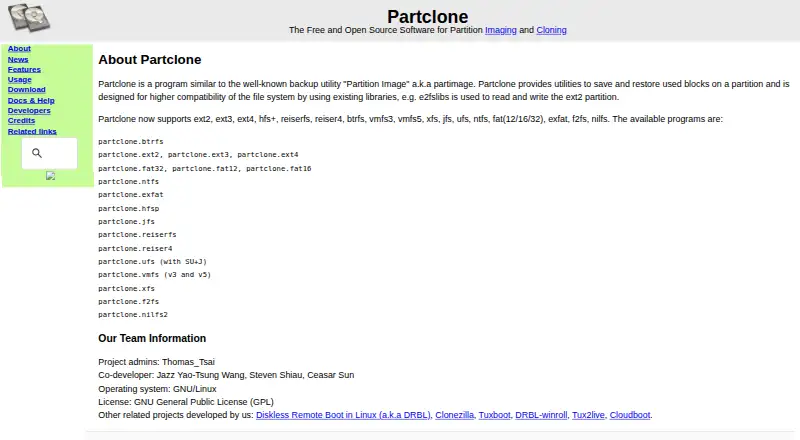
What Partclone is
Partclone is free, open-source software for saving and restoring used blocks on partitions and cloning devices. It runs on GNU/Linux, including self-hosted setups, and can save a filesystem to an image or restore an image to a partition. Listed filesystem support covers Btrfs, ext2/3/4, ReiserFS, Reiser4, XFS, JFS, NTFS, FAT, exFAT, HFS+, UFS2, VMFS, F2FS, and NILFS2. Its text-mode command-line tools offer an ncurses interface option and support pipes, stdin, and stdout for scripting. Pipe direction is limited by task: receiving piped data is supported for restore, while sending data to a pipe is supported for backup. Rescue mode attempts to skip bad blocks and back up readable blocks. Backup blocks are verified with CRC32, and partclone.chkimg can check image files. Other utilities make raw copies, display image header information, and restore Partclone images. The project uses the GNU General Public License. Downloads link to GitHub source and Debian and Ubuntu package repositories.
Good
- Free and open source
- Supports many listed filesystems
- Can save and restore filesystem images
- Rescue mode attempts to skip bad blocks
- CRC32 verification and image-check utility
Watch out
- Pipe direction depends on backup or restore
- Runs on GNU/Linux
Who it suits
Partclone suits GNU/Linux users who need partition imaging or device cloning, including scripting workflows. It may also fit users who need rescue attempts around bad blocks or image integrity checks.
Verdict
Partclone provides partition imaging and cloning tools with broad listed filesystem support and command-line workflows. Note the pipe-direction constraint when planning scripts.
Plans and prices
From Partclone's own pricing page, checked 10 Oct 2026.
| Plan | Price | What it gives you |
|---|---|---|
| Partclone | Free | Free and open source partition imaging and cloning software |
The facts
Each one read from Partclone's own pages, with the date it was checked.
What it does
- Command-line interface
- Partclone commands use text mode and provide an ncurses interface option.checked 10 Oct 2026
- Downloads
- The download page links to GitHub source and Debian and Ubuntu package repositories, and labels SourceForge and NCHC Taiwan as deprecated sources.checked 10 Oct 2026
- Filesystem support
- The project lists support for Btrfs, ext2/3/4, ReiserFS, Reiser4, XFS, JFS, NTFS, FAT, exFAT, HFS+, UFS2, VMFS, F2FS and NILFS2.checked 10 Oct 2026
- Imaging mode
- Partclone can save a filesystem to an image or restore an image to a partition.checked 10 Oct 2026
- Integrations
- The download page says Clonezilla is an integrated tool based on DRBL, Partclone and udpcast.checked 10 Oct 2026
- Integrity check
- The features page says backup blocks are verified with CRC32, and the project provides partclone.chkimg to check image files.checked 10 Oct 2026
- License
- The About page identifies the license as the GNU General Public License (GPL).checked 10 Oct 2026
- Purpose
- Partclone provides utilities to save and restore used blocks on partitions and to clone devices.checked 10 Oct 2026
- Related tools
- The project includes utilities to make raw copies, check images, display image header information and restore Partclone images.checked 10 Oct 2026
- Rescue
- Rescue mode attempts to skip bad blocks and back up readable blocks.checked 10 Oct 2026
- Streaming
- The utilities support pipes, stdin and stdout for scripting workflows.checked 10 Oct 2026
- Support
- The help page lists bug reporting through SourceForge and GitHub, plus IRC, mailing lists, forums and email contact.checked 10 Oct 2026
- Usage limit
- The manual says receiving data from a pipe is supported only for restore, while sending data to a pipe is supported only for backup.checked 10 Oct 2026
Alternatives to Partclone
- 1

DAEMON Tools Lite
Free planAndroidiOSmacOSWindows8.0$3 one-time - 2

Acronis True Image
AndroidiOSWebAPI7.7From $49.99 a year - 3

FOG Project
Free planOpen sourceWebAPILinuxmacOS7.7Free plan - 4
Iperius Backup
Free planWebSelf-hostedWindows7.7From €3.29 a month - 5
EaseUS Todo Backup
Free planmacOSSelf-hostedWindows7.5From $39.95 a year - 6
Vembu BDRCloud
WebAPILinuxmacOS7.5From $1.20 a month