Overwrite
Overwrite is a macOS disk-sanitization utility for erasing external drives, USB sticks, and SD cards.
What Overwrite is
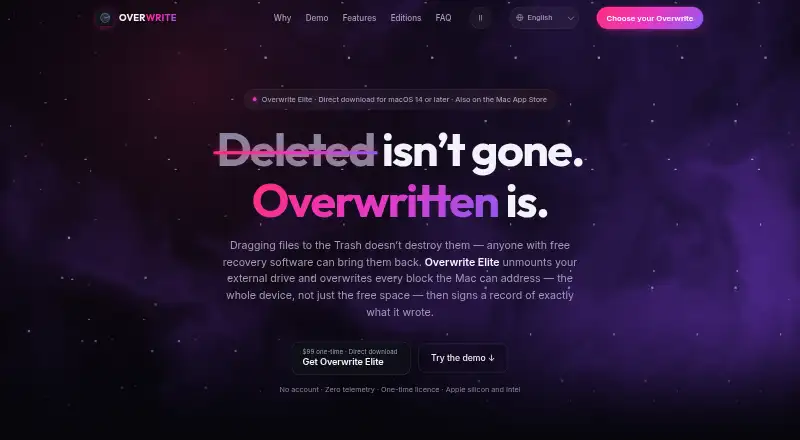
Overwrite is a macOS disk-sanitization utility for erasing external drives, USB sticks, and SD cards. The Mac App Store edition deletes files and overwrites free space through the file system. Overwrite Elite can overwrite every block the Mac can address on an external drive, using 1-, 3-, 7-, or 35-pass protocols. Completed wipes produce a locally signed Certificate of Data Erasure, and Elite certificates can be checked with a free standalone verifier. Elite can also read a drive back after a multi-pass Full Disk wipe and record measured coverage on the certificate. The utility is designed for removable and external media and cannot erase a Mac's internal boot drive. Both editions operate without accounts, analytics, or crash reporting; Elite makes three disclosed connections, while the App Store edition uses Apple's StoreKit. The free Preview lets users explore drives and app screens but does not provide secure wiping or erasure certificates. Annual Pro costs $12.99 a year, Lifetime Pro costs 24.99 USD once, and Elite costs 99.00 USD once.
Good
- Supports USB sticks, SD cards, and external drives.
- Elite offers four overwrite protocols.
- Completed wipes produce a signed erasure certificate.
- Elite can optionally verify coverage by reading back.
- Both editions operate without accounts or analytics.
Watch out
- Cannot erase the internal boot drive.
- Free Preview does not securely wipe drives.
- App Store edition lacks read-back verification.
- Elite requires macOS 14 or later.
Who it suits
It suits Mac users who need to sanitize external or removable media and want an erasure certificate. Organizations can also consider its enterprise licensing features, including consolidated CSV audit logs and certificates with organization names.
Verdict
Overwrite offers different wipe scopes across its App Store and Elite editions, with certificates for completed wipes. Choose based on whether file-system free-space wiping or full-device overwriting and read-back verification meet your needs.
Plans and prices
From Overwrite's own pricing page, checked 7 Oct 2026.
| Plan | Price | What it gives you |
|---|---|---|
| Preview | Free | Explore drives and app screens · no secure wiping or erasure certificates · $0 |
| Annual Pro | $12.99 a year | Unlimited secure wipes · all 4 protocols · signed certificates · wipe history and CSV export · $12.99/ year |
| Lifetime Pro | $24.99, paid once | Everything in Annual Pro · usable on every Mac signed in with your Apple ID · $24.99one-time |
| Overwrite Elite | $99, paid once | External and removable media · macOS 14 or later · direct download · $99 one-time; 1 user, 2 Macs |
| Lab Pack | $399, paid once | 5 users · $399 |
| Site License | Priced on request | Site-wide licensing · from $2,999 |
| Enterprise | Priced on request | Site-wide licensing · quoted to requirements · from $7,500 |
The facts
Each one read from Overwrite's own pages, with the date it was checked.
What it does
- Certificates
- Completed wipes produce a locally signed Certificate of Data Erasure; Elite certificates can be checked with a free standalone verifier.checked 7 Oct 2026
- Drive restriction
- Overwrite is designed for external and removable media and cannot touch the internal boot drive.checked 7 Oct 2026
- Organization features
- Enterprise licensing includes organization names on certificates, a consolidated CSV audit log, purchase orders, W-9, and invoices.checked 7 Oct 2026
- Privacy
- Both editions have no accounts, analytics, or crash reporting; the site says Elite makes three disclosed connections and the App Store edition uses Apple’s StoreKit.checked 7 Oct 2026
- Pro limits
- The App Store edition overwrites free space and issues a signed certificate without read-back verification.checked 7 Oct 2026
- Pro wipe scope
- The Mac App Store edition deletes a drive’s files and overwrites its free space through the file system.checked 7 Oct 2026
- Purpose
- Overwrite is a disk-sanitization utility for macOS that erases external drives, USB sticks, and SD cards.checked 7 Oct 2026
- Read-back verification
- Elite can optionally read the drive back after a multi-pass Full Disk wipe and print measured coverage on the certificate.checked 7 Oct 2026
- Support
- The press kit directs interview and review-copy inquiries to the ProfWorkBench support and press desk.checked 7 Oct 2026
Where it runs
- Elite whole-device wipe
- Overwrite Elite overwrites every block the Mac can address on an external drive using 1-, 3-, 7-, or 35-pass protocols.checked 7 Oct 2026
- Platforms
- Elite is a universal app for Apple silicon and Intel on macOS 14 or later; the App Store edition supports Apple silicon on macOS 26 or later.checked 7 Oct 2026
The company
- Headquarters
- New York, New York, United Stateschecked 28 Sep 2026
- Maker and launch
- The maker is ProfWorkBench, LLC; its press kit says the App Store edition launched with version 1.0 and Elite launched in August 2026.checked 7 Oct 2026
Alternatives to Overwrite
- 1
Active@ KillDisk
Free planLinuxmacOSWindows7.6$64.95 one-time - 2
DriveWipe
Free planOpen sourceLinuxmacOSSelf-hostedWindows7.3Free plan - 3

BitRaser Drive Eraser
WebLinuxmacOSWindows7.2$99 one-time - 4
Lethe
Free planOpen sourceLinuxmacOSWindows7.1Free plan - 5
Strix Disk Cleaner
Free planOpen sourceLinuxWindows7.1Free plan - 6
ShredIt
AndroidiOSmacOSWindows6.9$24.95 one-time