
Outlook.com
Outlook.com brings email, calendars, tasks, and contacts together, with web, desktop, and mobile access.
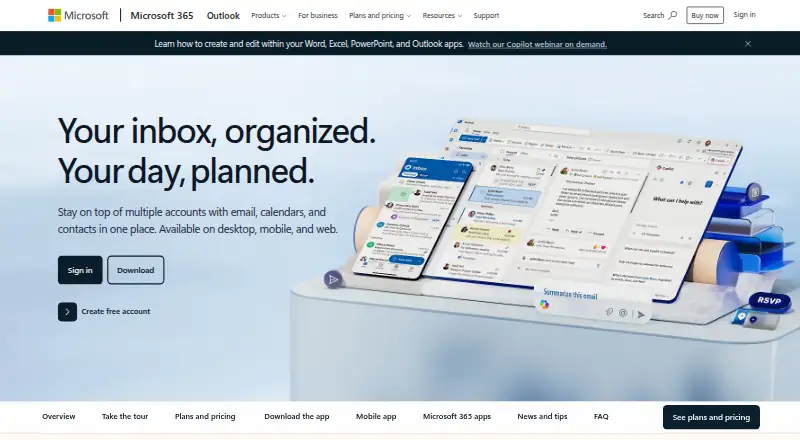
What Outlook.com is
Outlook.com brings email, calendars, tasks, and contacts together, with web, desktop, and mobile access. The free plan costs nothing and includes 15 GB of mailbox storage and core Outlook security features. Email aliases are available, but custom domains are not. Microsoft 365 Basic costs $1.99 a month, billed annually at $19.99, and includes 100 GB of mailbox storage, ad-free Outlook email and calendar, and 100 GB of cloud storage. Personal costs $9.99 a month, billed annually at $99.99, and includes 1 TB of cloud storage and desktop Office apps; a free trial is available. Family costs $12.99 a month, billed annually at $129.99, for 1 to 6 people, while Premium costs $19.99 a month, billed annually at $199.99, for up to six people. Personal and Family users can use the service on up to five devices simultaneously. Paid plans include advanced Outlook security features and OneDrive ransomware protection. Personal, Family, and Premium include desktop Word, Excel, PowerPoint, Outlook, and OneNote with Copilot. The product is marked unavailable in the viewer's market.
Good
- Free plan includes 15 GB of mailbox storage
- Email aliases are available
- Basic includes ad-free email and calendar
- Personal and Family plans support up to five simultaneous devices
Watch out
- Custom domains are not available
- Product is marked unavailable in the viewer's market
- Basic costs $1.99 a month billed annually
- Paid plans renew automatically unless canceled
Who it suits
Outlook.com suits people looking to manage email, calendars, tasks, and contacts together. Microsoft 365 options may suit individuals or households seeking additional storage, desktop Office apps, or multi-person access.
Verdict
Outlook.com offers a free email option and paid Microsoft 365 plans with more storage and added apps or protections. Check the market availability notice and annual billing terms before choosing a plan.
Plans and prices
From Outlook.com's own pricing page, checked 19 Sep 2026.
| Plan | Price | What it gives you |
|---|---|---|
| Outlook Free | Free | 15 GB mailbox storage · Web, desktop, and mobile access · Core Outlook security features |
| Microsoft 365 Basic | $1.99 a month | For 1 person; subscription automatically renews unless canceled · 100 GB mailbox storage · Ad-free Outlook email and calendar · 100 GB cloud storage · billed annually at $19.99 |
| Microsoft 365 Personal | $9.99 a month | For 1 person; subscription automatically renews unless canceled; free trial available · 100 GB mailbox storage · Ad-free Outlook email and calendar · 1 TB cloud storage · Desktop Office apps · billed annually at $99.99 |
| Microsoft 365 Family | $12.99 a month | For 1 to 6 people; subscription automatically renews unless canceled; free trial available · billed annually at $129.99 |
| Microsoft 365 Premium | $19.99 a month | For up to six people; subscription automatically renews unless canceled; free trial available · billed annually at $199.99 |
The facts
Each one read from Outlook.com's own pages, with the date it was checked.
Money
- Ad-free email
- Microsoft 365 Basic includes ad-free Outlook email and calendar across web, mobile, and desktop apps.checked 27 Sep 2026
- Ad-free inbox
- Yeschecked 19 Sep 2026
- Basic annual price
- Microsoft 365 Basic costs $19.99 per year.checked 27 Sep 2026
- Free plan
- Yeschecked 19 Sep 2026
- Personal free trial
- Microsoft 365 Personal includes an option to try for free.checked 27 Sep 2026
What it does
- Attachment limit
- 25checked 19 Sep 2026
- Basic mailbox storage
- Microsoft 365 Basic includes 100 GB of mailbox storage.checked 27 Sep 2026
- Copilot AI agents
- Microsoft 365 Premium includes AI agents for complex tasks such as research reports and data analysis with visualization.checked 27 Sep 2026
- Custom domain
- Nochecked 19 Sep 2026
- Email aliases
- Yeschecked 19 Sep 2026
- Family cloud storage
- Microsoft 365 Family includes up to 6 TB of secure cloud storage, 1 TB per person.checked 27 Sep 2026
- Family sharing
- Microsoft 365 Family supports 1 to 6 people, with AI features for the subscription owner only.checked 27 Sep 2026
- Mailbox storage
- 100checked 19 Sep 2026
- Market availability
- The product is marked as unavailable in the viewer's market.checked 27 Sep 2026
- Ongoing support
- Paid plans include ongoing support when help is needed.checked 27 Sep 2026
- Outlook functions
- Outlook manages email, calendars, tasks, and contacts together in one place.checked 27 Sep 2026
- Personal cloud storage
- Microsoft 365 Personal includes 1 TB, or 1,000 GB, of secure cloud storage.checked 27 Sep 2026
- Security features
- Paid plans include advanced Outlook security features and OneDrive ransomware protection.checked 27 Sep 2026
Where it runs
- Device limit
- Personal and Family users can use the service on up to 5 devices simultaneously.checked 27 Sep 2026
- Included Microsoft apps
- Personal, Family, and Premium include Word, Excel, PowerPoint, Outlook, and OneNote desktop apps with Copilot.checked 27 Sep 2026
- Platform access
- web_mobile_desktopchecked 19 Sep 2026
- Supported platforms
- Microsoft 365 Personal, Family, and Premium work on PC, Mac, iPhone, iPad, and Android phones and tablets.checked 27 Sep 2026
The company
- Teams collaboration
- Microsoft Teams supports meeting, chat, calling, and collaboration.checked 27 Sep 2026
The full review of Outlook.com
Outlook.com is Microsoft’s personal email service with calendars, tasks, and contacts alongside the inbox. It is best suited to people who want a connected personal organizer and may also use Microsoft storage, Office apps, or Teams. The free tier handles ordinary email; paid plans become worthwhile when ad-free mail, larger storage, or desktop applications are priorities.
Overview
Outlook.com brings email, calendars, tasks, and contacts into one service, reducing the need to maintain separate personal tools. Access spans web, mobile, and desktop, with Android, iOS, and macOS support. Email aliases are available, but custom domains are not, so it is not a fit for users who need an address on their own domain.
The product is marked as unavailable in the viewer’s market, which may prevent local sign-up or purchase. Check that constraint before planning a migration or subscription.
Key features
The free account includes 15 GB of mailbox storage, core Outlook security, and web, desktop, and mobile access. That is enough for routine personal correspondence, but a heavily used mailbox will eventually need tighter storage management. Paid tiers provide 100 GB of mailbox storage, ad-free Outlook email and calendar across web, mobile, and desktop apps, advanced Outlook security, and OneDrive ransomware protection. Those additions are practical for people who want fewer interruptions and more protection, rather than merely another email address.
Microsoft Teams adds meetings, chat, calling, and collaboration. Microsoft 365 Premium goes further with AI agents for demanding work such as research reports and data analysis with visualization. These capabilities matter most to users already working in Microsoft’s ecosystem; they add little value if Outlook is needed only for basic mail.
Pricing
Outlook Free costs nothing. It provides 15 GB of mailbox storage, core security, and access on web, desktop, and mobile. Choose it when that quota is sufficient and an ad-free inbox is not essential.
Microsoft 365 Basic costs $1.99 a month, billed annually at $19.99, for one person. It raises mailbox storage to 100 GB, adds ad-free Outlook email and calendar, and includes 100 GB of cloud storage. The subscription renews automatically unless canceled. It is the focused upgrade for one user who wants more mail capacity and an ad-free experience without desktop Office apps.
Microsoft 365 Personal costs $9.99 a month, billed annually at $99.99, for one person, with automatic renewal unless canceled. It includes 100 GB of mailbox storage, ad-free email and calendar, 1 TB of secure cloud storage, and desktop Word, Excel, PowerPoint, Outlook, and OneNote with Copilot. A free trial is available. This is the strongest single-user choice when Office software and substantial cloud storage matter as much as email.
Microsoft 365 Family costs $12.99 a month, billed annually at $129.99, for one to six people, and renews automatically unless canceled. It offers up to 6 TB of secure cloud storage, 1 TB per person, plus the included desktop Microsoft apps. AI features are limited to the subscription owner. Family users can use the service on up to five devices simultaneously. It suits households that can share the allowance; a solo user will usually get more than needed.
Microsoft 365 Premium costs $19.99 a month, billed annually at $199.99, for up to six people, with automatic renewal unless canceled. It includes the Personal and Family app and storage benefits, plus Premium’s AI agents for complex research and analysis. A free trial is available. It is difficult to justify unless those advanced AI workflows are central to the household’s use.
Microsoft 365 Personal, Family, and Premium work on PC, Mac, iPhone, iPad, and Android phones and tablets, and Personal and Family users can use the service on up to five devices simultaneously. Paid plans include ongoing support.
Platforms
Outlook.com is accessible through web, mobile, and desktop interfaces, with supported apps and services on Android, iOS, macOS, PC, Mac, iPhone, iPad, and Android tablets and phones depending on the Microsoft 365 plan.
Who it's for
Choose Outlook.com for a unified personal inbox and organizer, especially if you already depend on Microsoft 365, Teams, OneDrive, or Office applications. The free account is appropriate for moderate personal mail. Basic fits one person seeking extra mailbox space and no advertising; Personal fits one person who also needs desktop Office and 1 TB of cloud storage; Family is aimed at households sharing benefits across up to six people; Premium is for households with a specific need for advanced AI agents. Look elsewhere if a custom domain is mandatory or if Microsoft’s service is unavailable in your market.
Pros and cons
- Pros: Email, calendars, tasks, and contacts are managed together, making it a broader organizer than a standalone inbox.
- Pros: Paid plans combine 100 GB mailbox storage, ad-free mail and calendar, advanced security, and OneDrive ransomware protection.
- Pros: Personal, Family, and Premium bundle desktop Office apps, while Family can allocate 1 TB of cloud storage per person.
- Cons: The free mailbox is limited to 15 GB, which may constrain long-term or attachment-heavy use.
- Cons: Custom domains are unavailable, excluding branded or domain-based email addresses.
- Cons: Paid subscriptions automatically renew unless canceled, and the higher tiers are difficult to justify without storage, Office, or AI needs.
Alternatives
For a broader comparison, see Personal Email Services. Pick Proton Mail instead if you want an encrypted, privacy-focused service with a 1 GB free plan and apps across web, Windows, macOS, Linux, iOS, and Android. Zoho Mail is the better option for a forever-free setup supporting five users, one domain, and 5 GB per user.
Gmail suits users who prefer Google’s ecosystem: its free plan offers 15 GB shared across Gmail, Drive, and Photos, with Google One Basic at 1.99 USD. eclipso Mail Europe offers a free 4 GB mailbox with one address and no aliases. Yahoo Mail provides a 20 GB standard mailbox and a 5.00 USD-per-month Plus tier. mail.ch has a free 1 GB mailbox with one alias and a 50-email-per-day limit. Thelemail publishes its production browser and macOS clients under AGPL-3.0. Mail2World offers a 25 GB Basic plan and a 1,000 GB Premium plan, with prices not listed.
Verdict
Outlook.com is a strong choice for Microsoft-oriented individuals and households that want integrated email, organization tools, Office applications, and OneDrive storage. Its main reason to choose it is the breadth of the Microsoft 365 bundle; its main reason to look elsewhere is the lack of custom-domain support, the recurring cost of higher tiers, or unavailability in your market.
Alternatives to Outlook.com
- 1

Zoho Mail
Free planAndroidiOSWebAPI9.0Free plan - 2
Gmail
Free planAndroidiOSWeb8.8Free plan - 3

eclipso Mail Europe
Free planAndroidiOSWebmacOS8.7From €1.49 a month - 4
Inbox.lv
Free planAndroidiOSWeb8.6From €13.99 a year - 5

Mailo
Free planAndroidiOSWeb8.5From €1.50 a month - 6

Proton Mail
Free planAndroidiOSWebWindows8.3Free plan