OpenParental
OpenParental is free, open-source parental-control software for Android, built around visible, consent-based supervision for parents and teenagers.
What OpenParental is
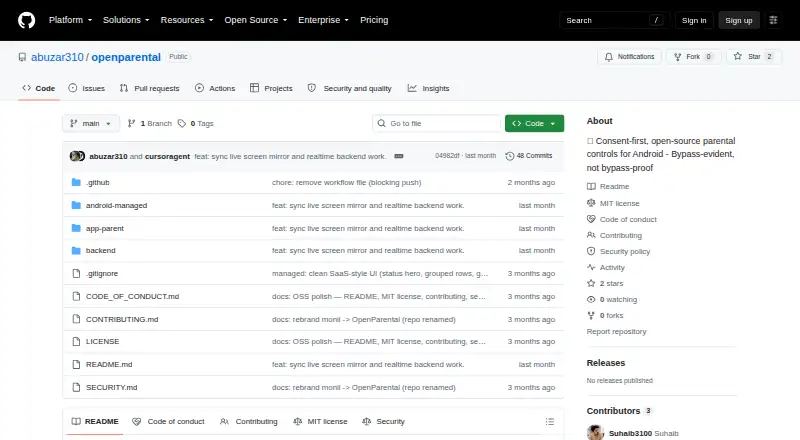
OpenParental is free, open-source parental-control software for Android, built around visible, consent-based supervision for parents and teenagers. A parent pairs a child’s app with a short code; the device then receives a scoped token. From the parent side, families can set app blocklists, per-app daily limits, and schedules, or remotely lock or ping a device. The child app can report periodic location, daily app usage, newly installed apps, and tampering to a dashboard or alert feed. Alerts can also flag a device going dark or an unblock request. The project says bypass actions, such as disabling accessibility or force-stopping the app, should trigger an alert within minutes, though the child can disable the app. Live screen viewing requires a setup-time MediaProjection grant. OpenParental avoids covert audio, camera, ambient recording, and screen capture, as well as server-side storage of minors’ photos. It requires a self-hosted backend and a sideloaded Android child app; the Flutter parent app has a Play Store track. The project is MIT licensed.
Good
- Free and open source under the MIT license
- Set blocklists, per-app limits, and schedules
- Reports usage, location, new apps, and tampering
- Visible child interface explains what it reports
Watch out
- Content filtering is not included
- Child app can be disabled
- Backend requires self-hosting
- Child app is distributed as a sideloaded APK
Who it suits
It may suit parents and teenagers who want overt, consent-based supervision with app limits, schedules, and activity alerts. It requires a self-hosted backend and an Android child app.
Verdict
OpenParental combines app and schedule controls with activity reporting in a consent-first design. Its self-hosted setup and sideloaded child app are important requirements to weigh.
Plans and prices
From OpenParental's own pricing page, checked 8 Oct 2026.
| Plan | Price | What it gives you |
|---|---|---|
| OpenParental | Free | Open-source parental controls for Android · MIT licensed |
The facts
Each one read from OpenParental's own pages, with the date it was checked.
What it does
- Activity reports
- Yeschecked 22 Sep 2026
- Alerts
- Alerts cover tampering, a device going dark, new apps, and unblock requests.checked 8 Oct 2026
- Architecture
- The repository describes a NestJS backend with PostgreSQL, Redis, and FCM, a Kotlin Android child app, and a Flutter parent app.checked 8 Oct 2026
- Bypass behavior
- The project says the child can turn the app off, but bypasses such as disabling accessibility or force-stopping should trigger a parent alert within minutes.checked 8 Oct 2026
- Bypass limitation
- The project says the child app can be disabled, but bypass actions are intended to trigger parent alerts within minutes.checked 8 Oct 2026
- Consent
- The child app has a visible interface that explains what it does and shows what it reports.checked 8 Oct 2026
- Content filtering
- The documented DNS content filter uses Android VpnService and says it does not inspect traffic or use a man-in-the-middle.checked 8 Oct 2026
- Controls
- The parent can remotely lock or ping a device and configure app blocklists, per-app daily limits, and schedules.checked 8 Oct 2026
- Deployment
- The README describes a self-hosted backend using Node 20+, Docker, PostgreSQL 16, and Redis 7.checked 8 Oct 2026
- Distribution
- The child app is described as a sideloaded APK, while the parent app is described as being on a Play Store track.checked 8 Oct 2026
- Integrations
- Firebase Cloud Messaging is an optional integration for push notifications; without Firebase, devices poll every 60 seconds.checked 8 Oct 2026
- License
- The repository identifies the project as MIT licensed and credits Suhaib, © 2026.checked 8 Oct 2026
- Live screen
- The README describes live screen viewing using a setup-time MediaProjection grant and JPEG frames sent over Socket.IO.checked 8 Oct 2026
- Location tracking
- Yeschecked 22 Sep 2026
- Monitoring
- The child app reports periodic location, daily per-app usage, newly installed apps, and tamper events to the parent dashboard or alert feed.checked 8 Oct 2026
- Pairing
- A parent creates a short pairing code that the child app claims, and the device receives its own scoped token.checked 8 Oct 2026
- Privacy limits
- The project says it does not use covert audio, camera, ambient recording, covert screen capture, server-side storage of minors’ photos, Device Owner, or device wipe.checked 8 Oct 2026
- Purpose
- OpenParental is consent-first, open-source parental-control software for Android.checked 8 Oct 2026
- Screen-time schedules
- Yeschecked 22 Sep 2026
Where it runs
- App blocking
- Yeschecked 22 Sep 2026
- App controls
- Parents can set app blocklists, per-app daily limits, and schedules.checked 8 Oct 2026
- Apps
- The child app is a sideloaded Kotlin Android app and the parent app is Flutter, described as having a Play Store track.checked 8 Oct 2026
- Device platforms
- androidchecked 22 Sep 2026
The company
- License and maker
- The repository lists an MIT license and credits Suhaib with copyright in 2026.checked 8 Oct 2026
Alternatives to OpenParental
- 1
Kaspersky Safe Kids
Free planAndroidiOSWebmacOS8.8From $14.99 a year - 2

Qustodio
Free planAndroidiOSmacOSWindows8.5From $72.94 a year - 3

MMGuardian
AndroidiOSWebmacOS8.3From $59.90 a year - 4

OurPact
Free planAndroidiOS8.2From $69.99 a year - 5

Mobicip
AndroidiOSmacOSWindows8.0From $2.99 a month - 6
FamilyTime
AndroidiOSmacOSWindows8.0From $2.41 a month