OpenCred
OpenCred is a free, open-source toolkit for issuing and verifying W3C Verifiable Credentials, designed to keep operations local.
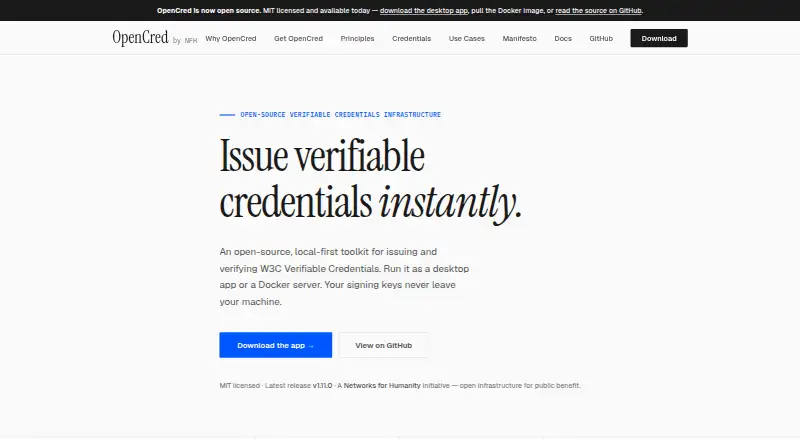
What OpenCred is
OpenCred is a free, open-source toolkit for issuing and verifying W3C Verifiable Credentials, designed to keep operations local. Individuals and small teams can use its desktop app to issue, manage, and export credentials, including PDFs with scannable QR codes. Organizations can run a Docker image as a headless HTTP API to automate issuance and verification on their own infrastructure. The API and CLI can be embedded in student records, HR, and billing systems. Listed verification inputs include JSON-LD credentials, vc-jwt, sd-jwt-vc, and PixelPass QR data. OpenCred says issuer signing keys stay within the issuer’s environment: desktop keys remain on the machine, while server keys remain in the issuer-operated container. The Docker image runs in the operator’s infrastructure and sends no data to OpenCred or NFH Trust Labs. Credentials issued with did:key can be verified offline; did:web credentials need network access to retrieve the issuer’s DID document. OpenCred is licensed under MIT and published by NFH Trust Labs, which the product site identifies as a Networks for Humanity initiative. The documentation says OID4VCI support is planned. Bug reports, feature requests, and questions go through GitHub issues, with a separate private route for security vulnerability reports.
Good
- Desktop app exports PDFs with scannable QR codes
- HTTP API and CLI can integrate with existing systems
- Issuer signing keys stay in the issuer’s environment
- did:key credentials can be verified offline
Watch out
- OID4VCI support is planned, not currently available
- did:web verification needs network access
Who it suits
The desktop app is described for individuals and small teams issuing credentials. Organizations that need to automate credential workflows on their own infrastructure can use the Docker server.
Verdict
OpenCred offers desktop and self-hosted options for credential issuance and verification, with signing keys kept in the issuer’s environment. Note that did:web verification requires network access and OID4VCI support remains planned.
Plans and prices
From OpenCred's own pricing page, checked 7 Oct 2026.
| Plan | Price | What it gives you |
|---|---|---|
| OpenCred | Free | Free under the MIT licence · Desktop app or self-hosted Docker server |
The facts
Each one read from OpenCred's own pages, with the date it was checked.
What it does
- Credential formats
- The documentation lists JSON-LD credentials, vc-jwt, sd-jwt-vc, and PixelPass QR data among supported verification inputs.checked 7 Oct 2026
- Desktop features
- The desktop app lets users issue, manage, and export credentials, including PDFs with scannable QR codes.checked 7 Oct 2026
- Integration
- The homepage says the HTTP API and CLI can be embedded in existing student records, HR, and billing systems.checked 7 Oct 2026
- Intended users
- The desktop app is described for individuals and small teams, while the Docker server is described for organizations issuing credentials at scale.checked 7 Oct 2026
- Key security
- OpenCred says issuer signing keys stay in the issuer's environment, with desktop keys on the machine and server keys in the issuer-operated container.checked 7 Oct 2026
- License
- OpenCred is open source under the MIT licence.checked 7 Oct 2026
- Notable limit
- The documentation says OID4VCI support is planned.checked 7 Oct 2026
- Offline verification
- The documentation says credentials issued with did:key can be verified fully offline, while did:web credentials require network access to retrieve the issuer's DID document.checked 7 Oct 2026
- Privacy
- The documentation says the Docker image runs in the operator's infrastructure and sends no data to OpenCred or NFH Trust Labs.checked 7 Oct 2026
- Publisher
- OpenCred is published by NFH Trust Labs, which the product site identifies as a Networks for Humanity initiative.checked 7 Oct 2026
- Purpose
- OpenCred is an open-source, local-first toolkit for issuing and verifying W3C Verifiable Credentials.checked 7 Oct 2026
- Server features
- The Docker image provides a headless HTTP API for organizations automating credential issuance and verification on their own infrastructure.checked 7 Oct 2026
- Support
- The documentation directs bug reports, feature requests, and questions to GitHub issues and security vulnerability reports to private reporting.checked 7 Oct 2026
Where it runs
- Platforms
- Desktop installers are offered for macOS, Windows, and Linux, and the server runs wherever Docker runs.checked 7 Oct 2026
The full review of OpenCred
OpenCred is an MIT-licensed toolkit for issuing and verifying W3C Verifiable Credentials through a desktop application or a Docker-based server. It suits individuals and small teams that need local credential work, as well as organizations integrating issuance into their own systems. The main appeal is control over keys and data without a subscription; the main qualification is that some current interoperability needs are not yet covered.
Overview
OpenCred is published by NFH Trust Labs as a Networks for Humanity initiative. Its free OpenCred plan includes the desktop app or a self-hosted Docker server, with digital certificates, digital badges, public verification, custom branding and API access. Because the software is open source under the MIT licence, organizations can operate it on infrastructure they control rather than adopting a hosted credential platform.
This model is particularly appropriate when custody of signing keys and credential data is a requirement. It is less suitable for a buyer who wants a managed service with a vendor handling deployment and operations, or who depends on OID4VCI today.
Key features
The desktop app issues, manages and exports credentials, including PDFs containing scannable QR codes. That is a useful workflow for individuals and small teams producing certificates or badges directly from a computer, without first building an automated backend.
For larger operations, the Docker image supplies a headless HTTP API for automated issuance and verification. The API and CLI can be embedded in existing student-records, HR and billing systems, allowing credential tasks to become part of established business processes. This is the stronger option for organizations issuing at scale, although self-hosting also leaves deployment, maintenance and security operations with the organization.
Supported verification inputs include JSON-LD credentials, vc-jwt, sd-jwt-vc and PixelPass QR data. Credentials issued with did:key can be verified fully offline, which fits environments where connectivity is unreliable or prohibited. did:web credentials require network access to retrieve the issuer's DID document, so they are not equivalent for disconnected verification.
OpenCred keeps issuer signing keys in the issuer's environment: desktop keys remain on the machine and server keys remain in the issuer-operated container. The Docker image runs in the operator's infrastructure and sends no data to OpenCred or NFH Trust Labs. Those properties make the product a strong match for privacy-sensitive deployments, provided the operator can protect its own machines and containers.
OID4VCI support is planned rather than present. Teams whose issuance flow depends on that specification should treat this as a material compatibility gap.
Pricing
OpenCred — free (free under the MIT licence; desktop app or self-hosted Docker server).
There is no free trial because the product is free, and no paid tier or recurring renewal is described. The same zero-price offer covers desktop use and self-hosting, making it attractive to individuals, small teams and organizations that can provide their own infrastructure. The trade-off is that self-hosted users take on operating responsibilities rather than paying for a managed plan.
Platforms
OpenCred supports API, Linux, macOS, self-hosted, web and Windows environments. The desktop route is therefore suited to local work on supported computers, while the Docker server and API target infrastructure-based deployments. Its platform range is broad, but the practical division remains clear: desktop for individual or small-team issuance, and self-hosted server operation for organizational automation.
Who it's for
Choose OpenCred if you are an individual or small team that wants to issue, manage and export credentials locally, or an organization that needs API-driven issuance and verification inside student, HR or billing software. It is also a sensible choice when keeping signing keys and credential data within your own environment is more important than outsourcing operations.
Look elsewhere if you require OID4VCI immediately, prefer a fully managed service, or cannot support the operational work that accompanies a self-hosted Docker deployment.
Pros and cons
Pros
- Free and MIT-licensed: both the desktop app and self-hosted Docker server are included at 0.00 USD, with no paid renewal described.
- Local key custody: signing keys stay on the desktop machine or in the issuer's container, keeping control with the issuer.
- Privacy-oriented deployment: the Docker image runs in the operator's infrastructure and sends no data to OpenCred or NFH Trust Labs.
- Useful integration surface: an HTTP API and CLI can connect credential workflows to student records, HR and billing systems.
- Offline option: did:key credentials support fully offline verification.
Cons
- OID4VCI is not supported yet: organizations depending on that standard must wait or choose another product.
- Self-hosting is a responsibility: server users must operate and secure their own Docker environment.
- did:web needs connectivity: verification cannot be completed offline when the issuer uses did:web.
- Support is community-oriented: bug reports, requests and questions go through GitHub issues, with security vulnerabilities handled through private reporting.
Alternatives
For a broader category comparison, see Credentialing Software.
Awero is a better fit when Android and iOS access or a freemium service with personal and organisation accounts matters more than local-first operation; its Open Access plan is free, while a custom-look platform setup costs 1500.00 EUR once.
CanCred Factory suits teams seeking a freemium, cross-platform service with a free trial and Android, iOS, web and API support.
POK is worth considering for unlimited free Web2 credentials with no user caps, or pay-as-you-go blockchain verification at 0.30 USD once.
Blockcerts is another free, self-hostable option across Android, API, iOS and web; issuing certificates may incur blockchain transaction fees.
Open Badge Passport is a free open-source choice for personal use on Android, iOS and web.
Certifier fits buyers wanting a hosted API and web service with a free Starter plan capped at 250 credentials per year, one user, five templates and three forms.
CertSeal offers a hosted or self-hosted route with a free plan limited to 100 certificates per year, one batch, one organization member and one workspace.
CREDEBL is a free open-source alternative with community support through GitHub, Discord and a forum.
Verdict
OpenCred is a strong recommendation for individuals, small teams and organizations that want free, open-source credential issuance with keys and data kept in their own environment. Its desktop workflow, integration-ready API and offline-capable did:key verification give it practical range. Look elsewhere if you need OID4VCI now or want a vendor-managed service instead of operating the infrastructure yourself.
Getting started
- Visit the OpenCred website.
- Choose the desktop app for individual or small-team use, or the Docker server for organizational use.
- For server use, run the Docker image on your own infrastructure.
- Use the HTTP API or CLI to connect it with an existing student records, HR or billing system.
- Send bug reports, feature requests or questions through GitHub issues.
Limits worth knowing
OID4VCI support is planned. Credentials issued with did:web require network access for verification because the issuer's DID document must be retrieved.
Questions
How much does OpenCred cost?
The OpenCred plan is free and is free under the MIT licence. It offers a desktop app or a self-hosted Docker server.
Is OpenCred open source?
Yes. OpenCred is licensed under MIT.
Which credential formats can it verify?
Listed verification inputs include JSON-LD credentials, vc-jwt, sd-jwt-vc and PixelPass QR data.
Can credentials be verified offline?
Credentials issued with did:key can be verified fully offline. did:web credentials require network access to retrieve the issuer's DID document.
Who publishes OpenCred?
It is published by NFH Trust Labs, which the product site identifies as a Networks for Humanity initiative.
Does it support OID4VCI?
OID4VCI support is planned.
Alternatives to OpenCred
- 1

Awero
Free planAndroidiOSWebAPI8.0From €110 a year - 2
Blockcerts
Free planOpen sourceAndroidiOSWebAPI7.7Free plan - 3

SimpleCert
Free planWebAPImacOSWindows7.7From $19 a month - 4

Certifier
Free planWebAPI7.4From $49 a month - 5

CanCred Factory
Free planAndroidiOSWebAPI7.3From C$495 a year - 6
CertSeal
Free planWebAPISelf-hosted7.3From $390 a year