Notebook FanControl
Notebook FanControl (NBFC) is a free, open-source service for controlling notebook fans on Windows and Linux.
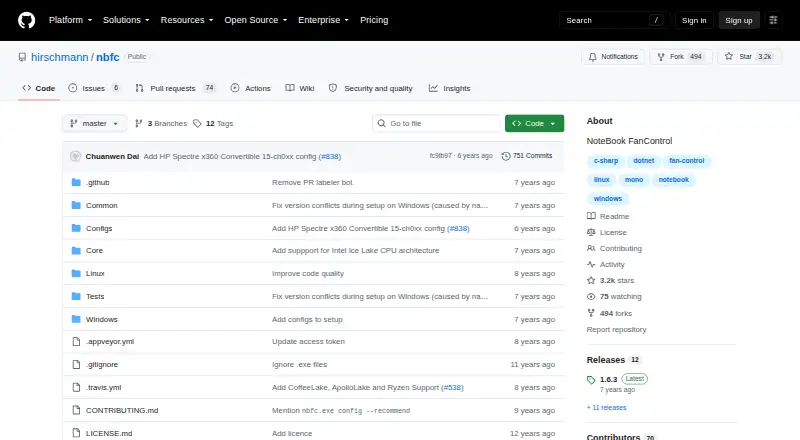
What Notebook FanControl is
Notebook FanControl (NBFC) is a free, open-source service for controlling notebook fans on Windows and Linux. Its configuration system lets users adapt NBFC to different notebook models. On Windows, setup involves running the installer, choosing a configuration, and applying it. The project links to GitHub releases and a Chocolatey package. Linux users need to build NBFC themselves, install its systemd service, and apply a notebook configuration; there are no pre-built Linux releases. The repository includes the GNU General Public License version 3. It also says the maintainer cannot create individual configurations. Some hardware monitoring tools, including ImDisk Toolkit and HWiNFO, have caused problems alongside NBFC on some systems. On some Nvidia Optimus notebooks, NBFC cannot control fans while the dedicated GPU is active, and the FAQ says there is no current solution. Linux setup normally relies on /dev/port, which is unavailable with Secure Boot enabled; the setup page lists disabling Secure Boot as a workaround.
Good
- Free and open source under GPL version 3.
- Configuration system supports different notebook models.
- Windows installer and Chocolatey package are linked.
- Release 1.6.3 adds support for several processor families.
Watch out
- Linux users must build it themselves.
- No pre-built Linux releases are available.
- Some Optimus notebooks lose fan control with dedicated GPU active.
- Secure Boot makes /dev/port unavailable.
Who it suits
NBFC suits notebook owners on Windows or Linux who want configurable fan control and can apply a configuration for their model. Linux users should be prepared to build it themselves and may need to address Secure Boot.
Verdict
NBFC offers configurable notebook fan control across Windows and Linux, but Linux requires manual building and setup. Check model support and the listed hardware limitations before relying on it.
Plans and prices
From Notebook FanControl's own pricing page, checked 8 Oct 2026.
| Plan | Price | What it gives you |
|---|---|---|
| NBFC | Free | Notebook fan control · Configurable for different notebook models |
The facts
Each one read from Notebook FanControl's own pages, with the date it was checked.
What it does
- Config support
- The FAQ says the maintainer cannot create a config for a user's notebook and suggests users try creating one themselves.checked 8 Oct 2026
- Configuration
- Its configuration system lets users adjust NBFC for many different notebook models.checked 8 Oct 2026
- Distribution
- The README links to GitHub releases and a Chocolatey package for downloads.checked 8 Oct 2026
- Hardware conflict
- The FAQ reports that some hardware monitoring tools, including ImDisk Toolkit and HWiNFO, have caused problems alongside NBFC on some systems.checked 8 Oct 2026
- License
- The repository includes the GNU General Public License version 3.checked 8 Oct 2026
- Nvidia Optimus limitation
- On some notebooks with Nvidia Optimus, NBFC cannot control the fans while the dedicated GPU is active, and the FAQ says there is currently no solution.checked 8 Oct 2026
- Purpose
- NBFC is a cross-platform fan control service for notebooks.checked 8 Oct 2026
- Release notes
- Release 1.6.3 lists support for Intel Coffee Lake, Apollo Lake, AMD Ryzen, AMD Puma, and additional notebook models.checked 8 Oct 2026
- Secure Boot limitation
- The Linux setup page says NBFC normally uses /dev/port, which is unavailable with Secure Boot enabled, and lists disabling Secure Boot as a workaround.checked 8 Oct 2026
- Supported models
- The FAQ directs users to a supported notebook list and says a config for a similar model may work when their model is not listed.checked 8 Oct 2026
Where it runs
- Linux downloads
- The project README says there are no pre-built Linux releases and users can build NBFC themselves.checked 8 Oct 2026
- Linux setup
- On Linux, users build NBFC themselves, install its systemd service, and apply a notebook config.checked 8 Oct 2026
- Windows setup
- On Windows, users run the installer, select a config, and apply it to let NBFC control the notebook fans.checked 8 Oct 2026
Alternatives to Notebook FanControl
- 1
MemTest86
Free planLinuxmacOSSelf-hostedWindows7.5From $76 a year - 2
HCI MemTest
Free planLinuxWindows7.3$5 one-time - 3
CoreCtrl
Free planOpen sourceLinux7.1Free plan - 4
AIDA64
AndroidiOSWindows7.0€59.95 one-time - 5

ASUS GPU Tweak III
Free planWindows6.7Free plan - 6

OCCT
Free planLinuxWindows6.6Free plan