NFSA Digital Resource Finder
NFSA Digital Resource Finder is a free web search service for teachers and educators looking for classroom video resources.
What NFSA Digital Resource Finder is
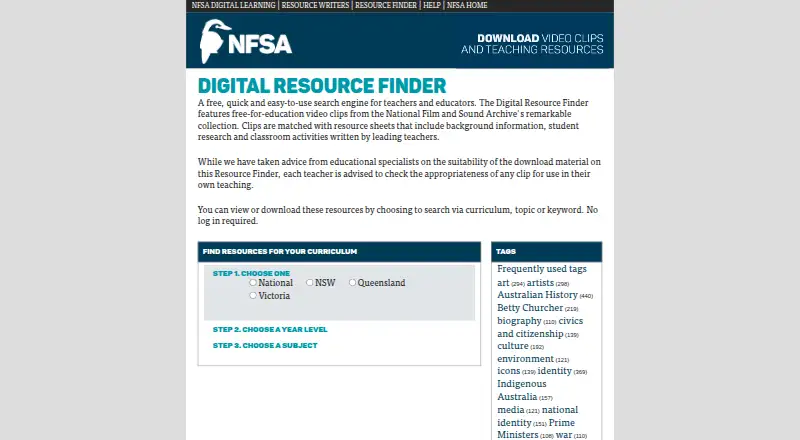
NFSA Digital Resource Finder is a free web search service for teachers and educators looking for classroom video resources. It pairs clips from the NFSA collection with resource sheets that offer background information, student research, and classroom activities. Resources can be found by curriculum, topic, or keyword, with curriculum choices for Australian states and territories and a National option. Users can view or download material without logging in. The Help page describes MP4 downloads in Premium and Broadband quality, which can be played on a computer when internet access is unavailable or unreliable. Teachers are advised to assess each clip for their own classroom. NFSA says experienced educators contributed the resources. Downloading and use are allowed for personal or non-commercial educational purposes, while commercial exploitation is prohibited. Browser video playback requires Flash Player plug-in version 6 or higher; MP4 downloads are an alternative. The site also provides help instructions for accessing and downloading clips.
Good
- Search by curriculum, topic, or keyword.
- No login is needed to view or download.
- MP4 downloads can support offline classroom use.
- Curriculum options include Australian jurisdictions and National.
Watch out
- Browser playback requires Flash Player version 6 or higher.
- Use is limited to personal or non-commercial education.
- Teachers are advised to assess clip suitability themselves.
Who it suits
It suits K–12 teachers and educators seeking curriculum-linked video and classroom materials, including for settings with unreliable internet access.
Verdict
NFSA Digital Resource Finder offers free educational clips with accompanying classroom materials and downloadable MP4s. Its stated use terms exclude commercial exploitation, and browser playback has a legacy Flash requirement.
Plans and prices
From NFSA Digital Resource Finder's own pricing page, checked 4 Oct 2026.
| Plan | Price | What it gives you |
|---|---|---|
| Digital Resource Finder | Free | Free-for-education video clips and resources |
The facts
Each one read from NFSA Digital Resource Finder's own pages, with the date it was checked.
What it does
- Access
- Users can view or download resources without logging in.checked 4 Oct 2026
- Classroom suitability
- The site advises teachers to check each clip's appropriateness for their own teaching.checked 4 Oct 2026
- Content creators
- NFSA says experienced educators contributed digital resources intended to be relevant, engaging and challenging for teachers and students.checked 4 Oct 2026
- Curricula
- The site offers curriculum choices for Australian states and territories as well as a National option.checked 4 Oct 2026
- Legacy technology
- The Help page says browser video access requires the Flash Player plug-in version 6 or higher and offers downloadable MP4s as an alternative.checked 4 Oct 2026
- Offline use
- Downloaded videos can be played on a computer and are intended to help when internet access is unavailable or unreliable.checked 4 Oct 2026
- Privacy
- NFSA's website privacy statement says visits are logged for statistical purposes, including pages accessed, downloads, browser and device type, and site interactions.checked 4 Oct 2026
- Purpose
- The Digital Resource Finder is a free search engine for teachers and educators.checked 4 Oct 2026
- Resource content
- It provides educational video clips from the NFSA collection matched with resource sheets containing background information, student research and classroom activities.checked 4 Oct 2026
- Search
- Users can find resources by curriculum, topic or keyword.checked 4 Oct 2026
- Support
- The site provides a Help page with instructions for accessing and downloading video clips.checked 4 Oct 2026
- Usage limits
- NFSA's Digital Learning legal notice permits downloading and use for personal or non-commercial educational purposes and prohibits commercial exploitation.checked 4 Oct 2026
- Video downloads
- The Help page says video clips can be downloaded as MP4 files in Premium and Broadband quality versions.checked 4 Oct 2026
The company
- Founded
- 1984checked 28 Sep 2026
- Headquarters
- Canberra, Australian Capital Territory, Australiachecked 28 Sep 2026
The full review of NFSA Digital Resource Finder
Overview
NFSA Digital Resource Finder is a free web resource for educators seeking clips from Australia’s National Film and Sound Archive paired with teaching materials. It is best suited to teachers who want to connect screen material with curriculum topics and classroom activities. Its strongest practical advantage is that clips can be downloaded for offline use; the caveat is an older browser-playback requirement.
Key features
Search by curriculum, topic or keyword, with curriculum choices for Australian states and territories and a national option. This makes it a focused tool for finding material in a teaching context rather than a general video destination. Resource sheets pair clips with background information, student research and classroom activities; experienced educators contributed the resources. Teachers should still judge each clip’s suitability for their own class.
Viewing and downloading do not require a login. The Help page describes MP4 downloads in Premium and Broadband quality, playable on a computer when internet access is unreliable or unavailable. That offline option is useful for classrooms with connectivity constraints. Browser video access, however, requires Flash Player version 6 or higher, making downloads the more practical route for many users.
NFSA permits use for personal or non-commercial educational purposes and prohibits commercial exploitation. Its privacy statement says visits are logged for statistical purposes, including pages accessed, downloads, browser and device type, and site interactions.
Pricing
The Digital Resource Finder plan is free, described as free-for-education video clips and resources. There is no free trial because access is already free, and no account is needed to view or download resources. That makes it an easy fit for individual educators seeking classroom material without a subscription. The key limitation is the non-commercial-use condition: this is not a source for commercial exploitation.
Platforms
The finder is available on the web. Downloaded MP4s can be played on a computer, but the site’s browser video access requirement for Flash Player version 6 or higher is a substantial compatibility drawback.
Who it's for
Australian K–12 teachers and educators looking for archive clips with supporting classroom materials are the clearest audience, particularly those who need curriculum-oriented search or offline playback. It is less suitable for users who need modern browser playback without a legacy plug-in, or for commercial use.
Pros and cons
- Pros: Free access without a login lowers friction for educators seeking clips and accompanying teaching materials.
- Pros: Curriculum, topic and keyword search, plus state, territory and national curriculum choices, help teachers narrow resources to a course context.
- Pros: Downloadable MP4s support computer playback when classroom internet is unreliable.
- Cons: Browser playback requires Flash Player version 6 or higher, an outdated dependency that can make direct viewing impractical.
- Cons: Use is limited to personal or non-commercial educational purposes; commercial exploitation is prohibited.
- Cons: Teachers need to assess clip appropriateness for their own students, so the resource sheets do not replace classroom judgment.
Alternatives
For a wider set of education-focused video options, start with the Educational Video Libraries category. Consider ClickView if its free teacher account and school streaming allocation fit better, or Into Film+ if your English state school has a valid PVS Licence. PBS LearningMedia is another free web option for PreK–12 educators and students, with an account required for all features; choose TED-Ed for free lesson creation and lesson consumption tools.
Australian Screen Online (ASO) Education is another freely available web resource, while Open Yale Courses offers free public access without registration but does not provide Yale course credit, a degree or a certificate. For hosted films and teacher resources that require an institutional licence, consider NFB Education; SAFARI Montage Video Streaming Library is a paid alternative whose pricing is available by request.
Verdict
NFSA Digital Resource Finder is a sensible choice for Australian educators who want free archive clips tied to curriculum and classroom materials, especially when offline MP4 playback matters. Choose it for no-login access and targeted educational resources; look elsewhere if you need dependable modern browser playback or content for commercial use.
Alternatives to NFSA Digital Resource Finder
- 1

ClickView
Free planAndroidiOSWebAPI7.5Free plan - 2

Scholastic Watch and Learn Library
iOSWebmacOSWindows7.4From $650 a year - 3
VideoLectures.NET
Free planiOSWebLinuxmacOS7.4Free plan - 4
Gil Hedley Integral Anatomy
Free planWeb7.3From $150 a year - 5
Sage Video
Web6.9From $4,680 a year - 6

National Theatre Collection
Free planWeb6.8Free plan