NetSetMan
NetSetMan saves network and system settings in profiles that users can switch between or have activated automatically.
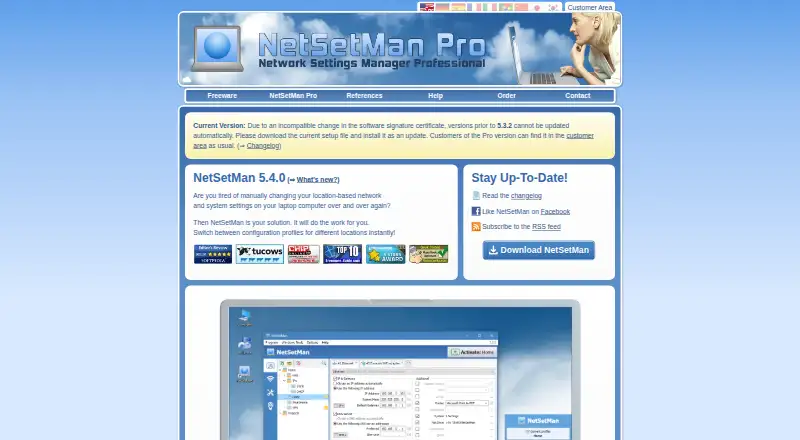
What NetSetMan is
NetSetMan saves network and system settings in profiles that users can switch between or have activated automatically. A profile can include IP addresses, gateways, DNS, WINS, network drives, routes, hosts entries, and printers. It can also store display, screensaver, wallpaper, power plan, sound, time zone, Windows Firewall, and Windows Update settings. Wi-Fi tools organize, create, delete, and connect to Wi-Fi profiles, while AutoSwitch responds to network and time conditions. The software supports running scripts and programs and includes a network scanner, connections manager, and console. Proxy settings are listed for Internet Explorer, Firefox, Opera, and Chrome; Chrome and newer Opera use Internet Explorer settings. The freeware edition is for non-commercial use and supports up to eight profiles. Domain or Windows Enterprise/Server use of that edition is limited to 14 days for testing; commercial use requires Pro. NetSetMan runs on-premises, with downloads for Windows 7, 8, 10, and 11 in 32-bit and 64-bit versions.
Good
- Profiles group network and system settings
- AutoSwitch uses network and time conditions
- Wi-Fi profile management is included
- Scripts, scanner, connections manager, and console included
- Setup, update, and portable options are available
Watch out
- Freeware is for non-commercial use only
- Freeware supports up to 8 profiles
- Domain or Enterprise/Server use limited to 14 test days
- Commercial use requires a Pro license
Who it suits
NetSetMan suits Windows users who regularly switch between different network configurations or want related system settings grouped in profiles. The free edition is limited to non-commercial use, and domain or Enterprise/Server use is only for a 14-day test period.
Verdict
NetSetMan brings a wide range of network and Windows settings into switchable profiles, with both manual and automatic activation. The freeware restrictions matter for commercial users and some managed Windows environments.
Plans and prices
From NetSetMan's own pricing page, checked 9 Oct 2026.
| Plan | Price | What it gives you |
|---|---|---|
| Non-Commercial Freeware | Free | Non-commercial use · 8 profiles · Windows 7/8/10/11 (32/64-bit) |
| NetSetMan Pro | €49, paid once | One license per system (device or VM) · License never expires · Free updates within major release · Free major upgrade for one year after purchase · Per license; 1–9 licenses |
The facts
Each one read from NetSetMan's own pages, with the date it was checked.
What it does
- Commercial-use limit
- The freeware edition is for non-commercial use, and commercial use requires a NetSetMan Pro license.checked 9 Oct 2026
- Domain and Enterprise limit
- The freeware page says use in a network domain or with Windows Enterprise/Server is limited to 14 days for test purposes.checked 9 Oct 2026
- Integrations
- Proxy settings are listed for Internet Explorer, Firefox, Opera, and Chrome; the page notes that Chrome and newer Opera use Internet Explorer settings.checked 9 Oct 2026
- Network settings
- Profiles can configure IP addresses, gateways, DNS, WINS, network drives, routes, hosts entries, printers, and other settings.checked 9 Oct 2026
- Operating systems
- The download page lists Windows 7, 8, 10, and 11 in 32-bit and 64-bit versions, with setup, update, and portable options in one file.checked 9 Oct 2026
- Payment security
- The maker says Stripe processes credit-card payments and that card details are used for that payment and are not stored on its servers.checked 9 Oct 2026
- Pro licensing
- A Pro license never expires, includes updates within its major release, and includes the next major upgrade for one year after purchase.checked 9 Oct 2026
- Purpose
- NetSetMan manages network settings through preconfigured profiles that users can switch between instantly or automatically.checked 9 Oct 2026
- Scripts and tools
- The software supports running scripts and programs and includes tools such as a network scanner, connections manager, and console.checked 9 Oct 2026
- Security and privacy
- The maker says it uses organizational, contractual, and technical measures to protect personal data and processes website data under EU data-protection rules including GDPR.checked 9 Oct 2026
- Support
- The maker directs users to its support forums and FAQ and provides a detailed help file with the program and online.checked 9 Oct 2026
- System settings
- The feature list includes display, screensaver, wallpaper, power plan, sound, time zone, Windows Firewall, and Windows Update settings.checked 9 Oct 2026
- Wi-Fi and automation
- Wi-Fi management organizes, creates, deletes, and connects to Wi-Fi profiles, while AutoSwitch can activate profiles based on network and time conditions.checked 9 Oct 2026
The company
- Founded
- 2004checked 28 Sep 2026
Alternatives to NetSetMan
- 1

ManageEngine Network Configuration Manager
Free planAndroidiOSWebAPI8.2From $238 a year - 2
Configuration Center
APIWindows6.8$99 one-time - 3

NetBrain
WebAPILinuxSelf-hosted6.8 - 4

Netpicker
Free planWebAPILinuxSelf-hosted6.8From $7,500 a year - 5

rConfig
Free planWebAPILinuxSelf-hosted6.8From €3,999 a year - 6
Nexsparkle ConfigVault
LinuxSelf-hostedWindows6.7From $495 a year