NeoCD-Wii
NeoCD-Wii is a free, open-source emulator for Nintendo Wii that runs Neo-Geo CD games.
What NeoCD-Wii is
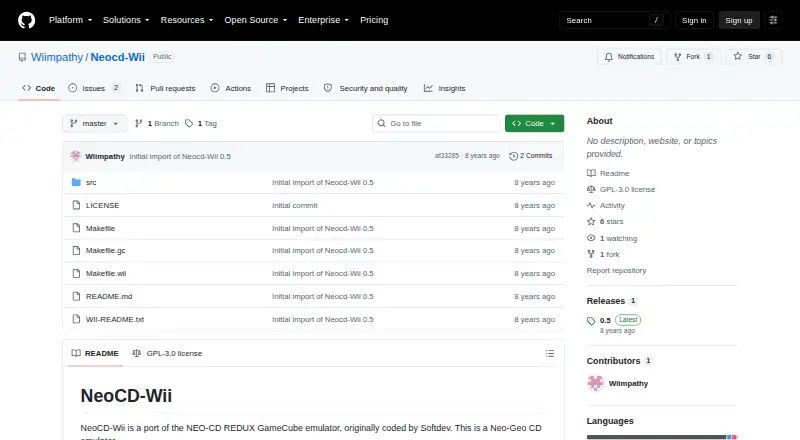
NeoCD-Wii is a free, open-source emulator for Nintendo Wii that runs Neo-Geo CD games. It is a port of the NEO-CD REDUX GameCube emulator. Installation involves extracting the program archive to an SD card or USB drive, then placing game files in folders on that storage. The emulator requires a NeoGeo CD/Z BIOS file named NeoCD.bin in a BIOS folder at the SD card root. USB 2 support requires IOS 202. Game audio tracks go in each game's MP3 subdirectory and must use the Trackxx.mp3 naming pattern; 44.1 or 48 kHz and 128 kbps or better are recommended. Version 0.5 includes interlaced and progressive video modes, a filter toggle, configurable Wiimote and Classic Controller buttons, saved settings, and page-based game browsing. It supports the Wii's internal SD slot and is libfat compatible. The version history warns that some games may still show black screens or graphics bugs, and DVD support was untested. The project is licensed under GPL-3.0 and is available through GitHub; WiiBrew also links to the Open Shop Channel.
Good
- Free and open source under GPL-3.0
- Supports Wii internal SD slot
- Configurable Wiimote and Classic Controller buttons
- Interlaced and progressive video modes
Watch out
- Requires a NeoGeo CD/Z BIOS file
- USB 2 requires IOS 202
- Some games may show graphics bugs or black screens
- DVD support was untested
Who it suits
NeoCD-Wii is for Nintendo Wii users who want to play Neo-Geo CD games and are comfortable preparing game files, audio tracks, and a BIOS file on removable storage.
Verdict
NeoCD-Wii offers Neo-Geo CD emulation on Nintendo Wii, with configurable controls and video options. Setup requires the correct BIOS and file arrangement, and some games may have display issues.
The facts
Each one read from NeoCD-Wii's own pages, with the date it was checked.
What it does
- Audio
- Game audio tracks must be MP3 files in each game's MP3 subdirectory, named Trackxx.mp3; 44.1 or 48 kHz and 128 kbps or better are recommended.checked 4 Oct 2026
- Compatibility
- The version history says that some games may still show black screens or graphics bugs.checked 4 Oct 2026
- Compatibility limits
- The version history says some games previously still had black screens and graphics bugs.checked 8 Oct 2026
- Controller support
- The version history lists Wiimote and Classic Controller support.checked 8 Oct 2026
- Controls
- Version 0.5 lists configurable buttons for Wiimotes and Classic Controllers.checked 4 Oct 2026
- Controls and video
- Version 0.5 lists configurable buttons and interlaced or progressive video modes, with a filter toggle.checked 8 Oct 2026
- Distribution
- The WiiBrew page links to a GitHub download and says the application is downloadable via the Open Shop Channel.checked 4 Oct 2026
- Game audio
- Game audio tracks are supplied as MP3 files in each game's MP3 subdirectory and named Trackxx.mp3.checked 8 Oct 2026
- Installation
- The README instructs users to extract the program to an SD card or USB drive.checked 8 Oct 2026
- Latest listed release
- The GitHub releases page marks version 0.5 as the latest release.checked 8 Oct 2026
- License
- The repository identifies its license as GPL-3.0.checked 8 Oct 2026
- Purpose
- NeoCD-Wii is a port of the NEO-CD REDUX GameCube emulator and emulates Neo-Geo CD.checked 8 Oct 2026
- Settings
- Version 0.5 lists the ability to save settings and browse games by page.checked 4 Oct 2026
- Settings and browsing
- Version 0.5 lists saving settings and browsing games by page.checked 8 Oct 2026
- Storage
- Installation instructions say to extract the archive to an SD card or USB drive and place game files in folders there.checked 4 Oct 2026
- Storage support
- The version history says the port is libfat compatible and supports the internal SD slot; DVD support was untested.checked 8 Oct 2026
- Support
- The repository README provides installation guidance and credits contributors, but does not state a support contact or service.checked 4 Oct 2026
- USB 2
- The installation instructions say USB 2 requires IOS 202.checked 8 Oct 2026
- USB requirement
- The README says IOS 202 is needed to enable USB 2 support.checked 4 Oct 2026
- Video options
- Version 0.5 lists interlaced and progressive video modes and a filter on/off option.checked 4 Oct 2026
Where it runs
- BIOS requirement
- The emulator requires a NeoGeo CD/Z BIOS file named NeoCD.bin in a BIOS folder at the SD card root.checked 8 Oct 2026
Alternatives to NeoCD-Wii
- 1
GnGeo
Free planLinux6.2Free plan - 2
NeoCD/PS2
Free planSelf-hosted6.1Free plan - 3
NeoDS
Free plan6.1Free plan - 4
NeoCD/SDL
Free planLinuxWindows6.0Free plan - 5
NeoGeo CD Redux
Free planSelf-hosted6.0Free plan - 6
DREAMNEOCD
Free plan5.9Free plan