MustardOS
MustardOS, also called muOS, is free custom firmware for handheld gaming devices.
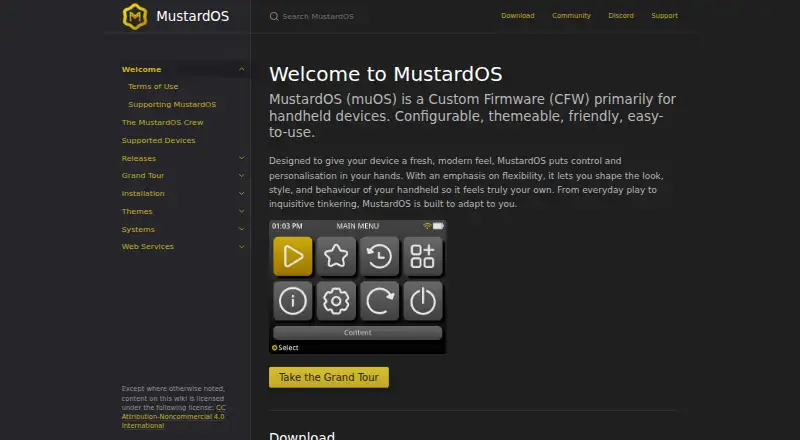
What MustardOS is
MustardOS, also called muOS, is free custom firmware for handheld gaming devices. It offers configurable themes and behavior, controller navigation, portable mode, and emulation support through systems and cores including RetroArch and ScummVM. Supported hardware includes Anbernic and TrimUI models such as the RG35XX family, RG28XX H, RG34XX H and SP, RG40XX H and V, RGCUBEXX, TrimUI Brick, and TrimUI Smart Pro. Installation requires writing a firmware image to an SD card with an image-flashing tool, then inserting the card into the handheld. After enabling SFTP and Filebrowser, users can open Filebrowser through a browser on the same local network; the documented default username and password are both muos. Syncthing can copy the save folder to a PC for backup, but Watch for Changes works only on FAT32 and should be disabled for exFAT. The project began as a hobby project and now accepts donations and subscriptions.
Good
- Free custom firmware for supported handhelds
- Theme and behavior customization options
- Supports RetroArch and ScummVM cores
- Includes controller navigation and portable mode
- Syncthing guide covers PC save backups
Watch out
- Requires manual image flashing to an SD card
- Device support is limited to listed handhelds
- Default Filebrowser credentials are documented as muos
- Watch for Changes does not work on exFAT
Who it suits
MustardOS suits new handheld owners and experienced enthusiasts using supported Anbernic or TrimUI devices. It is for users comfortable flashing an SD card and managing local files.
Verdict
MustardOS provides configurable firmware and emulation features across a defined set of handhelds. Installation and storage caveats are straightforward but require attention to device support and filesystem format.
Plans and prices
From MustardOS's own pricing page, checked 7 Oct 2026.
| Plan | Price | What it gives you |
|---|---|---|
| Artificer | $6 a month | testing crew preview access · weekly testing updates · special Discord access · $6 per month |
| Knight | $9 a month | exclusive testing group · weekly testing updates · name on credits screen · special Discord access · $9 per month |
| Hero | $12 a month | nightly development exclusives · name on credits screen · special Discord access · behind the scenes · $12 per month |
The facts
Each one read from MustardOS's own pages, with the date it was checked.
What it does
- Audience
- MustardOS says it is designed for both people new to handhelds and experienced enthusiasts.checked 7 Oct 2026
- Default credentials
- The Filebrowser guide gives the default username and password as muos and muos.checked 7 Oct 2026
- Emulation
- The documentation lists supported systems and cores including RetroArch and ScummVM.checked 7 Oct 2026
- File access
- The built-in Filebrowser can be accessed through a browser on the same local network after enabling SFTP + Filebrowser.checked 7 Oct 2026
- Funding
- The project accepts one-off donations and subscriptions to support software, hardware, and development accessories.checked 7 Oct 2026
- Installation
- Installation uses an image flashing tool to write MustardOS to an SD card, which is then inserted into the handheld.checked 7 Oct 2026
- Personalization
- The firmware is configurable and themeable, with options to customize its look, style, and behavior.checked 7 Oct 2026
- Product
- MustardOS (muOS) is custom firmware primarily for handheld devices.checked 7 Oct 2026
- Project origin
- The site describes MustardOS as having begun as a small personal hobby project that grew into a community project.checked 7 Oct 2026
- Storage caveat
- The Syncthing guide says its Watch for Changes option works only on FAT32 partitions and should be disabled for exFAT.checked 7 Oct 2026
- Support
- The site points users to its Discord and community forum for assistance.checked 7 Oct 2026
- Sync and backup
- The Syncthing guide describes syncing the MustardOS save folder to a PC as a backup method.checked 7 Oct 2026
Where it runs
- Device support
- The supported-device page lists handhelds from Anbernic and TrimUI, including RG35XX and TrimUI Smart Pro models.checked 7 Oct 2026
The company
- Project team
- The crew page identifies XongleBongle as the lead developer behind MustardOS.checked 7 Oct 2026
Alternatives to MustardOS
- 1

ES-DE Frontend
Free planOpen sourceAndroidLinuxmacOSWindows8.3$6.50 one-time - 2

GameEx
Free planAndroidLinuxmacOSWindows7.8$17 one-time - 3

LaunchBox
Free planAndroidAPIWindows7.8$30 one-time - 4
RetroArch
Free planAndroidiOSWebLinux7.7Free plan - 5

Attract-Mode
Free planOpen sourceAPILinuxmacOSSelf-hosted7.5Free plan - 6
EmulatorJS
Free planAndroidiOSWebSelf-hosted6.8Free plan